mirror of
https://github.com/freedombox/FreedomBox.git
synced 2026-03-25 09:21:10 +00:00
Compare commits
No commits in common. "main" and "v24.14" have entirely different histories.
@ -1,40 +0,0 @@
|
||||
# SPDX-License-Identifier: AGPL-3.0-or-later
|
||||
|
||||
FROM debian:stable
|
||||
|
||||
CMD /sbin/init
|
||||
USER root:root
|
||||
|
||||
ENV DEBIAN_FRONTEND=noninteractive
|
||||
|
||||
RUN echo "deb http://deb.debian.org/debian trixie-backports main" > /etc/apt/sources.list.d/backports.list; echo "deb-src http://deb.debian.org/debian trixie-backports main" >> /etc/apt/sources.list.d/backports.list
|
||||
|
||||
RUN apt-get update
|
||||
|
||||
# Update all packages
|
||||
RUN apt-get dist-upgrade -y
|
||||
|
||||
# Install freedombox package so that plint:plinth user/group are created etc.
|
||||
RUN apt-get install -y freedombox/trixie-backports
|
||||
RUN systemctl disable plinth.service
|
||||
|
||||
# Don't ask for the secret in first wizard
|
||||
RUN rm -f /var/lib/plinth/firstboot-wizard-secret
|
||||
|
||||
# Dependencies of the freedombox Debian package
|
||||
RUN apt-get build-dep -y freedombox/trixie-backports
|
||||
|
||||
# Build and test dependencies
|
||||
RUN apt-get install -y \
|
||||
build-essential \
|
||||
parted \
|
||||
sshpass \
|
||||
wget
|
||||
|
||||
|
||||
# Install functional test dependencies
|
||||
ADD https://salsa.debian.org/freedombox-team/freedombox/-/raw/main/plinth/tests/functional/install.sh /usr/src/install.sh
|
||||
RUN bash /usr/src/install.sh; rm -f /usr/src/install.sh
|
||||
|
||||
# Allow daemons to start when container is started
|
||||
RUN rm -f /usr/sbin/policy-rc.d
|
||||
@ -19,11 +19,10 @@ RUN apt-get build-dep -y .
|
||||
RUN apt-get install -y build-essential \
|
||||
# Test dependencies
|
||||
sshpass parted \
|
||||
sudo python3-pip \
|
||||
python3-flake8
|
||||
sudo python3-pip
|
||||
|
||||
# Module dependencies
|
||||
RUN apt-get install -y $(./run --list-dependencies)
|
||||
|
||||
# Coverage should know that test_functional.py files are tests
|
||||
RUN pip3 install --break-system-packages splinter
|
||||
RUN pip3 install --break-system-packages splinter pytest-bdd
|
||||
@ -1,27 +1,66 @@
|
||||
---
|
||||
# SPDX-License-Identifier: AGPL-3.0-or-later
|
||||
|
||||
.run-functional-tests:
|
||||
.app-server:
|
||||
stage: functional-tests
|
||||
needs: []
|
||||
dependencies: []
|
||||
tags:
|
||||
- functional-tests
|
||||
timeout: 10h
|
||||
# Need to find another way of running the cleanup step even on failure
|
||||
allow_failure: true
|
||||
except:
|
||||
- $GITLAB_USER_LOGIN == "weblate"
|
||||
script:
|
||||
- BUILD_JOB_ID=$(curl -s "https://salsa.debian.org/api/v4/projects/$CI_PROJECT_ID/pipelines/$CI_PIPELINE_ID/jobs?scope[]=success" | jq -r '.[] | select(.name==env.BUILD_JOB_NAME) | .id')
|
||||
- export AWS_DEFAULT_REGION=us-east-1
|
||||
- |
|
||||
aws lambda invoke --function-name launch_app_server --payload '{"launch_template_name": "'"$LAUNCH_TEMPLATE_NAME"'", "instance_name": "'"$INSTANCE_NAME"'", "ci_project_id": "'"$CI_PROJECT_ID"'", "build_job_id": "'"$BUILD_JOB_ID"'"}' response.json
|
||||
- echo "APP_SERVER_IP_1=$(jq -r '.app_server_ip' response.json)" >> app-servers.env
|
||||
- echo "INSTANCE_ID_1=$(jq -r '.instance_id' response.json)" >> app-servers.env
|
||||
- |
|
||||
aws lambda invoke --function-name launch_app_server --payload '{"launch_template_name": "'"$LAUNCH_TEMPLATE_NAME"'", "instance_name": "'"$INSTANCE_NAME"'", "ci_project_id": "'"$CI_PROJECT_ID"'", "build_job_id": "'"$BUILD_JOB_ID"'"}' response.json
|
||||
- echo "APP_SERVER_IP_2=$(jq -r '.app_server_ip' response.json)" >> app-servers.env
|
||||
- echo "INSTANCE_ID_2=$(jq -r '.instance_id' response.json)" >> app-servers.env
|
||||
tags:
|
||||
- functional-tests
|
||||
artifacts:
|
||||
reports:
|
||||
dotenv: app-servers.env
|
||||
|
||||
.run-functional-tests:
|
||||
stage: functional-tests
|
||||
timeout: 3h
|
||||
# Need to find another way of running the cleanup step even on failure
|
||||
allow_failure: true
|
||||
when: delayed
|
||||
# Wait for the app-server to come up. Saves time for the CI runners.
|
||||
start_in: 3 minutes
|
||||
before_script:
|
||||
- apt-get update
|
||||
- apt-get -y install make
|
||||
- make provision-dev
|
||||
- make wait-while-first-setup
|
||||
- apt-get install -y sudo curl wget
|
||||
- ./plinth/tests/functional/install.sh
|
||||
- adduser tester --gecos "First Last,RoomNumber,WorkPhone,HomePhone" --disabled-password && echo "tester:password" | chpasswd
|
||||
script:
|
||||
- FREDOMBOX_URL=https://localhost FREEDOMBOX_SSH_PORT=22 FREEDOMBOX_SAMBA_PORT=445 pytest -v --durations=10 --include-functional --splinter-headless --instafail --template=html1/index.html --report=functional-tests.html
|
||||
- cp -r . /home/tester/freedombox && chown -R tester:tester /home/tester/freedombox
|
||||
- |
|
||||
sudo APP_SERVER_URL_1="https://$APP_SERVER_IP_1" APP_SERVER_URL_2="https://$APP_SERVER_IP_2" -u tester bash -c \
|
||||
'cd /home/tester/freedombox && py.test-3 -v --durations=10 --include-functional --splinter-headless -n 2 --dist=loadscope --template=html1/index.html --report=functional-tests.html'
|
||||
after_script:
|
||||
- echo "INSTANCE_ID_1=$INSTANCE_ID_1" >> app-servers.env
|
||||
- echo "INSTANCE_ID_2=$INSTANCE_ID_2" >> app-servers.env
|
||||
- cp /home/tester/freedombox/functional-tests.html .
|
||||
- cp -r /home/tester/freedombox/screenshots/ .
|
||||
artifacts:
|
||||
when: always
|
||||
reports:
|
||||
dotenv: app-servers.env
|
||||
paths:
|
||||
- functional-tests.html
|
||||
- screenshots/
|
||||
- plinth.log
|
||||
|
||||
# Does not run if the previous job times out or is cancelled
|
||||
.terminate-app-server:
|
||||
stage: functional-tests
|
||||
script:
|
||||
- export AWS_DEFAULT_REGION=us-east-1
|
||||
- |
|
||||
aws lambda invoke --function-name terminate_app_server --payload '{"instance_id": "'"$INSTANCE_ID_1"'"}' response.json
|
||||
aws lambda invoke --function-name terminate_app_server --payload '{"instance_id": "'"$INSTANCE_ID_2"'"}' response.json
|
||||
tags:
|
||||
- functional-tests
|
||||
|
||||
@ -1,21 +0,0 @@
|
||||
concurrent = 1
|
||||
check_interval = 0
|
||||
|
||||
[[runners]]
|
||||
name = "freedombox-functional"
|
||||
url = "https://salsa.debian.org"
|
||||
token = "<insert-server-provided-token-here>"
|
||||
executor = "custom"
|
||||
builds_dir = "/freedombox"
|
||||
cache_dir = "/cache"
|
||||
[runners.custom]
|
||||
prepare_exec = "/var/lib/fbx-functional/bin/prepare.sh"
|
||||
prepare_exec_timeout = 1200
|
||||
|
||||
run_exec = "/var/lib/fbx-functional/bin/run.sh"
|
||||
|
||||
cleanup_exec = "/var/lib/fbx-functional/bin/cleanup.sh"
|
||||
cleanup_exec_timeout = 1200
|
||||
|
||||
graceful_kill_timeout = 200
|
||||
force_kill_timeout = 200
|
||||
@ -1,7 +0,0 @@
|
||||
# SPDX-License-Identifier: AGPL-3.0-or-later
|
||||
|
||||
This directory contains a custom driver for Gitlab-CI Runner. This is used to
|
||||
run functional tests.
|
||||
|
||||
Based on https://docs.gitlab.com/runner/executors/custom_examples/lxd.html under
|
||||
Expat license.
|
||||
@ -1,4 +0,0 @@
|
||||
#!/usr/bin/bash
|
||||
# SPDX-License-Identifier: AGPL-3.0-or-later
|
||||
|
||||
CONTAINER_ID="runner-$CUSTOM_ENV_CI_RUNNER_ID-project-$CUSTOM_ENV_CI_PROJECT_ID-concurrent-$CUSTOM_ENV_CI_CONCURRENT_PROJECT_ID-$CUSTOM_ENV_CI_JOB_ID"
|
||||
@ -1,10 +0,0 @@
|
||||
#!/usr/bin/bash
|
||||
# SPDX-License-Identifier: AGPL-3.0-or-later
|
||||
|
||||
current_dir="$( cd "$( dirname "${BASH_SOURCE[0]}" )" >/dev/null 2>&1 && pwd )"
|
||||
source ${current_dir}/base.sh # Get variables from base.
|
||||
|
||||
echo "Deleting container $CONTAINER_ID"
|
||||
|
||||
podman container stop "$CONTAINER_ID"
|
||||
podman container rm -f "$CONTAINER_ID"
|
||||
@ -1,48 +0,0 @@
|
||||
#!/usr/bin/bash
|
||||
# SPDX-License-Identifier: AGPL-3.0-or-later
|
||||
|
||||
current_dir="$( cd "$( dirname "${BASH_SOURCE[0]}" )" >/dev/null 2>&1 && pwd )"
|
||||
source ${current_dir}/base.sh # Get variables from base.
|
||||
|
||||
set -eo pipefail
|
||||
|
||||
# trap any error, and mark it as a system failure.
|
||||
trap "exit $SYSTEM_FAILURE_EXIT_CODE" ERR
|
||||
|
||||
start_container () {
|
||||
if podman container exists "$CONTAINER_ID" ; then
|
||||
echo 'Found old container, deleting'
|
||||
podman container stop "$CONTAINER_ID"
|
||||
podman container rm -f "$CONTAINER_ID"
|
||||
fi
|
||||
|
||||
podman pull registry.salsa.debian.org/freedombox-team/freedombox:functional-tests-stable
|
||||
podman run --name "$CONTAINER_ID" --systemd=always \
|
||||
--privileged \
|
||||
--cap-add=SYS_ADMIN --cap-add=NET_ADMIN --cap-add=MKNOD \
|
||||
--detach registry.salsa.debian.org/freedombox-team/freedombox:functional-tests-stable /sbin/init
|
||||
|
||||
if podman exec "$CONTAINER_ID" systemctl is-system-running --wait; then
|
||||
echo 'Container started.'
|
||||
else
|
||||
echo 'Container started degraded.'
|
||||
fi
|
||||
}
|
||||
|
||||
install_dependencies () {
|
||||
podman exec "$CONTAINER_ID" /usr/bin/bash <<EOF
|
||||
set -eo pipefail
|
||||
echo 'Package: *' > /etc/apt/preferences.d/unstable
|
||||
echo 'Pin: release a=unstable' >> /etc/apt/preferences.d/unstable
|
||||
echo 'Pin-Priority: 400' >> /etc/apt/preferences.d/unstable
|
||||
echo 'deb http://deb.debian.org/debian unstable main' > /etc/apt/sources.list.d/unstable.list
|
||||
apt-get update
|
||||
DEBIAN_FRONTEND=noninteractive apt-get install -y gitlab-runner git-lfs
|
||||
EOF
|
||||
}
|
||||
|
||||
echo "Running in $CONTAINER_ID"
|
||||
|
||||
start_container
|
||||
|
||||
install_dependencies
|
||||
@ -1,14 +0,0 @@
|
||||
#!/usr/bin/bash
|
||||
# SPDX-License-Identifier: AGPL-3.0-or-later
|
||||
|
||||
set -eo pipefail
|
||||
|
||||
current_dir="$( cd "$( dirname "${BASH_SOURCE[0]}" )" >/dev/null 2>&1 && pwd )"
|
||||
source ${current_dir}/base.sh # Get variables from base.
|
||||
|
||||
podman exec --interactive "$CONTAINER_ID" /bin/bash < "${1}"
|
||||
if [ $? -ne 0 ]; then
|
||||
# Exit using the variable, to make the build as failure in GitLab
|
||||
# CI.
|
||||
exit $BUILD_FAILURE_EXIT_CODE
|
||||
fi
|
||||
@ -1,11 +0,0 @@
|
||||
#! /bin/bash
|
||||
# SPDX-License-Identifier: AGPL-3.0-or-later
|
||||
|
||||
CONTAINER=$1
|
||||
CONTAINER="${CONTAINER:-gitlabci}"
|
||||
|
||||
podman login registry.salsa.debian.org
|
||||
|
||||
# Build and upload a new image to the container registry
|
||||
podman build -t registry.salsa.debian.org/freedombox-team/freedombox:${CONTAINER} -f .ci/Containerfile.${CONTAINER} .
|
||||
podman push registry.salsa.debian.org/freedombox-team/freedombox:${CONTAINER}
|
||||
8
.ci/update-gitlabci-docker-image.sh
Executable file
8
.ci/update-gitlabci-docker-image.sh
Executable file
@ -0,0 +1,8 @@
|
||||
#! /bin/bash
|
||||
# SPDX-License-Identifier: AGPL-3.0-or-later
|
||||
|
||||
docker login registry.salsa.debian.org
|
||||
|
||||
# Build and upload a new image to the container registry
|
||||
DOCKER_BUILDKIT=1 docker build -t registry.salsa.debian.org/freedombox-team/freedombox:gitlabci -f .ci/Dockerfile.gitlabci .
|
||||
docker push registry.salsa.debian.org/freedombox-team/freedombox:gitlabci
|
||||
2
.gitignore
vendored
2
.gitignore
vendored
@ -4,7 +4,7 @@
|
||||
doc/manual/*/*.pdf
|
||||
doc/manual/*/*.html
|
||||
doc/manual/*/*.xml
|
||||
doc/*.1
|
||||
doc/plinth.1
|
||||
doc/dev/_build
|
||||
\#*
|
||||
.#*
|
||||
|
||||
@ -47,16 +47,73 @@ doc-tests:
|
||||
script:
|
||||
- make check-doc
|
||||
|
||||
run-functional-tests-stable:
|
||||
.app-server-stable:
|
||||
variables:
|
||||
LAUNCH_TEMPLATE_NAME: functional-tests-stable
|
||||
INSTANCE_NAME: app-server-stable
|
||||
BUILD_JOB_NAME: build-backports
|
||||
extends: .app-server
|
||||
|
||||
.run-functional-tests-stable:
|
||||
needs:
|
||||
- job: app-server-stable
|
||||
artifacts: true
|
||||
extends: .run-functional-tests
|
||||
|
||||
.terminate-app-server-stable:
|
||||
needs:
|
||||
- job: run-functional-tests-stable
|
||||
artifacts: true
|
||||
extends: .terminate-app-server
|
||||
|
||||
.app-server-testing:
|
||||
variables:
|
||||
LAUNCH_TEMPLATE_NAME: functional-tests-testing
|
||||
INSTANCE_NAME: app-server-testing
|
||||
BUILD_JOB_NAME: build
|
||||
extends: .app-server
|
||||
|
||||
.run-functional-tests-testing:
|
||||
needs:
|
||||
- job: app-server-testing
|
||||
artifacts: true
|
||||
extends: .run-functional-tests
|
||||
|
||||
.terminate-app-server-testing:
|
||||
needs:
|
||||
- job: run-functional-tests-testing
|
||||
artifacts: true
|
||||
extends: .terminate-app-server
|
||||
|
||||
.app-server-unstable:
|
||||
variables:
|
||||
LAUNCH_TEMPLATE_NAME: functional-tests-unstable
|
||||
INSTANCE_NAME: app-server-unstable
|
||||
BUILD_JOB_NAME: build
|
||||
extends: .app-server
|
||||
|
||||
.run-functional-tests-unstable:
|
||||
needs:
|
||||
- job: app-server-unstable
|
||||
artifacts: true
|
||||
extends: .run-functional-tests
|
||||
|
||||
.terminate-app-server-unstable:
|
||||
needs:
|
||||
- job: run-functional-tests-unstable
|
||||
artifacts: true
|
||||
extends: .terminate-app-server
|
||||
|
||||
extract-source:
|
||||
extends: .provisioning-extract-source
|
||||
|
||||
build:
|
||||
extends: .build-package
|
||||
|
||||
build-backports:
|
||||
extends: .build-package
|
||||
variables:
|
||||
RELEASE: trixie-backports
|
||||
RELEASE: bookworm-backports
|
||||
|
||||
build i386:
|
||||
extends: .build-package-i386
|
||||
@ -79,9 +136,8 @@ lintian:
|
||||
|
||||
# autopkgtest is flaky due to
|
||||
# https://salsa.debian.org/freedombox-team/freedombox/-/issues/2077
|
||||
autopkgtest:
|
||||
extends: .test-autopkgtest
|
||||
allow_failure: true
|
||||
#autopkgtest:
|
||||
# extends: .test-autopkgtest
|
||||
|
||||
blhc:
|
||||
extends: .test-blhc
|
||||
|
||||
16
.vagrant-scripts/plinth-user-permissions.py
Executable file
16
.vagrant-scripts/plinth-user-permissions.py
Executable file
@ -0,0 +1,16 @@
|
||||
#!/usr/bin/python3
|
||||
# -*- mode: python -*-
|
||||
# SPDX-License-Identifier: AGPL-3.0-or-later
|
||||
"""Set required permissions for user "plinth" to run plinth in dev setup."""
|
||||
|
||||
import pathlib
|
||||
|
||||
content = '''
|
||||
Cmnd_Alias FREEDOMBOX_ACTION_DEV = /usr/share/plinth/actions/actions, /freedombox/actions/actions
|
||||
Defaults!FREEDOMBOX_ACTION_DEV closefrom_override
|
||||
plinth ALL=(ALL:ALL) NOPASSWD:SETENV : FREEDOMBOX_ACTION_DEV
|
||||
fbx ALL=(ALL:ALL) NOPASSWD : ALL
|
||||
'''
|
||||
|
||||
sudoers_file = pathlib.Path('/etc/sudoers.d/01-freedombox-development')
|
||||
sudoers_file.write_text(content)
|
||||
@ -34,8 +34,8 @@ Naming conventions:
|
||||
tools `yapf` and `isort`. Please check also with `flake8`.
|
||||
* Please include one single feature per merge request, to keep the review simple
|
||||
and focused on one topic. (This might still mean hundreds of lines of code.)
|
||||
Use a branch other than `main`, so you can create multiple merge requests
|
||||
and still keep merging from `main`. Depending on the complexity of your
|
||||
Use a branch other than `master`, so you can create multiple merge requests
|
||||
and still keep merging from `master`. Depending on the complexity of your
|
||||
merge request, it may take a while until it is reviewed and merged.
|
||||
* Keep your commits organized logically and as small as possible. If commit B
|
||||
fixes a mistake in commit A, both of which are part of the same merge request,
|
||||
|
||||
@ -1,9 +1,9 @@
|
||||
# License to Copy FreedomBox Service (Plinth)
|
||||
|
||||
FreedomBox Service (Plinth) is Copyright 2011, 2012, 2013, 2014, 2015, 2016,
|
||||
2017, 2018, 2019, 2020, 2021, 2022, 2023, 2024, 2025 FreedomBox Authors. See Git
|
||||
log in the source repository for a full list of authors. It is distributed under
|
||||
the GNU Affero General Public License, Version 3 or later. A copy of AGPLv3 is
|
||||
FreedomBox Service (Plinth) is Copyright 2011, 2012, 2013, 2014, 2015,
|
||||
2016, 2017, 2018, 2019 FreedomBox Authors. See Git log in the source
|
||||
repository for a full list of authors. It is distributed under the GNU
|
||||
Affero General Public License, Version 3 or later. A copy of AGPLv3 is
|
||||
available [from the Free Software
|
||||
Foundation](http://www.gnu.org/licenses/agpl.html).
|
||||
|
||||
|
||||
69
HACKING.md
69
HACKING.md
@ -66,7 +66,7 @@ development environment inside a systemd-nspawn container.
|
||||
folder: (This step requires at least 16GB of free disk space)
|
||||
|
||||
```bash
|
||||
host$ ./container start
|
||||
host$ ./container up
|
||||
```
|
||||
|
||||
1. To run unit tests:
|
||||
@ -97,43 +97,23 @@ development environment inside a systemd-nspawn container.
|
||||
1. Using an environment variable.
|
||||
|
||||
```bash
|
||||
host$ DISTRIBUTION=stable ./container start
|
||||
host$ DISTRIBUTION=stable ./container up
|
||||
host$ DISTRIBUTION=stable ./container ssh
|
||||
```
|
||||
|
||||
```bash
|
||||
host$ export DISTRIBUTION=stable
|
||||
host$ ./container start
|
||||
host$ ./container up
|
||||
host$ ./container ssh
|
||||
```
|
||||
|
||||
2. Using the `--distribution` option for each command.
|
||||
|
||||
```bash
|
||||
host$ ./container start --distribution=stable
|
||||
host$ ./container up --distribution=stable
|
||||
host$ ./container ssh --distribution=stable
|
||||
```
|
||||
|
||||
#### Using KVM Virtual Machine
|
||||
|
||||
The `./container` script, shipped with FreedomBox source code, can manage the
|
||||
development environment inside a KVM-based virtual machine using libvirt. This
|
||||
is an alternative to using containers described above (but the name of the
|
||||
script is still 'container' even when managing virtual machines). Some hardware,
|
||||
such as additional disks, can be better tested with virtual machine than with
|
||||
containers.
|
||||
|
||||
Containers and a virtual machines of the same or different distribution all be
|
||||
used simultaneously as they all use different disk images.
|
||||
|
||||
1. To use virtual machines instead of container, append the option
|
||||
'--machine-type=vm' to all the ./container commands described above. For
|
||||
example, to bring up a virtual machine instead of a container run:
|
||||
|
||||
```bash
|
||||
host$ ./container start --machine-type=vm
|
||||
```
|
||||
|
||||
#### Using after Setup
|
||||
|
||||
After logging into the container, the source code is available in `/freedombox`
|
||||
@ -143,12 +123,12 @@ directory:
|
||||
guest$ cd /freedombox
|
||||
```
|
||||
|
||||
FreedomBox Service runs as plinth.service in the container. This service
|
||||
restarts when it detects a change to the source code file. This provides a quick
|
||||
feedback cycle during development. To watch service logs run:
|
||||
Run the development version of FreedomBox Service in the container using the
|
||||
following command. This command continuously deploys your code changes into the
|
||||
container providing a quick feedback cycle during development.
|
||||
|
||||
```bash
|
||||
guest$ sudo freedombox-logs
|
||||
guest$ freedombox-develop
|
||||
```
|
||||
|
||||
If you have changed any system configuration files during your development,
|
||||
@ -156,17 +136,16 @@ you will need to run the following to install those files properly on to the
|
||||
system and their changes to reflect properly.
|
||||
|
||||
```bash
|
||||
guest$ sudo make build install ;
|
||||
guest$ sudo systemctl restart plinth.service
|
||||
guest$ sudo make build install
|
||||
```
|
||||
|
||||
Note: This development container has automatic upgrades disabled by default.
|
||||
|
||||
#### Troubleshooting
|
||||
|
||||
* Sometimes `host$ ./container destroy && ./container start` doesn't work. In such
|
||||
* Sometimes `host$ ./container destroy && ./container up` doesn't work. In such
|
||||
cases, try to delete the hidden `.container` folder and then `host$
|
||||
./container start`.
|
||||
./container up`.
|
||||
* Not all kinds of changes are automatically updated. Try `guest$ sudo mount -o
|
||||
remount /freedombox`.
|
||||
* I am getting an error that says `lo` is not managed by Network Manager
|
||||
@ -178,7 +157,7 @@ Note: This development container has automatic upgrades disabled by default.
|
||||
```bash
|
||||
host$ sudo touch /etc/NetworkManager/conf.d/10-globally-managed-devices.conf
|
||||
host$ sudo service network-manager restart
|
||||
host$ ./container destroy && ./container start
|
||||
host$ ./container destroy && ./container up
|
||||
```
|
||||
* File/directory not found errors when running tests can be fixed by clearing `__pycache__` directories.
|
||||
|
||||
@ -374,12 +353,13 @@ After logging into the virtual machine (VM), the source code is available in
|
||||
vm$ cd /freedombox
|
||||
```
|
||||
|
||||
FreedomBox Service runs as plinth.service in the virtual machine. This service
|
||||
restarts when it detects a change to the source code file. This provides a quick
|
||||
feedback cycle during development. To watch service logs run:
|
||||
Run the development version of FreedomBox Service (Plinth) from your source
|
||||
directory in the virtual machine using the following command. This command
|
||||
continuously deploys your code changes into the virtual machine providing a
|
||||
quick feedback cycle during development.
|
||||
|
||||
```bash
|
||||
vm$ sudo freedombox-logs
|
||||
vm$ freedombox-develop
|
||||
```
|
||||
|
||||
If you have changed any system configuration files during your development,
|
||||
@ -416,7 +396,7 @@ for more details.
|
||||
### Translating literals (contributing translations)
|
||||
|
||||
The easiest way to start translating is with your browser, by using
|
||||
[Weblate](https://hosted.weblate.org/projects/freedombox/freedombox/).
|
||||
[Weblate](https://hosted.weblate.org/projects/freedombox/plinth/).
|
||||
Your changes will automatically get pushed to the code repository.
|
||||
|
||||
Alternatively, you can directly edit the `.po` file in your language directory
|
||||
@ -609,19 +589,6 @@ installed.
|
||||
$ py.test-3 -n 4 --dist=loadfile --include-functional -m essential
|
||||
```
|
||||
|
||||
#### Enabling all apps
|
||||
|
||||
When testing distribution upgrades from a stable release to next stable release
|
||||
or testing, it is beneficial to install all available FreedomBox applications.
|
||||
There is a script available to perform operation.
|
||||
|
||||
In the VM or container, run the following command:
|
||||
|
||||
```
|
||||
guest$ cd /freedombox
|
||||
guest$ sudo make build install
|
||||
guest$ plinth/tests/functional/enable-all-apps
|
||||
```
|
||||
|
||||
[back to index](#hacking)
|
||||
|
||||
|
||||
@ -35,7 +35,7 @@ FreedomBox [Manual](https://wiki.debian.org/FreedomBox/Manual/)'s
|
||||
|
||||
3. Access FreedomBox UI:
|
||||
|
||||
UI should be accessible at http://localhost:8000/freedombox
|
||||
UI should be accessible at http://localhost:8000/plinth
|
||||
|
||||
If you are installing FreedomBox Service (Plinth) for development purposes, see
|
||||
HACKING.md instead.
|
||||
|
||||
77
Makefile
77
Makefile
@ -19,10 +19,7 @@ DISABLED_APPS_TO_REMOVE := \
|
||||
restore \
|
||||
repro \
|
||||
tahoe \
|
||||
mldonkey \
|
||||
i2p \
|
||||
ttrss \
|
||||
sso
|
||||
mldonkey
|
||||
|
||||
APP_FILES_TO_REMOVE := $(foreach app,$(DISABLED_APPS_TO_REMOVE),$(ENABLED_APPS_PATH)/$(app))
|
||||
|
||||
@ -39,7 +36,6 @@ DIRECTORIES_TO_CREATE := \
|
||||
|
||||
STATIC_FILES_DIRECTORY := $(DESTDIR)/usr/share/plinth/static
|
||||
BIN_DIR := $(DESTDIR)/usr/bin
|
||||
LIB_DIR := $(DESTDIR)/usr/lib
|
||||
|
||||
FIND_ARGS := \
|
||||
-not -iname "*.log" \
|
||||
@ -53,19 +49,14 @@ FIND_ARGS := \
|
||||
-not -iname ".*" \
|
||||
-not -iname "sessionid*" \
|
||||
-not -iname "~*" \
|
||||
-not -iname "django-secret.key" \
|
||||
-not -iwholename "*/.mypy_cache/*"
|
||||
-not -iname "django-secret.key"
|
||||
|
||||
|
||||
ROOT_DATA_FILES := $(shell find data -type f $(FIND_ARGS))
|
||||
MODULE_DATA_FILES := $(shell find $(wildcard plinth/modules/*/data) -type f $(FIND_ARGS))
|
||||
|
||||
update-translations:
|
||||
$(DJANGO_ADMIN) makemessages --all --domain django --keep-pot \
|
||||
--verbosity=1 --ignore conftest.py --ignore doc --ignore build \
|
||||
--ignore htmlcov --ignore screenshots --ignore debian --ignore \
|
||||
actions --ignore preseed --ignore static --ignore data \
|
||||
--settings plinth.settings --pythonpath .
|
||||
cd plinth; $(DJANGO_ADMIN) makemessages --all --domain django --keep-pot --verbosity=1
|
||||
|
||||
configure:
|
||||
# Nothing to do
|
||||
@ -78,7 +69,6 @@ build:
|
||||
$(MAKE) -C doc -j 8
|
||||
|
||||
# Build .whl package
|
||||
rm -f dist/plinth-*.whl
|
||||
$(PYTHON) -m build --no-isolation --skip-dependency-check --wheel
|
||||
|
||||
install:
|
||||
@ -102,12 +92,12 @@ install:
|
||||
$(INSTALL) -d $(DESTDIR)$${lib_dir} && \
|
||||
rm -rf $(DESTDIR)$${lib_dir}/plinth $(DESTDIR)$${lib_dir}/plinth*.dist-info && \
|
||||
mv $${temp}/plinth $${temp}/plinth*.dist-info $(DESTDIR)$${lib_dir} && \
|
||||
rm -f $(DESTDIR)$${lib_dir}/plinth*.dist-info/licenses/COPYING.md && \
|
||||
rm -f $(DESTDIR)$${lib_dir}/plinth*.dist-info/COPYING.md && \
|
||||
rm -f $(DESTDIR)$${lib_dir}/plinth*.dist-info/direct_url.json && \
|
||||
$(INSTALL) -D -t $(BIN_DIR) bin/plinth
|
||||
$(INSTALL) -D -t $(LIB_DIR)/freedombox bin/freedombox-privileged
|
||||
$(INSTALL) -D -t $(BIN_DIR) bin/freedombox-cmd
|
||||
$(INSTALL) -D -t $(BIN_DIR) bin/freedombox-change-password
|
||||
|
||||
# Actions
|
||||
$(INSTALL) -D -t $(DESTDIR)/usr/share/plinth/actions actions/actions
|
||||
|
||||
# Static web server files
|
||||
rm -rf $(STATIC_FILES_DIRECTORY)
|
||||
@ -142,7 +132,7 @@ check-tests-cov:
|
||||
|
||||
# Code quality checking using flake8
|
||||
check-code:
|
||||
$(PYTHON) -m flake8 plinth container
|
||||
$(PYTHON) -m flake8 plinth actions/actions container
|
||||
|
||||
# Static type checking using mypy
|
||||
check-type:
|
||||
@ -157,23 +147,6 @@ clean:
|
||||
rm -rf Plinth.egg-info
|
||||
find plinth/locale -name *.mo -delete
|
||||
|
||||
define DEVELOP_SERVICE_CONF
|
||||
[Service]
|
||||
Environment=FREEDOMBOX_DEVELOP=1
|
||||
Environment=PYTHONPATH=/freedombox/
|
||||
endef
|
||||
export DEVELOP_SERVICE_CONF
|
||||
|
||||
define DEVELOP_LOGS_SCRIPT
|
||||
#!/usr/bin/bash
|
||||
|
||||
set -e
|
||||
set -x
|
||||
|
||||
journalctl --follow --unit=plinth.service --unit=freedombox-privileged.service
|
||||
endef
|
||||
export DEVELOP_LOGS_SCRIPT
|
||||
|
||||
# Run basic setup for a developer environment (VM or container)
|
||||
provision-dev:
|
||||
# Install newer build dependencies if any
|
||||
@ -183,29 +156,9 @@ provision-dev:
|
||||
# Install latest code over .deb
|
||||
$(MAKE) build install
|
||||
|
||||
# Configure privileged and web daemon for development setup
|
||||
mkdir -p /etc/systemd/system/freedombox-privileged.service.d/
|
||||
echo "$$DEVELOP_SERVICE_CONF" > /etc/systemd/system/freedombox-privileged.service.d/develop.conf
|
||||
mkdir -p /etc/systemd/system/plinth.service.d/
|
||||
echo "$$DEVELOP_SERVICE_CONF" > /etc/systemd/system/plinth.service.d/develop.conf
|
||||
|
||||
# Create a command to easily watch service logs
|
||||
echo "$$DEVELOP_LOGS_SCRIPT" > /usr/bin/freedombox-logs
|
||||
chmod 755 /usr/bin/freedombox-logs
|
||||
|
||||
# Reload newer systemd units, ignore failure
|
||||
-systemctl daemon-reload
|
||||
|
||||
# Enable privileged daemon
|
||||
-systemctl stop freedombox-privileged.service
|
||||
|
||||
-test -d /run/systemd/system && \
|
||||
systemctl enable --now freedombox-privileged.socket
|
||||
|
||||
# Enable and restart plinth service if it is running
|
||||
-systemctl enable plinth.service
|
||||
-systemctl restart plinth.service
|
||||
|
||||
# Stop any ongoing upgrade, ignore failure
|
||||
-killall -9 unattended-upgr
|
||||
|
||||
@ -221,21 +174,10 @@ provision-dev:
|
||||
$$(sudo -u plinth ./run --develop --list-dependencies)
|
||||
apt-mark unhold freedombox
|
||||
|
||||
# DNS resolution may be broken by upgrade to systemd-resolved. See
|
||||
# #1079819 and ##1032937.
|
||||
-systemctl restart systemd-resolved
|
||||
-nmcli general reload dns-rc
|
||||
|
||||
# Install additional packages
|
||||
DEBIAN_FRONTEND=noninteractive apt-get install --yes ncurses-term \
|
||||
sshpass bash-completion
|
||||
|
||||
wait-while-first-setup:
|
||||
while [ x$$(curl -k https://localhost/freedombox/status/ 2> /dev/null | \
|
||||
json_pp 2> /dev/null | grep 'is_first_setup_running' | \
|
||||
tr -d '[:space:]' | cut -d':' -f2 ) != 'xfalse' ] ; do \
|
||||
sleep 1; echo -n .; done
|
||||
|
||||
.PHONY: \
|
||||
build \
|
||||
check \
|
||||
@ -248,5 +190,4 @@ wait-while-first-setup:
|
||||
configure \
|
||||
install \
|
||||
provision \
|
||||
update-translations \
|
||||
wait-while-first-setup
|
||||
update-translations
|
||||
|
||||
14
README.md
14
README.md
@ -1,4 +1,4 @@
|
||||
[](https://salsa.debian.org/freedombox-team/freedombox/commits/main)
|
||||
[](https://salsa.debian.org/freedombox-team/freedombox/commits/master)
|
||||
[](https://hosted.weblate.org/engage/freedombox/?utm_source=widget)
|
||||
[](https://packages.debian.org/unstable/freedombox)
|
||||
[](https://packages.debian.org/testing/freedombox)
|
||||
@ -58,16 +58,8 @@ HACKING.md.
|
||||
|
||||
# Contributing
|
||||
|
||||
See the [HACKING.md](https://salsa.debian.org/freedombox-team/freedombox/blob/main/HACKING.md) file for contributing to FreedomBox Service (Plinth).
|
||||
See the [HACKING.md](https://salsa.debian.org/freedombox-team/freedombox/blob/master/HACKING.md) file for contributing to FreedomBox Service (Plinth).
|
||||
|
||||
# Localization
|
||||
|
||||
[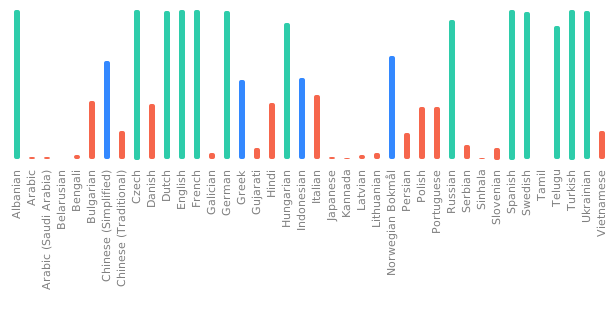](https://hosted.weblate.org/engage/freedombox/)
|
||||
|
||||
# License
|
||||
|
||||
[](https://www.gnu.org/licenses/agpl-3.0.html)
|
||||
|
||||
FreedomBox is distributed under the GNU Affero General Public License, Version 3
|
||||
or later. A copy of [AGPLv3](http://www.gnu.org/licenses/agpl.html) is available
|
||||
from the Free Software Foundation.
|
||||
[](https://hosted.weblate.org/engage/freedombox/?utm_source=widget)
|
||||
|
||||
24
Vagrantfile
vendored
24
Vagrantfile
vendored
@ -6,13 +6,13 @@ require 'etc'
|
||||
|
||||
Vagrant.configure(2) do |config|
|
||||
config.vm.box = "freedombox/freedombox-testing-dev"
|
||||
config.vm.network "public_network"
|
||||
config.vm.network "forwarded_port", guest: 443, host: 4430
|
||||
config.vm.network "forwarded_port", guest: 445, host: 4450
|
||||
config.vm.synced_folder ".", "/freedombox", owner: "plinth", group: "plinth"
|
||||
config.vm.provider "virtualbox" do |vb|
|
||||
vb.cpus = Etc.nprocessors
|
||||
vb.memory = 2048
|
||||
vb.linked_clone = true
|
||||
vb.customize ["modifyvm", :id, "--firmware", "efi"]
|
||||
end
|
||||
config.vm.provision "shell", run: 'always', inline: <<-SHELL
|
||||
# Disable automatic upgrades
|
||||
@ -24,18 +24,24 @@ Vagrant.configure(2) do |config|
|
||||
config.vm.provision "shell", inline: <<-SHELL
|
||||
cd /freedombox/
|
||||
make provision-dev
|
||||
|
||||
echo 'alias freedombox-develop="cd /freedombox; sudo -u plinth /freedombox/run --develop"' >> /home/vagrant/.bashrc
|
||||
SHELL
|
||||
config.vm.provision "tests", run: "never", type: "shell", path: "plinth/tests/functional/install.sh"
|
||||
config.vm.post_up_message = "FreedomBox virtual machine is ready
|
||||
for development. To get the IP address:
|
||||
for development. You can run the development version of Plinth using
|
||||
the following command.
|
||||
$ vagrant ssh
|
||||
$ ip address show
|
||||
|
||||
FreedomBox interface will be available at https://<ip address>/freedombox
|
||||
(with an invalid SSL certificate). To watch logs:
|
||||
$ vagrant ssh
|
||||
$ sudo freedombox-logs
|
||||
$ freedombox-develop
|
||||
Plinth will be available at https://localhost:4430/plinth (with
|
||||
an invalid SSL certificate).
|
||||
"
|
||||
|
||||
config.trigger.after [:up, :resume, :reload] do |trigger|
|
||||
trigger.info = "Set plinth user permissions for development environment"
|
||||
trigger.run_remote = {
|
||||
path: ".vagrant-scripts/plinth-user-permissions.py"
|
||||
}
|
||||
end
|
||||
config.vm.boot_timeout=1200
|
||||
end
|
||||
|
||||
7
actions/actions
Executable file
7
actions/actions
Executable file
@ -0,0 +1,7 @@
|
||||
#!/usr/bin/python3
|
||||
# SPDX-License-Identifier: AGPL-3.0-or-later
|
||||
|
||||
from plinth.actions import privileged_main
|
||||
|
||||
if __name__ == '__main__':
|
||||
privileged_main()
|
||||
@ -1,61 +0,0 @@
|
||||
#!/usr/bin/python3
|
||||
# SPDX-License-Identifier: AGPL-3.0-or-later
|
||||
"""
|
||||
Utility to change user password in FreedomBox's Django database.
|
||||
|
||||
Usage:
|
||||
$ freedombox-change-password <username>
|
||||
"""
|
||||
|
||||
import argparse
|
||||
import getpass
|
||||
import sys
|
||||
|
||||
import plinth.web_framework
|
||||
from plinth.modules.users import privileged
|
||||
|
||||
|
||||
def main():
|
||||
"""Ask for new password, setup Django and update a user's password."""
|
||||
try:
|
||||
plinth.web_framework.init()
|
||||
except Exception:
|
||||
_print('Error initializing Django.')
|
||||
return
|
||||
|
||||
parser = argparse.ArgumentParser()
|
||||
parser.add_argument('username',
|
||||
help='Username of the account to change password for')
|
||||
args = parser.parse_args()
|
||||
|
||||
username = args.username
|
||||
password = getpass.getpass('Enter new password: ')
|
||||
|
||||
try:
|
||||
_change_password(username, password)
|
||||
privileged._set_user_password(username, password)
|
||||
privileged._set_samba_user(username, password)
|
||||
_print('Password updated in web interface, LDAP, and samba databases.')
|
||||
except Exception as exception:
|
||||
_print('Error setting password:', str(exception))
|
||||
|
||||
|
||||
def _print(*args, **kwargs):
|
||||
"""Write to stderr."""
|
||||
print(*args, **kwargs, file=sys.stderr)
|
||||
|
||||
|
||||
def _change_password(username: str, password: str):
|
||||
"""Update the password in SQLite database file."""
|
||||
from django.contrib.auth.models import User
|
||||
try:
|
||||
user = User.objects.get(username=username)
|
||||
user.set_password(password)
|
||||
user.save()
|
||||
except User.DoesNotExist:
|
||||
_print('User account does not exist:', username)
|
||||
raise
|
||||
|
||||
|
||||
if __name__ == '__main__':
|
||||
main()
|
||||
@ -1,6 +0,0 @@
|
||||
#!/usr/bin/python3
|
||||
# SPDX-License-Identifier: AGPL-3.0-or-later
|
||||
|
||||
import plinth.privileged_daemon
|
||||
|
||||
plinth.privileged_daemon.client_main()
|
||||
@ -1,6 +0,0 @@
|
||||
#!/usr/bin/python3
|
||||
# SPDX-License-Identifier: AGPL-3.0-or-later
|
||||
|
||||
import plinth.privileged_daemon
|
||||
|
||||
plinth.privileged_daemon.main()
|
||||
@ -16,14 +16,8 @@
|
||||
SSLProtocol all -SSLv3 -TLSv1 -TLSv1.1
|
||||
|
||||
# Automatically obtained certificates from Let's Encrypt
|
||||
<IfFile /etc/letsencrypt/live/$domain/privkey.pem>
|
||||
SSLCertificateFile /etc/letsencrypt/live/$domain/fullchain.pem
|
||||
SSLCertificateKeyFile /etc/letsencrypt/live/$domain/privkey.pem
|
||||
</IfFile>
|
||||
<IfFile !/etc/letsencrypt/live/$domain/privkey.pem>
|
||||
SSLCertificateFile /etc/ssl/certs/ssl-cert-snakeoil.pem
|
||||
SSLCertificateKeyFile /etc/ssl/private/ssl-cert-snakeoil.key
|
||||
</IfFile>
|
||||
SSLCertificateFile /etc/letsencrypt/live/$domain/fullchain.pem
|
||||
SSLCertificateKeyFile /etc/letsencrypt/live/$domain/privkey.pem
|
||||
|
||||
<FilesMatch "\.(cgi|shtml|phtml|php)$">
|
||||
SSLOptions +StdEnvVars
|
||||
@ -31,19 +25,6 @@
|
||||
<Directory /usr/lib/cgi-bin>
|
||||
SSLOptions +StdEnvVars
|
||||
</Directory>
|
||||
|
||||
<IfFile /etc/apache2/includes/all-domains-include-freedombox.conf>
|
||||
Include includes/all-domains-include-freedombox.conf
|
||||
</IfFile>
|
||||
<IfFile /etc/apache2/includes/all-domains-include.conf>
|
||||
Include includes/all-domains-include.conf
|
||||
</IfFile>
|
||||
<IfFile /etc/apache2/includes/$domain-include-freedombox.conf>
|
||||
Include includes/$domain-include-freedombox.conf
|
||||
</IfFile>
|
||||
<IfFile /etc/apache2/includes/$domain-include.conf>
|
||||
Include includes/$domain-include.conf
|
||||
</IfFile>
|
||||
</VirtualHost>
|
||||
</IfModule>
|
||||
</Macro>
|
||||
|
||||
@ -12,7 +12,6 @@
|
||||
# Don't redirect for onion sites as it is not needed and leads to
|
||||
# unnecessary warning.
|
||||
RewriteCond %{HTTP_HOST} !^.*\.onion$ [NC]
|
||||
RewriteCond %{REQUEST_URI} !^/freedombox/apache/discover-idp/$ [NC]
|
||||
ReWriteCond %{HTTPS} !=on
|
||||
RewriteRule ^ https://%{HTTP_HOST}%{REQUEST_URI} [R=301,L]
|
||||
</LocationMatch>
|
||||
|
||||
@ -39,16 +39,53 @@
|
||||
</If>
|
||||
|
||||
##
|
||||
## Redirect traffic on home to /freedombox as part of turning the machine
|
||||
## Redirect traffic on home to /plinth as part of turning the machine
|
||||
## into FreedomBox server. Plinth then acts as a portal to reach all
|
||||
## other services.
|
||||
##
|
||||
<IfFile !/etc/apache2/conf-enabled/freedombox-apache-homepage.conf>
|
||||
RedirectMatch "^/$" "/freedombox"
|
||||
</IfFile>
|
||||
RedirectMatch "^/$" "/plinth"
|
||||
|
||||
##
|
||||
## On all sites, provide FreedomBox on a default path: /freedombox
|
||||
## Disable sending Referer (sic) header from FreedomBox web interface to
|
||||
## external websites. This improves privacy by not disclosing FreedomBox
|
||||
## domains/URLs to external domains. Apps such as blogs which want to popularize
|
||||
## themselves with referrer header may still do so.
|
||||
##
|
||||
## A strict Content Security Policy.
|
||||
## - @fonts are allowed only from FreedomBox itself.
|
||||
## - <frame>/<iframe> sources are disabled.
|
||||
## - <img> sources are allowed only from FreedomBox itself.
|
||||
## - Manifest file is not allowed as there is none yet.
|
||||
## - <audio>, <video>, <track> tags are not allowed yet.
|
||||
## - <object>, <embed>, <applet> tags are not allowed yet.
|
||||
## - Allow JS from FreedomBox itself (no inline and attribute scripts).
|
||||
## - Allow inline CSS and CSS files from Freedombox itself.
|
||||
## - Web worker sources are allowed only from FreedomBox itself (for JSXC).
|
||||
## - All other fetch sources including Ajax are not allowed from FreedomBox
|
||||
## itself.
|
||||
## - <base> tag is not allowed.
|
||||
## - No plugins types are alllowed since object-src is 'none'.
|
||||
## - Form action should be to FreedomBox itself.
|
||||
## - This interface may be not embedded in <frame>, <iframe>, etc. tags.
|
||||
## - When serving HTTPS, don't allow HTTP assets.
|
||||
##
|
||||
## Enable strict sandboxing enabled with some exceptions:
|
||||
## - Allow running Javascript.
|
||||
## - Allow popups as sometimes we use <a target=_blank>
|
||||
## - Allow forms to support configuration forms.
|
||||
## -
|
||||
##
|
||||
## Disable browser guessing of MIME types. FreedoBox already sets good content
|
||||
## types for all the common file types.
|
||||
##
|
||||
<LocationMatch "^/(plinth|freedombox)">
|
||||
Header set Referrer-Policy 'same-origin'
|
||||
Header set Content-Security-Policy "font-src 'self'; frame-src 'none'; img-src 'self'; manifest-src 'none'; media-src 'none'; object-src 'none'; script-src 'self'; style-src 'self'; worker-src 'self'; default-src 'self'; base-uri 'none'; sandbox allow-scripts allow-popups allow-forms allow-same-origin allow-downloads; form-action 'self'; frame-ancestors 'none'; block-all-mixed-content;"
|
||||
Header set X-Content-Type-Options 'nosniff'
|
||||
</LocationMatch>
|
||||
|
||||
##
|
||||
## On all sites, provide FreedomBox on a default path: /plinth
|
||||
##
|
||||
## Requires the following Apache modules to be enabled:
|
||||
## mod_headers
|
||||
@ -56,8 +93,7 @@
|
||||
## mod_proxy_http
|
||||
##
|
||||
<Location /freedombox>
|
||||
ProxyPass http://127.0.0.1:8000/freedombox
|
||||
ProxyPreserveHost On
|
||||
ProxyPass http://127.0.0.1:8000/plinth
|
||||
## Send the scheme from user's request to enable Plinth to redirect
|
||||
## URLs, set cookies, set absolute URLs (if any) properly.
|
||||
RequestHeader set X-Forwarded-Proto 'https' env=HTTPS
|
||||
@ -71,20 +107,7 @@
|
||||
RequestHeader unset X-Forwarded-For
|
||||
</Location>
|
||||
<Location /plinth>
|
||||
ProxyPass http://127.0.0.1:8000/freedombox
|
||||
ProxyPreserveHost On
|
||||
RequestHeader set X-Forwarded-Proto 'https' env=HTTPS
|
||||
RequestHeader unset X-Forwarded-For
|
||||
</Location>
|
||||
<Location /.well-known/openid-configuration>
|
||||
ProxyPass http://127.0.0.1:8000/freedombox/o/.well-known/openid-configuration
|
||||
ProxyPreserveHost On
|
||||
RequestHeader set X-Forwarded-Proto 'https' env=HTTPS
|
||||
RequestHeader unset X-Forwarded-For
|
||||
</Location>
|
||||
<Location /.well-known/jwks.json>
|
||||
ProxyPass http://127.0.0.1:8000/freedombox/o/.well-known/jwks.json
|
||||
ProxyPreserveHost On
|
||||
ProxyPass http://127.0.0.1:8000/plinth
|
||||
RequestHeader set X-Forwarded-Proto 'https' env=HTTPS
|
||||
RequestHeader unset X-Forwarded-For
|
||||
</Location>
|
||||
@ -96,7 +119,7 @@
|
||||
<Location ~ ^/favicon\.ico$>
|
||||
<IfModule mod_rewrite.c>
|
||||
RewriteEngine On
|
||||
RewriteRule /favicon\.ico$ "/freedombox/static/theme/img/favicon.ico" [PT]
|
||||
RewriteRule /favicon\.ico$ "/plinth/static/theme/img/favicon.ico" [PT]
|
||||
</IfModule>
|
||||
</Location>
|
||||
|
||||
@ -126,12 +149,3 @@ ErrorLog "|/usr/bin/systemd-cat --identifier=apache-error"
|
||||
# records its own timestamp.
|
||||
ErrorLogFormat "[%-m:%l] [pid %P:tid %{g}T] %7F: %E: [client\ %a] %M% ,\ referer\ %{Referer}i"
|
||||
CustomLog "|/usr/bin/systemd-cat --identifier=apache-access" vhost_combined
|
||||
|
||||
## When showing an index page for a directory listing, ensure that viewport's
|
||||
## width is the same as the device's width. Directory index pages generated by
|
||||
## mod_autoindex are reasonably suitable for mobile devices. However, without
|
||||
## the directive, mobile devices will assume the page to be not-mobile friendly
|
||||
## and use a larger view port than the device size.
|
||||
<IfModule mod_autoindex.c>
|
||||
IndexHeadInsert "<meta name=\"viewport\" content=\"width=device-width, initial-scale=1\">"
|
||||
</IfModule>
|
||||
|
||||
@ -1,3 +1,11 @@
|
||||
#
|
||||
# Allow plinth user to run plinth action scripts with superuser privileges
|
||||
# without needing a password.
|
||||
#
|
||||
Cmnd_Alias FREEDOMBOX_ACTION = /usr/share/plinth/actions/actions
|
||||
Defaults!FREEDOMBOX_ACTION closefrom_override
|
||||
plinth ALL=(ALL:ALL) NOPASSWD:FREEDOMBOX_ACTION
|
||||
|
||||
#
|
||||
# On FreedomBox, allow all users in the 'admin' LDAP group to execute
|
||||
# commands as root.
|
||||
|
||||
@ -1,27 +0,0 @@
|
||||
# SPDX-License-Identifier: AGPL-3.0-or-later
|
||||
|
||||
[Unit]
|
||||
Description=FreedomBox Privileged Service
|
||||
Documentation=https://wiki.debian.org/FreedomBox/
|
||||
# Don't hit the start rate limiting.
|
||||
StartLimitIntervalSec=0
|
||||
# Stop/restart along with .socket unit (invoked from dpkg scripts).
|
||||
PartOf=freedombox-privileged.socket
|
||||
# Uploaded files in /var/tmp/ are shared with FreedomBox web service.
|
||||
JoinsNamespaceOf=plinth.service
|
||||
|
||||
[Service]
|
||||
Type=notify
|
||||
ExecStart=/usr/lib/freedombox/freedombox-privileged
|
||||
TimeoutSec=300s
|
||||
User=root
|
||||
Group=root
|
||||
NotifyAccess=main
|
||||
# Uploaded files in /var/tmp/ are shared with FreedomBox web service by joining
|
||||
# namespaces.
|
||||
PrivateTmp=yes
|
||||
Restart=on-failure
|
||||
# Don't restart too fast
|
||||
RestartSec=1
|
||||
RestartSteps=3
|
||||
RestartMaxDelaySec=5
|
||||
@ -1,16 +0,0 @@
|
||||
# SPDX-License-Identifier: AGPL-3.0-or-later
|
||||
|
||||
[Unit]
|
||||
Description=FreedomBox Privileged Service Socket
|
||||
Documentation=https://wiki.debian.org/FreedomBox/
|
||||
|
||||
[Socket]
|
||||
Accept=no
|
||||
ListenStream=/run/freedombox/privileged.socket
|
||||
SocketUser=root
|
||||
SocketGroup=root
|
||||
SocketMode=0666
|
||||
DirectoryMode=755
|
||||
|
||||
[Install]
|
||||
WantedBy=sockets.target
|
||||
@ -5,13 +5,9 @@ Description=FreedomBox Service (Plinth)
|
||||
Documentation=man:plinth(1)
|
||||
After=network.target
|
||||
StartLimitIntervalSec=0
|
||||
# Uploaded files in /var/tmp/ are shared with FreedomBox privileged service.
|
||||
JoinsNamespaceOf=freedombox-privileged.service
|
||||
|
||||
[Service]
|
||||
Type=notify
|
||||
ExecStart=/usr/bin/plinth
|
||||
TimeoutSec=300s
|
||||
Restart=on-failure
|
||||
RestartSec=5
|
||||
ExecReload=/bin/kill -HUP $MAINPID
|
||||
@ -19,10 +15,6 @@ User=plinth
|
||||
Group=plinth
|
||||
StandardOutput=null
|
||||
StandardError=null
|
||||
NotifyAccess=main
|
||||
# Uploaded files in /var/tmp/ are shared with FreedomBox privileged service by
|
||||
# joining namespaces.
|
||||
PrivateTmp=yes
|
||||
|
||||
[Install]
|
||||
WantedBy=multi-user.target
|
||||
|
||||
2403
debian/changelog
vendored
2403
debian/changelog
vendored
File diff suppressed because it is too large
Load Diff
132
debian/control
vendored
132
debian/control
vendored
@ -1,5 +1,6 @@
|
||||
Source: freedombox
|
||||
Section: web
|
||||
Priority: optional
|
||||
Maintainer: FreedomBox packaging team <freedombox-pkg-team@lists.alioth.debian.org>
|
||||
Uploaders:
|
||||
Tzafrir Cohen <tzafrir@debian.org>,
|
||||
@ -14,70 +15,80 @@ Build-Depends:
|
||||
dblatex,
|
||||
dh-python,
|
||||
docbook-xsl,
|
||||
e2fsprogs <!nocheck>,
|
||||
e2fsprogs,
|
||||
gir1.2-nm-1.0,
|
||||
libjs-bootstrap5 <!nocheck>,
|
||||
libjs-htmx <!nocheck>,
|
||||
# Older libjs-bootstrap5 does not have proper dependency on popper.js >= 2.0
|
||||
node-popper2 <!nocheck>,
|
||||
libjs-bootstrap4,
|
||||
pybuild-plugin-pyproject,
|
||||
python3-all:any,
|
||||
python3-apt <!nocheck>,
|
||||
python3-apt,
|
||||
python3-augeas,
|
||||
python3-bootstrapform <!nocheck>,
|
||||
python3-bootstrapform,
|
||||
python3-build,
|
||||
python3-cherrypy3,
|
||||
python3-configobj <!nocheck>,
|
||||
python3-cryptography <!nocheck>,
|
||||
python3-configobj,
|
||||
python3-dbus,
|
||||
python3-django <!nocheck>,
|
||||
python3-django-axes <!nocheck>,
|
||||
python3-django-captcha <!nocheck>,
|
||||
# Explictly depend on ipware as it is optional dependecy of django-axes
|
||||
python3-django-ipware <!nocheck>,
|
||||
python3-django-oauth-toolkit <!nocheck>,
|
||||
python3-django-stronghold <!nocheck>,
|
||||
python3-django (>= 1.11),
|
||||
python3-django-axes (>= 5.0.0),
|
||||
python3-django-captcha,
|
||||
# Explictly depend on ipware as it is optional dependecy for future versions
|
||||
# of django-axes.
|
||||
python3-django-ipware (>= 3),
|
||||
python3-django-stronghold (>= 0.3.0),
|
||||
python3-flake8,
|
||||
python3-gi,
|
||||
python3-markupsafe,
|
||||
python3-mypy <!nocheck>,
|
||||
python3-pampy <!nocheck>,
|
||||
python3-pexpect,
|
||||
python3-mypy,
|
||||
python3-openssl,
|
||||
python3-pampy,
|
||||
python3-paramiko,
|
||||
python3-pip,
|
||||
python3-psutil,
|
||||
python3-pytest <!nocheck>,
|
||||
python3-pytest-cov <!nocheck>,
|
||||
python3-pytest-django <!nocheck>,
|
||||
python3-pytest-runner <!nocheck>,
|
||||
python3-pytest,
|
||||
python3-pytest-cov,
|
||||
python3-pytest-django,
|
||||
python3-pytest-runner,
|
||||
python3-requests,
|
||||
python3-ruamel.yaml,
|
||||
python3-setuptools,
|
||||
python3-systemd,
|
||||
python3-typeshed <!nocheck>,
|
||||
python3-setuptools-git,
|
||||
# python3-tomli is not available in Bullseye
|
||||
python3-tomli | python3-coverage (<< 6.0),
|
||||
python3-typeshed,
|
||||
python3-yaml,
|
||||
sshpass <!nocheck>,
|
||||
sshpass,
|
||||
xmlto,
|
||||
xsltproc
|
||||
Standards-Version: 4.7.3
|
||||
Standards-Version: 4.6.2
|
||||
Homepage: https://salsa.debian.org/freedombox-team/freedombox
|
||||
Vcs-Git: https://salsa.debian.org/freedombox-team/freedombox.git
|
||||
Vcs-Browser: https://salsa.debian.org/freedombox-team/freedombox
|
||||
Rules-Requires-Root: no
|
||||
|
||||
Package: freedombox
|
||||
Breaks:
|
||||
freedombox-setup (<< 0.13~),
|
||||
plinth (<< 0.46.0~),
|
||||
# Ensure fuse gets replaced by fuse3 on upgrades from buster s.t. sshfs can be installed.
|
||||
fuse (<< 3),
|
||||
# If ufw is installed, remove it. See issue 2247.
|
||||
ufw,
|
||||
Replaces:
|
||||
freedombox-setup (<< 0.13~),
|
||||
plinth (<< 0.46.0~),
|
||||
Architecture: all
|
||||
Provides: plinth
|
||||
Depends:
|
||||
${python3:Depends},
|
||||
${misc:Depends},
|
||||
${freedombox:Depends},
|
||||
adduser,
|
||||
augeas-tools,
|
||||
bind9-dnsutils,
|
||||
curl,
|
||||
debconf,
|
||||
dnsutils,
|
||||
e2fsprogs,
|
||||
fonts-fork-awesome,
|
||||
fonts-lato,
|
||||
# sgdisk is used in storage app to expand GPT disks
|
||||
gdisk,
|
||||
gettext,
|
||||
@ -87,13 +98,14 @@ Depends:
|
||||
ldapscripts,
|
||||
# For gdbus used to call hooks into service
|
||||
libglib2.0-bin,
|
||||
libjs-bootstrap5,
|
||||
libjs-htmx,
|
||||
libjs-bootstrap4,
|
||||
libjs-jquery,
|
||||
libjs-modernizr,
|
||||
lsof,
|
||||
netcat-openbsd,
|
||||
network-manager,
|
||||
# Older libjs-bootstrap5 does not have proper dependency on popper.js >= 2.0
|
||||
node-popper2,
|
||||
# Ensure that nscd is installed rather than unscd.
|
||||
nscd (>= 2),
|
||||
ppp,
|
||||
pppoe,
|
||||
python3-apt,
|
||||
@ -103,17 +115,17 @@ Depends:
|
||||
python3-cherrypy3,
|
||||
python3-configobj,
|
||||
python3-dbus,
|
||||
python3-django,
|
||||
python3-django-axes,
|
||||
python3-django (>= 1.11),
|
||||
python3-django-axes (>= 5.0.0),
|
||||
python3-django-captcha,
|
||||
# Explictly depend on ipware as it is optional dependecy of django-axes
|
||||
python3-django-ipware,
|
||||
python3-django-oauth-toolkit,
|
||||
# Explictly depend on ipware as it is optional dependecy for future versions
|
||||
# of django-axes.
|
||||
python3-django-ipware (>= 3),
|
||||
python3-django-stronghold,
|
||||
python3-gi,
|
||||
python3-markupsafe,
|
||||
python3-pampy,
|
||||
python3-pexpect,
|
||||
python3-paramiko,
|
||||
python3-psutil,
|
||||
python3-requests,
|
||||
python3-ruamel.yaml,
|
||||
@ -122,29 +134,65 @@ Depends:
|
||||
sudo,
|
||||
wget,
|
||||
# Ensure fuse gets replaced by fuse3 on upgrades from buster s.t. sshfs can be installed.
|
||||
fuse3,
|
||||
fuse3 (>= 3),
|
||||
Recommends:
|
||||
# Temporarily moved from Depends due to piuparts bug #1010967.
|
||||
e2fsprogs,
|
||||
# Priority: standard
|
||||
bzip2,
|
||||
# Provides brctl for controlling bridges
|
||||
bridge-utils,
|
||||
# Read, write to char devices
|
||||
devio,
|
||||
# Create, repair DOS filesystems
|
||||
dosfstools,
|
||||
# Priority: standard
|
||||
file,
|
||||
# Wifi firmware
|
||||
firmware-ath9k-htc,
|
||||
# FreedomBox documentation
|
||||
freedombox-doc-en,
|
||||
freedombox-doc-es,
|
||||
# Provide entropy using HAVEGE algorithm
|
||||
haveged,
|
||||
# Monitor system resources
|
||||
htop,
|
||||
# Monitor network traffic statistics
|
||||
iftop,
|
||||
# Basic network utitlity ping
|
||||
iputils-ping,
|
||||
# Manage wireless devices
|
||||
iw,
|
||||
# Resolve gateway.localhost
|
||||
libnss-gw-name,
|
||||
# Resolve .local address using mDNS
|
||||
libnss-mdns,
|
||||
# Resolve current hostname without /etc/hosts
|
||||
libnss-myhostname,
|
||||
# Block repeated failed PAM login attempts
|
||||
libpam-abl,
|
||||
# Priority: standard
|
||||
locales,
|
||||
# Precompiled data for all locales
|
||||
locales-all,
|
||||
# Priority: standard
|
||||
openssh-client,
|
||||
# Priority: standard
|
||||
pciutils,
|
||||
# Used by unattended-upgrades to check if running on AC power
|
||||
powermgmt-base,
|
||||
# fuser, killall, pstree and other utilities
|
||||
# fuser, pstree and other utilities
|
||||
psmisc,
|
||||
# Manage /etc/resolv.conf
|
||||
resolvconf,
|
||||
# Tool to kill WLAN, Bluetooth and moble broadband
|
||||
rfkill,
|
||||
# Monitor network traffic
|
||||
tcpdump,
|
||||
# Basic editor, VIM style
|
||||
vim-tiny,
|
||||
# Priority: standard
|
||||
whois,
|
||||
# Basic editor, Emacs style
|
||||
zile,
|
||||
Description: easy to manage, privacy oriented home server
|
||||
FreedomBox is designed to be your own inexpensive server at home. It runs free
|
||||
software and offers an increasing number of services ranging from a calendar or
|
||||
|
||||
345
debian/copyright
vendored
345
debian/copyright
vendored
@ -2,7 +2,7 @@ Format: https://www.debian.org/doc/packaging-manuals/copyright-format/1.0/
|
||||
Source: https://salsa.debian.org/freedombox-team/freedombox
|
||||
|
||||
Files: *
|
||||
Copyright: 2011-2026 FreedomBox Authors
|
||||
Copyright: 2011-2024 FreedomBox Authors
|
||||
License: AGPL-3+
|
||||
|
||||
Files: plinth/modules/jsxc/static/icons/jsxc.png
|
||||
@ -15,7 +15,7 @@ Files: doc/*.xml
|
||||
doc/*.png
|
||||
doc/*.jpg
|
||||
doc/*.wiki
|
||||
Copyright: 2011-2025 FreedomBox Authors
|
||||
Copyright: 2011-2023 FreedomBox Authors
|
||||
License: CC-BY-SA-4.0
|
||||
|
||||
Files: doc/visual_design/apple-touch-icon*
|
||||
@ -38,11 +38,6 @@ Copyright: Marie Van den Broeck (https://thenounproject.com/marie49/)
|
||||
Comment: https://thenounproject.com/icon/162372/
|
||||
License: CC-BY-SA-3.0
|
||||
|
||||
Files: static/themes/default/js/color-modes.js
|
||||
Copyright: 2011-2025 The Bootstrap Authors
|
||||
Comment: https://getbootstrap.com/docs/5.3/customize/color-modes/
|
||||
License: CC-BY-3.0
|
||||
|
||||
Files: plinth/modules/bepasty/static/icons/bepasty.svg
|
||||
Copyright: (c) 2014 by the Bepasty Team, see the AUTHORS file.
|
||||
Comment: https://github.com/bepasty/bepasty-server/blob/master/src/bepasty/static/app/bepasty.svg
|
||||
@ -69,8 +64,6 @@ Files: plinth/modules/ejabberd/static/icons/ejabberd.png
|
||||
plinth/modules/ejabberd/static/icons/ejabberd.svg
|
||||
plinth/modules/email/static/icons/email.png
|
||||
plinth/modules/email/static/icons/email.svg
|
||||
plinth/modules/gnome/static/icons/gnome.png
|
||||
plinth/modules/gnome/static/icons/gnome.svg
|
||||
plinth/modules/matrixsynapse/static/icons/matrixsynapse.svg
|
||||
plinth/modules/privoxy/static/icons/privoxy.png
|
||||
plinth/modules/privoxy/static/icons/privoxy.svg
|
||||
@ -79,7 +72,6 @@ Files: plinth/modules/ejabberd/static/icons/ejabberd.png
|
||||
plinth/modules/rssbridge/static/icons/rssbridge.svg
|
||||
plinth/modules/zoph/static/icons/zoph.png
|
||||
plinth/modules/zoph/static/icons/zoph.svg
|
||||
static/themes/default/img/application.svg
|
||||
static/themes/default/img/network-connection.svg
|
||||
static/themes/default/img/network-connection-vertical.svg
|
||||
static/themes/default/img/network-ethernet.svg
|
||||
@ -101,11 +93,13 @@ Copyright: 2020 Adwaita Icon Theme Authors, GNOME Project
|
||||
Comment: https://github.com/GNOME/adwaita-icon-theme/ http://www.gnome.org
|
||||
License: LGPL-3 or CC-BY-SA-3.0-US
|
||||
|
||||
Files: plinth/modules/featherwiki/static/icons/featherwiki.png
|
||||
plinth/modules/featherwiki/static/icons/featherwiki.svg
|
||||
Copyright: 2022 Robbie Antenesse <dev@alamantus.com>
|
||||
Comment: https://codeberg.org/Alamantus/FeatherWiki/src/branch/main/logo.svg
|
||||
License: AGPL-3+
|
||||
Files: static/themes/default/icons/f-droid.png
|
||||
static/themes/default/icons/f-droid.svg
|
||||
Copyright: 2012 William Theaker
|
||||
2013 Robert Martinez
|
||||
2015 Andrew Nayenko
|
||||
Comment: https://gitlab.com/fdroid/artwork/blob/master/fdroid-logo-2015/fdroid-logo.svg
|
||||
License: CC-BY-SA-3.0 or GPL-3+
|
||||
|
||||
Files: plinth/modules/gitweb/static/icons/gitweb.png
|
||||
plinth/modules/gitweb/static/icons/gitweb.svg
|
||||
@ -113,11 +107,14 @@ Copyright: 2010 Git Authors
|
||||
Comment: https://github.com/git/git/blob/master/gitweb/static/git-logo.png
|
||||
License: GPL-2
|
||||
|
||||
Files: plinth/modules/homeassistant/static/icons/homeassistant.png
|
||||
plinth/modules/homeassistant/static/icons/homeassistant.svg
|
||||
Copyright: Home Assistant Core Developers
|
||||
Comment: https://github.com/home-assistant/core/blob/dev/tests/components/image_upload/logo.png
|
||||
License: Apache-2.0
|
||||
Files: static/themes/default/icons/google-play.png
|
||||
Copyright: Chameleon Design (https://thenounproject.com/Chamedesign/)
|
||||
Comment: https://thenounproject.com/icon/887917/
|
||||
License: CC-BY-3.0-US
|
||||
|
||||
Files: static/themes/default/icons/gnu-linux.png
|
||||
Copyright: 2017 Cowemoji
|
||||
License: CC0-1.0
|
||||
|
||||
Files: plinth/modules/ikiwiki/static/icons/ikiwiki.png
|
||||
plinth/modules/ikiwiki/static/icons/ikiwiki.svg
|
||||
@ -132,10 +129,7 @@ License: ISC
|
||||
|
||||
Files: plinth/modules/janus/static/icons/janus.png
|
||||
plinth/modules/janus/static/icons/janus.svg
|
||||
plinth/modules/janus/static/janus-video-room.css
|
||||
plinth/modules/janus/static/janus-video-room.js
|
||||
plinth/modules/janus/templates/janus_video_room.html
|
||||
Copyright: 2014-2025 Meetecho
|
||||
Copyright: 2014-2022 Meetecho
|
||||
License: GPL-3 with OpenSSL exception
|
||||
|
||||
Files: plinth/modules/kiwix/static/icons/kiwix.png
|
||||
@ -144,6 +138,12 @@ Copyright: 2020 The other Kiwix guy
|
||||
Comment: https://commons.wikimedia.org/wiki/File:Kiwix_logo_v3.svg
|
||||
License: CC-BY-SA-4.0
|
||||
|
||||
Files: static/themes/default/icons/macos.png
|
||||
static/themes/default/icons/macos.svg
|
||||
Copyright: Vectors Market (https://thenounproject.com/vectorsmarket/)
|
||||
Comment: https://thenounproject.com/icon/1203053/
|
||||
License: CC-BY-SA-3.0
|
||||
|
||||
Files: plinth/modules/matrixsynapse/static/icons/matrixsynapse.png
|
||||
Copyright: 2017 Kishan Raval
|
||||
Comment: https://github.com/thekishanraval/Logos
|
||||
@ -161,15 +161,9 @@ License: CC-BY-SA-3.0
|
||||
|
||||
Files: plinth/modules/minetest/static/icons/minetest.svg
|
||||
Copyright: 2015 Calinou, Nils Dagsson Moskopp
|
||||
Comment: https://github.com/luanti-org/luanti/blob/master/misc/luanti.svg
|
||||
Comment: https://github.com/minetest/minetest/blob/master/misc/minetest.svg
|
||||
License: CC-BY-SA-3.0
|
||||
|
||||
Files: plinth/modules/miniflux/static/icons/miniflux.png
|
||||
plinth/modules/miniflux/static/icons/miniflux.svg
|
||||
Copyright: 2018, 2019 Frédéric Guillot
|
||||
Comment: https://github.com/miniflux/logo
|
||||
License: CC-BY-SA-4.0
|
||||
|
||||
Files: plinth/modules/mumble/static/icons/mumble.png
|
||||
Copyright: 2009 Martin Skilnand
|
||||
Comment: https://commons.wikimedia.org/wiki/File:Icons_mumble.svg
|
||||
@ -267,12 +261,6 @@ Copyright: Interface (https://www.shareicon.net/author/interface)
|
||||
Comment: https://www.shareicon.net/universal-interface-interface-sharing-share-697502
|
||||
License: CC-BY-3.0
|
||||
|
||||
Files: plinth/modules/sogo/static/icons/sogo.png
|
||||
plinth/modules/sogo/static/icons/sogo.svg
|
||||
Copyright: 2024 Inverse inc./Alinto
|
||||
Comment: https://github.com/Alinto/sogo/blob/master/COPYING.GPL
|
||||
License: GPL-2
|
||||
|
||||
Files: plinth/modules/syncthing/static/icons/syncthing.png
|
||||
Copyright: 2015 Jack Palevich <jack.palevich@gmail.com>
|
||||
2014 The Syncthing Authors
|
||||
@ -284,13 +272,6 @@ Copyright: Jakob Borg and the Syncthing project
|
||||
Comment: https://commons.wikimedia.org/wiki/File:SyncthingLogoHorizontal.svg
|
||||
License: MPL-2.0
|
||||
|
||||
Files: plinth/modules/tiddlywiki/static/icons/tiddlywiki.svg
|
||||
plinth/modules/tiddlywiki/static/icons/tiddlywiki.png
|
||||
Copyright: 2004-2007 Jeremy Ruston <jeremy@jermolene.com>
|
||||
2007-2016 UnaMesa Association
|
||||
Comment: https://github.com/Jermolene/TiddlyWiki5/blob/086506012d98e9db34c7d96dc27aea249a9bdbc8/editions/introduction/tiddlers/images/Motovun%20Jack.svg
|
||||
License: BSD-3-clause
|
||||
|
||||
Files: plinth/modules/tor/static/icons/tor.png
|
||||
plinth/modules/tor/static/icons/tor.svg
|
||||
Copyright: The Tor Project, Inc.
|
||||
@ -304,12 +285,14 @@ Copyright: Transmission Authors
|
||||
Comment: https://github.com/transmission/transmission/blob/master/gtk/icons/hicolor_apps_scalable_transmission.svg
|
||||
License: GPL-3
|
||||
|
||||
Files: plinth/modules/upgrades/data/usr/share/augeas/lenses/aptsources.aug
|
||||
plinth/modules/upgrades/data/usr/share/augeas/lenses/tests/test_aptsources.aug
|
||||
Copyright: 2007-2025 David Lutterkort
|
||||
Comment: https://github.com/hercules-team/augeas/blob/master/lenses/aptsources.aug
|
||||
https://github.com/hercules-team/augeas/blob/master/lenses/tests/test_aptsources.aug
|
||||
License: LGPL-2.1+
|
||||
Files: plinth/modules/ttrss/static/icons/ttrss.png
|
||||
Copyright: Mark James <mjames@gmail.com>
|
||||
License: CC-BY-3.0
|
||||
|
||||
Files: plinth/modules/ttrss/static/icons/ttrss.svg
|
||||
Copyright: 2005 Andrew Dolgov
|
||||
Comment: https://git.tt-rss.org/fox/tt-rss/src/master/images/favicon-72px.png
|
||||
License: GPL-3+
|
||||
|
||||
Files: plinth/modules/wordpress/static/icons/wordpress.png
|
||||
plinth/modules/wordpress/static/icons/wordpress.svg
|
||||
@ -317,6 +300,12 @@ Copyright: 2011-2021 WordPress Contributors
|
||||
Comment: https://github.com/WordPress/wordpress-develop/blob/master/src/wp-admin/images/wordpress-logo.svg
|
||||
License: GPL-2+
|
||||
|
||||
Files: static/themes/default/icons/windows.png
|
||||
static/themes/default/icons/windows.svg
|
||||
Copyright: 2007 ruli (https://thenounproject.com/2007ruli/)
|
||||
Comment: https://thenounproject.com/icon/1206946/
|
||||
License: CC-BY-SA-3.0
|
||||
|
||||
Files: plinth/modules/wireguard/static/icons/wireguard.png
|
||||
plinth/modules/wireguard/static/icons/wireguard.svg
|
||||
Copyright: 2019 WireGuard LLC
|
||||
@ -328,88 +317,13 @@ Copyright: 2008 GNOME icon artists
|
||||
Comment: https://commons.wikimedia.org/wiki/File:Gnome-computer.svg
|
||||
License: LGPL-3+ or CC-BY-SA-3.0
|
||||
|
||||
Files: static/themes/default/icons/adjust.svg
|
||||
static/themes/default/icons/android.svg
|
||||
static/themes/default/icons/arrow-right.svg
|
||||
static/themes/default/icons/ban.svg
|
||||
static/themes/default/icons/bar-chart.svg
|
||||
static/themes/default/icons/bars.svg
|
||||
static/themes/default/icons/bell-o.svg
|
||||
static/themes/default/icons/book.svg
|
||||
static/themes/default/icons/check-circle.svg
|
||||
static/themes/default/icons/check.svg
|
||||
static/themes/default/icons/chevron-right.svg
|
||||
static/themes/default/icons/clock-o.svg
|
||||
static/themes/default/icons/cog.svg
|
||||
static/themes/default/icons/comments.svg
|
||||
static/themes/default/icons/compass.svg
|
||||
static/themes/default/icons/debian.svg
|
||||
static/themes/default/icons/download.svg
|
||||
static/themes/default/icons/eject.svg
|
||||
static/themes/default/icons/exclamation-triangle.svg
|
||||
static/themes/default/icons/external-link.svg
|
||||
static/themes/default/icons/eye-slash.svg
|
||||
static/themes/default/icons/eye.svg
|
||||
static/themes/default/icons/f-droid.svg
|
||||
static/themes/default/icons/files-o.svg
|
||||
static/themes/default/icons/film.svg
|
||||
static/themes/default/icons/flag.svg
|
||||
static/themes/default/icons/freedombox.svg
|
||||
static/themes/default/icons/frown-o.svg
|
||||
static/themes/default/icons/globe-w.svg
|
||||
static/themes/default/icons/gnu-linux.svg
|
||||
static/themes/default/icons/google-play.svg
|
||||
static/themes/default/icons/hdd-o.svg
|
||||
static/themes/default/icons/heartbeat.svg
|
||||
static/themes/default/icons/heart.svg
|
||||
static/themes/default/icons/home.svg
|
||||
static/themes/default/icons/hourglass-o.svg
|
||||
static/themes/default/icons/info-circle.svg
|
||||
static/themes/default/icons/key.svg
|
||||
static/themes/default/icons/life-ring.svg
|
||||
static/themes/default/icons/line-chart.svg
|
||||
static/themes/default/icons/lock.svg
|
||||
static/themes/default/icons/macos.svg
|
||||
static/themes/default/icons/moon.svg
|
||||
static/themes/default/icons/pencil-square-o.svg
|
||||
static/themes/default/icons/plus.svg
|
||||
static/themes/default/icons/poweroff.svg
|
||||
static/themes/default/icons/question-circle.svg
|
||||
static/themes/default/icons/refresh.svg
|
||||
static/themes/default/icons/repeat.svg
|
||||
static/themes/default/icons/rocket.svg
|
||||
static/themes/default/icons/shield.svg
|
||||
static/themes/default/icons/signal.svg
|
||||
static/themes/default/icons/smile-o.svg
|
||||
static/themes/default/icons/spinner.svg
|
||||
static/themes/default/icons/star.svg
|
||||
static/themes/default/icons/sun.svg
|
||||
static/themes/default/icons/tags.svg
|
||||
static/themes/default/icons/tag.svg
|
||||
static/themes/default/icons/terminal.svg
|
||||
static/themes/default/icons/th.svg
|
||||
static/themes/default/icons/times.svg
|
||||
static/themes/default/icons/trash-o.svg
|
||||
static/themes/default/icons/trash.svg
|
||||
static/themes/default/icons/upload.svg
|
||||
static/themes/default/icons/user.svg
|
||||
static/themes/default/icons/users.svg
|
||||
static/themes/default/icons/wifi.svg
|
||||
static/themes/default/icons/windows.svg
|
||||
static/themes/default/icons/wrench.svg
|
||||
Copyright: 2018, Fork Awesome
|
||||
Comment: https://github.com/ForkAwesome/Fork-Awesome/tree/master/src/icons/svg/
|
||||
Files: static/themes/default/lato/*
|
||||
Copyright: (c) 2010-2014, Łukasz Dziedzic
|
||||
License: OFL-1.1
|
||||
|
||||
Files: static/themes/default/icons/fedora.svg
|
||||
static/themes/default/icons/homebrew.svg
|
||||
Copyright: 2026, Simple Icons
|
||||
Comment: https://github.com/simple-icons/simple-icons/
|
||||
License: CC0-1.0
|
||||
|
||||
Files: debian/*
|
||||
Copyright: 2013 Tzafrir Cohen
|
||||
2013-2026 FreedomBox Authors
|
||||
2013-2024 FreedomBox Authors
|
||||
License: GPL-2+
|
||||
|
||||
License: AGPL-3+
|
||||
@ -2876,6 +2790,90 @@ License: MPL-2.0
|
||||
On Debian systems, the complete text of the Mozilla Public License, v. 2.0 can
|
||||
be found in "/usr/share/common-licenses/MPL-2.0".
|
||||
|
||||
License: OFL-1.1
|
||||
PREAMBLE
|
||||
The goals of the Open Font License (OFL) are to stimulate worldwide
|
||||
development of collaborative font projects, to support the font creation
|
||||
efforts of academic and linguistic communities, and to provide a free and
|
||||
open framework in which fonts may be shared and improved in partnership
|
||||
with others.
|
||||
.
|
||||
The OFL allows the licensed fonts to be used, studied, modified and
|
||||
redistributed freely as long as they are not sold by themselves. The
|
||||
fonts, including any derivative works, can be bundled, embedded,
|
||||
redistributed and/or sold with any software provided that any reserved
|
||||
names are not used by derivative works. The fonts and derivatives,
|
||||
however, cannot be released under any other type of license. The
|
||||
requirement for fonts to remain under this license does not apply
|
||||
to any document created using the fonts or their derivatives.
|
||||
.
|
||||
DEFINITIONS
|
||||
"Font Software" refers to the set of files released by the Copyright
|
||||
Holder(s) under this license and clearly marked as such. This may
|
||||
include source files, build scripts and documentation.
|
||||
.
|
||||
"Reserved Font Name" refers to any names specified as such after the
|
||||
copyright statement(s).
|
||||
.
|
||||
"Original Version" refers to the collection of Font Software components as
|
||||
distributed by the Copyright Holder(s).
|
||||
.
|
||||
"Modified Version" refers to any derivative made by adding to, deleting,
|
||||
or substituting -- in part or in whole -- any of the components of the
|
||||
Original Version, by changing formats or by porting the Font Software to a
|
||||
new environment.
|
||||
.
|
||||
"Author" refers to any designer, engineer, programmer, technical
|
||||
writer or other person who contributed to the Font Software.
|
||||
.
|
||||
PERMISSION & CONDITIONS
|
||||
Permission is hereby granted, free of charge, to any person obtaining
|
||||
a copy of the Font Software, to use, study, copy, merge, embed, modify,
|
||||
redistribute, and sell modified and unmodified copies of the Font
|
||||
Software, subject to the following conditions:
|
||||
.
|
||||
1) Neither the Font Software nor any of its individual components,
|
||||
in Original or Modified Versions, may be sold by itself.
|
||||
.
|
||||
2) Original or Modified Versions of the Font Software may be bundled,
|
||||
redistributed and/or sold with any software, provided that each copy
|
||||
contains the above copyright notice and this license. These can be
|
||||
included either as stand-alone text files, human-readable headers or
|
||||
in the appropriate machine-readable metadata fields within text or
|
||||
binary files as long as those fields can be easily viewed by the user.
|
||||
.
|
||||
3) No Modified Version of the Font Software may use the Reserved Font
|
||||
Name(s) unless explicit written permission is granted by the corresponding
|
||||
Copyright Holder. This restriction only applies to the primary font
|
||||
name as presented to the users.
|
||||
.
|
||||
4) The name(s) of the Copyright Holder(s) or the Author(s) of the Font
|
||||
Software shall not be used to promote, endorse or advertise any
|
||||
Modified Version, except to acknowledge the contribution(s) of the
|
||||
Copyright Holder(s) and the Author(s) or with their explicit written
|
||||
permission.
|
||||
.
|
||||
5) The Font Software, modified or unmodified, in part or in whole,
|
||||
must be distributed entirely under this license, and must not be
|
||||
distributed under any other license. The requirement for fonts to
|
||||
remain under this license does not apply to any document created
|
||||
using the Font Software.
|
||||
.
|
||||
TERMINATION
|
||||
This license becomes null and void if any of the above conditions are
|
||||
not met.
|
||||
.
|
||||
DISCLAIMER
|
||||
THE FONT SOFTWARE IS PROVIDED "AS IS", WITHOUT WARRANTY OF ANY KIND,
|
||||
EXPRESS OR IMPLIED, INCLUDING BUT NOT LIMITED TO ANY WARRANTIES OF
|
||||
MERCHANTABILITY, FITNESS FOR A PARTICULAR PURPOSE AND NONINFRINGEMENT
|
||||
OF COPYRIGHT, PATENT, TRADEMARK, OR OTHER RIGHT. IN NO EVENT SHALL THE
|
||||
COPYRIGHT HOLDER BE LIABLE FOR ANY CLAIM, DAMAGES OR OTHER LIABILITY,
|
||||
INCLUDING ANY GENERAL, SPECIAL, INDIRECT, INCIDENTAL, OR CONSEQUENTIAL
|
||||
DAMAGES, WHETHER IN AN ACTION OF CONTRACT, TORT OR OTHERWISE, ARISING
|
||||
FROM, OUT OF THE USE OR INABILITY TO USE THE FONT SOFTWARE OR FROM
|
||||
OTHER DEALINGS IN THE FONT SOFTWARE.
|
||||
|
||||
License: public-domain
|
||||
This software has been placed into the public domain by its authors.
|
||||
|
||||
@ -2898,94 +2896,3 @@ License: Zlib
|
||||
.
|
||||
3. This notice may not be removed or altered from any source
|
||||
distribution.
|
||||
|
||||
License: OFL-1.1
|
||||
This Font Software is licensed under the SIL Open Font License,
|
||||
Version 1.1.
|
||||
.
|
||||
This license is copied below, and is also available with a FAQ at:
|
||||
http://scripts.sil.org/OFL
|
||||
.
|
||||
SIL OPEN FONT LICENSE Version 1.1 - 26 February 2007
|
||||
.
|
||||
PREAMBLE The goals of the Open Font License (OFL) are to stimulate
|
||||
worldwide development of collaborative font projects, to support the font
|
||||
creation efforts of academic and linguistic communities, and to provide
|
||||
a free and open framework in which fonts may be shared and improved in
|
||||
partnership with others.
|
||||
.
|
||||
The OFL allows the licensed fonts to be used, studied, modified and
|
||||
redistributed freely as long as they are not sold by themselves.
|
||||
The fonts, including any derivative works, can be bundled, embedded,
|
||||
redistributed and/or sold with any software provided that any reserved
|
||||
names are not used by derivative works. The fonts and derivatives,
|
||||
however, cannot be released under any other type of license. The
|
||||
requirement for fonts to remain under this license does not apply to
|
||||
any document created using the fonts or their derivatives.
|
||||
.
|
||||
DEFINITIONS
|
||||
"Font Software" refers to the set of files released by the Copyright
|
||||
Holder(s) under this license and clearly marked as such.
|
||||
This may include source files, build scripts and documentation.
|
||||
.
|
||||
"Reserved Font Name" refers to any names specified as such after the
|
||||
copyright statement(s).
|
||||
.
|
||||
"Original Version" refers to the collection of Font Software components
|
||||
as distributed by the Copyright Holder(s).
|
||||
.
|
||||
"Modified Version" refers to any derivative made by adding to, deleting,
|
||||
or substituting ? in part or in whole ?
|
||||
any of the components of the Original Version, by changing formats or
|
||||
by porting the Font Software to a new environment.
|
||||
.
|
||||
"Author" refers to any designer, engineer, programmer, technical writer
|
||||
or other person who contributed to the Font Software.
|
||||
.
|
||||
PERMISSION & CONDITIONS
|
||||
.
|
||||
Permission is hereby granted, free of charge, to any person obtaining a
|
||||
copy of the Font Software, to use, study, copy, merge, embed, modify,
|
||||
redistribute, and sell modified and unmodified copies of the Font
|
||||
Software, subject to the following conditions:
|
||||
.
|
||||
1) Neither the Font Software nor any of its individual components, in
|
||||
Original or Modified Versions, may be sold by itself.
|
||||
.
|
||||
2) Original or Modified Versions of the Font Software may be bundled,
|
||||
redistributed and/or sold with any software, provided that each copy
|
||||
contains the above copyright notice and this license. These can be
|
||||
included either as stand-alone text files, human-readable headers or
|
||||
in the appropriate machine-readable metadata fields within text or
|
||||
binary files as long as those fields can be easily viewed by the user.
|
||||
.
|
||||
3) No Modified Version of the Font Software may use the Reserved Font
|
||||
Name(s) unless explicit written permission is granted by the
|
||||
corresponding Copyright Holder. This restriction only applies to the
|
||||
primary font name as presented to the users.
|
||||
.
|
||||
4) The name(s) of the Copyright Holder(s) or the Author(s) of the Font
|
||||
Software shall not be used to promote, endorse or advertise any
|
||||
Modified Version, except to acknowledge the contribution(s) of the
|
||||
Copyright Holder(s) and the Author(s) or with their explicit written
|
||||
permission.
|
||||
.
|
||||
5) The Font Software, modified or unmodified, in part or in whole, must
|
||||
be distributed entirely under this license, and must not be distributed
|
||||
under any other license. The requirement for fonts to remain under
|
||||
this license does not apply to any document created using the Font
|
||||
Software.
|
||||
.
|
||||
TERMINATION
|
||||
This license becomes null and void if any of the above conditions are not met.
|
||||
.
|
||||
DISCLAIMER
|
||||
THE FONT SOFTWARE IS PROVIDED "AS IS", WITHOUT WARRANTY OF ANY KIND,
|
||||
EXPRESS OR IMPLIED, INCLUDING BUT NOT LIMITED TO ANY WARRANTIES OF
|
||||
MERCHANTABILITY, FITNESS FOR A PARTICULAR PURPOSE AND NONINFRINGEMENT
|
||||
OF COPYRIGHT, PATENT, TRADEMARK, OR OTHER RIGHT. IN NO EVENT SHALL THE
|
||||
COPYRIGHT HOLDER BE LIABLE FOR ANY CLAIM, DAMAGES OR OTHER LIABILITY,
|
||||
INCLUDING ANY GENERAL, SPECIAL, INDIRECT, INCIDENTAL, OR CONSEQUENTIAL
|
||||
DAMAGES, WHETHER IN AN ACTION OF CONTRACT, TORT OR OTHERWISE, ARISING
|
||||
FROM, OUT OF THE USE OR INABILITY TO USE THE FONT SOFTWARE OR FROM OTHER
|
||||
DEALINGS IN THE FONT SOFTWARE.
|
||||
|
||||
9
debian/freedombox.lintian-overrides
vendored
9
debian/freedombox.lintian-overrides
vendored
@ -19,12 +19,3 @@ freedombox binary: web-application-works-only-with-apache
|
||||
# Not documentation
|
||||
freedombox: package-contains-documentation-outside-usr-share-doc [usr/share/plinth/static/jslicense.html]
|
||||
freedombox: package-contains-documentation-outside-usr-share-doc [usr/lib/python3/dist-packages/plinth-*.dist-info/top_level.txt]
|
||||
|
||||
# This executable is meant to executed from systemd service file and is not
|
||||
# meant for user. However, don't install to /usr/libexec and follow systemd
|
||||
# convention instead.
|
||||
freedombox: executable-in-usr-lib [usr/lib/freedombox/freedombox-privileged]
|
||||
|
||||
# [Install] section is missing for the privileged daemon service because it is
|
||||
# socket activated.
|
||||
freedombox: systemd-service-file-missing-install-key [usr/lib/systemd/system/freedombox-privileged.service]
|
||||
|
||||
1
debian/freedombox.manpages
vendored
1
debian/freedombox.manpages
vendored
@ -1,2 +1 @@
|
||||
./doc/freedombox-cmd.1
|
||||
./doc/plinth.1
|
||||
|
||||
43
debian/freedombox.preinst
vendored
Executable file
43
debian/freedombox.preinst
vendored
Executable file
@ -0,0 +1,43 @@
|
||||
#!/bin/sh
|
||||
|
||||
set -e
|
||||
|
||||
case "$1" in
|
||||
upgrade)
|
||||
# Handle removing freedombox-setup-repositories.timer from 20.5.
|
||||
if dpkg --compare-versions "$2" le 20.7; then
|
||||
if [ -x "/usr/bin/deb-systemd-invoke" ]; then
|
||||
deb-systemd-invoke stop freedombox-setup-repositories.timer >/dev/null 2>/dev/null || true
|
||||
fi
|
||||
|
||||
if [ -x "/usr/bin/deb-systemd-helper" ]; then
|
||||
deb-systemd-helper purge freedombox-setup-repositories.timer >/dev/null || true
|
||||
deb-systemd-helper unmask freedombox-setup-repositories.timer >/dev/null || true
|
||||
fi
|
||||
|
||||
if [ -d /run/systemd/system ]; then
|
||||
systemctl daemon-reload
|
||||
fi
|
||||
fi
|
||||
|
||||
# Handle removing freedombox-udiskie.service from 20.9.
|
||||
if dpkg --compare-versions "$2" le 20.9; then
|
||||
if [ -x "/usr/bin/deb-systemd-invoke" ]; then
|
||||
deb-systemd-invoke stop freedombox-udiskie.service >/dev/null 2>/dev/null || true
|
||||
fi
|
||||
|
||||
if [ -x "/usr/bin/deb-systemd-helper" ]; then
|
||||
deb-systemd-helper purge freedombox-udiskie.service >/dev/null || true
|
||||
deb-systemd-helper unmask freedombox-udiskie.service >/dev/null || true
|
||||
fi
|
||||
|
||||
if [ -d /run/systemd/system ]; then
|
||||
systemctl daemon-reload
|
||||
fi
|
||||
fi
|
||||
;;
|
||||
esac
|
||||
|
||||
#DEBHELPER#
|
||||
|
||||
exit 0
|
||||
6
debian/gbp.conf
vendored
6
debian/gbp.conf
vendored
@ -1,9 +1,3 @@
|
||||
[DEFAULT]
|
||||
debian-branch = main
|
||||
|
||||
[buildpackage]
|
||||
export-dir = ../build-area/
|
||||
|
||||
[dch]
|
||||
git-log = --no-merges
|
||||
multimaint-merge = True
|
||||
|
||||
36
debian/po/ca.po
vendored
36
debian/po/ca.po
vendored
@ -1,36 +0,0 @@
|
||||
# Catalan translation of plinth's debconf messages
|
||||
# Copyright © 2024 Free Software Foundation, Inc.
|
||||
# This file is distributed under the same license as the plinth package.
|
||||
# poc senderi <pocsenderi@protonmail.com>, 2024.
|
||||
#
|
||||
msgid ""
|
||||
msgstr ""
|
||||
"Project-Id-Version: plinth\n"
|
||||
"Report-Msgid-Bugs-To: plinth@packages.debian.org\n"
|
||||
"POT-Creation-Date: 2019-11-18 18:11-0500\n"
|
||||
"PO-Revision-Date: 2024-11-05 22:18+0100\n"
|
||||
"Language: ca\n"
|
||||
"MIME-Version: 1.0\n"
|
||||
"Content-Type: text/plain; charset=UTF-8\n"
|
||||
"Content-Transfer-Encoding: 8bit\n"
|
||||
"Last-Translator: poc senderi <pocsenderi@protonmail.com>\n"
|
||||
"Language-Team: Catalan <debian-l10n-catalan@lists.debian.org>\n"
|
||||
"X-Generator: Poedit 2.4.2\n"
|
||||
|
||||
#. Type: note
|
||||
#. Description
|
||||
#: ../templates:1001
|
||||
msgid "FreedomBox first wizard secret - ${secret}"
|
||||
msgstr "Secret per a l'engegada inicial del «wizard» de FreedomBox - ${secret}"
|
||||
|
||||
#. Type: note
|
||||
#. Description
|
||||
#: ../templates:1001
|
||||
msgid ""
|
||||
"Please note down the above secret. You will be asked to enter this in the "
|
||||
"first screen after you launch the FreedomBox web interface. In case you lose "
|
||||
"it, you can retrieve it by running the following command:"
|
||||
msgstr ""
|
||||
"Anoteu el secret anterior. Us serà demanat a la primera pantalla després "
|
||||
"d'engegar la interfície web del FreedomBox. En cas que el perdeu, el podeu "
|
||||
"recuperar executant la següent ordre:"
|
||||
34
debian/po/pt.po
vendored
34
debian/po/pt.po
vendored
@ -1,33 +1,31 @@
|
||||
# Translation of freedombox debconf messages to European Portuguese
|
||||
# Translation of plinth debconf templates to Portuguese
|
||||
# Copyright (C) 2019 FreedomBox packaging team <freedombox-pkg-team@lists.alioth.debian.org>
|
||||
# This file is distributed under the same license as the freedombox package.
|
||||
#
|
||||
# This file is distributed under the same license as the plinth package.
|
||||
# Rui Branco - DebianPT <ruipb@debianpt.org>, 2018.
|
||||
# Américo Monteiro <a_monteiro@gmx.com>, 2025.
|
||||
#
|
||||
msgid ""
|
||||
msgstr ""
|
||||
"Project-Id-Version: freedombox 25.9.1\n"
|
||||
"Report-Msgid-Bugs-To: \n"
|
||||
"POT-Creation-Date: 2025-06-07 15:09+0000\n"
|
||||
"PO-Revision-Date: 2025-06-07 20:00+0100\n"
|
||||
"Last-Translator: Américo Monteiro <a_monteiro@gmx.com>\n"
|
||||
"Language-Team: Portuguese <>\n"
|
||||
"Project-Id-Version: plinth 0.37.0\n"
|
||||
"Report-Msgid-Bugs-To: plinth@packages.debian.org\n"
|
||||
"POT-Creation-Date: 2019-11-18 18:11-0500\n"
|
||||
"PO-Revision-Date: 2018-09-27 15:33+0100\n"
|
||||
"Last-Translator: Rui Branco - DebianPT <ruipb@debianpt.org>\n"
|
||||
"Language-Team: Portuguese <traduz@debianpt.org>\n"
|
||||
"Language: pt\n"
|
||||
"MIME-Version: 1.0\n"
|
||||
"Content-Type: text/plain; charset=UTF-8\n"
|
||||
"Content-Transfer-Encoding: 8bit\n"
|
||||
"Plural-Forms: nplurals=2; plural=(n != 1);\n"
|
||||
"X-Generator: Lokalize 22.12.3\n"
|
||||
|
||||
#. Type: note
|
||||
#. Description
|
||||
#: ../freedombox.templates:1001
|
||||
#: ../templates:1001
|
||||
msgid "FreedomBox first wizard secret - ${secret}"
|
||||
msgstr "Primeiro segredo de feiticeiro FreedomBox - ${secret}"
|
||||
msgstr "Primeiro segredo FreedomBox - ${secret}"
|
||||
|
||||
#. Type: note
|
||||
#. Description
|
||||
#: ../freedombox.templates:1001
|
||||
#: ../templates:1001
|
||||
#, fuzzy
|
||||
#| msgid ""
|
||||
#| "Please save this string. You will be asked to enter this in the first "
|
||||
#| "screen after you launch the FreedomBox interface. In case you lose it, "
|
||||
@ -37,6 +35,6 @@ msgid ""
|
||||
"first screen after you launch the FreedomBox web interface. In case you lose "
|
||||
"it, you can retrieve it by running the following command:"
|
||||
msgstr ""
|
||||
"Por favor anote o segredo em cima. Irá ser-lhe pedido o introduzir no "
|
||||
"primeiro ecrã após lançar a interface web do FreedomBox. No caso de o "
|
||||
"perder, consegue o obter ao correr o seguinte comando:"
|
||||
"Por favor guarde esta 'string'. Ser-lhe-á pedido para a introduzir na "
|
||||
"primeira tela assim que lance a interface FreedomBox. No caso de a perder, "
|
||||
"poderá encontrá-la no ficheiro /var/lib/plinth/firstboot-wizard-secret."
|
||||
|
||||
18
debian/rules
vendored
18
debian/rules
vendored
@ -1,7 +1,5 @@
|
||||
#!/usr/bin/make -f
|
||||
|
||||
include /usr/share/dpkg/pkg-info.mk
|
||||
|
||||
export DH_VERBOSE=1
|
||||
export PYBUILD_DESTDIR=debian/tmp
|
||||
export PYBUILD_SYSTEM=custom
|
||||
@ -11,8 +9,6 @@ export PYBUILD_INSTALL_ARGS=make PYTHON={interpreter} DESTDIR={destdir} install
|
||||
export PYBUILD_CLEAN_ARGS=make clean
|
||||
export PYBUILD_TEST_ARGS=make PYTHON={interpreter} check-tests
|
||||
|
||||
FBX_VERSION := $(shell ./run --develop --version | awk 'NF{ print $$NF }')
|
||||
|
||||
%:
|
||||
dh $@ --with python3 --buildsystem=pybuild
|
||||
|
||||
@ -23,12 +19,10 @@ override_dh_auto_install-indep:
|
||||
# Ensure the list of dependencies is not empty.
|
||||
test -s debian/freedombox.substvars || exit 1
|
||||
|
||||
# Check that FreedomBox version number is matching.
|
||||
ifneq ($(FBX_VERSION),$(DEB_VERSION))
|
||||
>&2 echo "WARNING: FreedomBox version $(FBX_VERSION) does not match package version $(DEB_VERSION)."
|
||||
endif
|
||||
|
||||
override_dh_installsystemd:
|
||||
# Do not enable or start any service other than FreedomBox service.
|
||||
dh_installsystemd --package=freedombox plinth.service \
|
||||
freedombox-privileged.socket
|
||||
# Do not enable or start any service other than FreedomBox service. Use
|
||||
# of --tmpdir is a hack to workaround an issue with dh_installsystemd
|
||||
# (as of debhelper 13.5.2) that still has hardcoded search path of
|
||||
# /lib/systemd/system for searching systemd services. See #987989 and
|
||||
# reversion of its changes.
|
||||
dh_installsystemd --tmpdir=debian/tmp/usr --package=freedombox plinth.service
|
||||
|
||||
4
debian/source/lintian-overrides
vendored
4
debian/source/lintian-overrides
vendored
@ -5,4 +5,8 @@
|
||||
very-long-line-length-in-source-file * [doc/manual/*.raw.wiki:*]
|
||||
|
||||
# Misc. files which can't be fixed to have short line lengths.
|
||||
very-long-line-length-in-source-file * [plinth/modules/deluge/tests/data/sample.torrent:*]
|
||||
very-long-line-length-in-source-file * [plinth/modules/transmission/tests/data/sample.torrent:*]
|
||||
very-long-line-length-in-source-file * [doc/visual_design/FreedomBox-Logo.7z:*]
|
||||
very-long-line-length-in-source-file * [plinth/modules/i2p/tests/data/router.config:*]
|
||||
very-long-line-length-in-source-file * [COPYING.md:*]
|
||||
|
||||
5
debian/tests/control
vendored
5
debian/tests/control
vendored
@ -8,11 +8,10 @@
|
||||
# - Module inititailzation for essential modules
|
||||
#
|
||||
Test-Command: plinth --list-apps 2> /dev/null
|
||||
Restrictions: needs-root, breaks-testbed
|
||||
Restrictions: needs-root
|
||||
|
||||
#
|
||||
# Run unit and integration tests on installed files.
|
||||
#
|
||||
Test-Command: PYTHONPATH='/usr/lib/python3/dist-packages/' py.test-3 -p no:cacheprovider --cov=plinth --cov-report=html:debci/htmlcov --cov-report=term
|
||||
Depends: e2fsprogs, git, python3-pytest, python3-pytest-cov, python3-pytest-django, @
|
||||
Restrictions: breaks-testbed
|
||||
Depends: git, python3-openssl, python3-pytest, python3-pytest-cov, python3-pytest-django, python3-tomli | python3-coverage (<< 6.0), @
|
||||
|
||||
21
doc/Makefile
21
doc/Makefile
@ -13,7 +13,7 @@ SCRIPTS_DIR=scripts
|
||||
|
||||
manual-pdfs=$(foreach lang,$(MANUAL_LANGUAGES),manual/$(lang)/freedombox-manual.pdf)
|
||||
manual-xmls=$(patsubst %.pdf,%.xml,$(manual-pdfs))
|
||||
OUTPUTS=$(manual-pdfs) plinth.1 freedombox-cmd.1
|
||||
OUTPUTS=$(manual-pdfs) plinth.1
|
||||
|
||||
INSTALL_OPTS=-D --mode=644
|
||||
|
||||
@ -109,25 +109,20 @@ manual-pages-xml:=$(patsubst %.raw.wiki, %.xml, $(manual-pages-raw-wiki))
|
||||
manual-pages: $(manual-pages-part-html)
|
||||
|
||||
$(manual-pdfs): %.pdf: %.xml
|
||||
@echo "[PDF] $<"
|
||||
@xmlto $(XMLTO_DEBUG_FLAGS) --with-dblatex pdf -o $(dir $@) $< 2> /dev/null
|
||||
xmlto $(XMLTO_DEBUG_FLAGS) --with-dblatex pdf -o $(dir $@) $<
|
||||
|
||||
$(manual-pages-part-html): %.part.html: %.xml
|
||||
@echo "[XSLT] $<"
|
||||
@xsltproc /usr/share/xml/docbook/stylesheet/docbook-xsl/xhtml5/docbook.xsl $< 2> /dev/null | \
|
||||
xsltproc /usr/share/xml/docbook/stylesheet/docbook-xsl/xhtml5/docbook.xsl $< | \
|
||||
perl -pe 'BEGIN {undef $$/} s/.*<body[^>]*>(.*)<\/body\s*>.*/$$1/si' > $@
|
||||
@rm -f docbook.css
|
||||
@rm -f $(dir $@)docbook.css
|
||||
|
||||
$(manual-xmls) $(manual-pages-xml): %.xml: %.raw.wiki $(SCRIPTS_DIR)/wikiparser.py
|
||||
@echo "[WIKIPARSE] $<"
|
||||
@$(SCRIPTS_DIR)/wikiparser.py $< | xmllint --format - > $@
|
||||
$(SCRIPTS_DIR)/wikiparser.py $< | xmllint --format - > $@
|
||||
|
||||
%.1: %.xml
|
||||
@echo "[MAN] $<"
|
||||
@xmlto man $< 2> /dev/null
|
||||
xmlto man $<
|
||||
|
||||
.PHONY: clean
|
||||
clean:
|
||||
@echo "[RM] {part-htmls} {xmls} {manuals} {outputs}"
|
||||
@rm -f $(manual-pages-part-html) $(manual-pages-xml) $(manual-xmls)
|
||||
@rm -f $(OUTPUTS)
|
||||
rm -f $(manual-pages-part-html) $(manual-pages-xml) $(manual-xmls)
|
||||
rm -f $(OUTPUTS)
|
||||
|
||||
@ -19,12 +19,6 @@ Install the following Debian packages:
|
||||
|
||||
* python3-sphinx
|
||||
* python3-sphinx-autobuild
|
||||
* python3-sphinx-book-theme
|
||||
* python3-django
|
||||
* python3-django-axes
|
||||
* python3-django-captcha
|
||||
* python3-django-ipware
|
||||
* python3-django-stronghold
|
||||
|
||||
If your preferred text editor doesn't have support for the reStructuredText
|
||||
format, you can install a simple desktop application called ReText. It has live
|
||||
|
||||

File diff suppressed because one or more lines are too long
|
Before Width: | Height: | Size: 14 KiB |
15
doc/dev/_templates/layout.html
Normal file
15
doc/dev/_templates/layout.html
Normal file
@ -0,0 +1,15 @@
|
||||
{%- extends "alabaster/layout.html" %}
|
||||
|
||||
{%- block footer %}
|
||||
<div class="footer">
|
||||
{% if show_copyright %}©{{ copyright }} | {% endif %}
|
||||
Licensed under the <a href="https://creativecommons.org/licenses/by-sa/4.0/">
|
||||
CC BY-SA 4.0</a> license
|
||||
{%- if show_source and has_source and sourcename %}
|
||||
{% if show_copyright or theme_show_powered_by %}|{% endif %}
|
||||
<a href="{{ pathto('_sources/' + sourcename, true)|e }}"
|
||||
rel="nofollow">{{ _('Page source') }}</a>
|
||||
{%- endif %}
|
||||
</div>
|
||||
|
||||
{% endblock %}
|
||||
@ -15,19 +15,14 @@ list see the documentation: http://www.sphinx-doc.org/en/master/config
|
||||
#
|
||||
import os
|
||||
import sys
|
||||
from datetime import datetime
|
||||
|
||||
import django
|
||||
|
||||
sys.path.insert(0, os.path.abspath('../../'))
|
||||
os.environ['DJANGO_SETTINGS_MODULE'] = 'plinth.settings'
|
||||
django.setup()
|
||||
|
||||
# -- Project information -----------------------------------------------------
|
||||
|
||||
# pylint: disable=invalid-name
|
||||
project = 'FreedomBox'
|
||||
copyright = f'2021-{datetime.now().year}'
|
||||
copyright = '2021-2023, FreedomBox Authors'
|
||||
author = 'FreedomBox Authors'
|
||||
|
||||
# The short X.Y version
|
||||
@ -83,23 +78,15 @@ pygments_style = None
|
||||
# The theme to use for HTML and HTML Help pages. See the documentation for
|
||||
# a list of builtin themes.
|
||||
#
|
||||
html_theme = 'sphinx_book_theme'
|
||||
html_theme = 'alabaster'
|
||||
|
||||
# Theme options are theme-specific and customize the look and feel of a theme
|
||||
# further. For a list of options available for each theme, see the
|
||||
# documentation.
|
||||
#
|
||||
html_theme_options = {
|
||||
'home_page_in_toc': True,
|
||||
'repository_provider': 'gitlab',
|
||||
'repository_url': 'https://salsa.debian.org/freedombox-team/freedombox/',
|
||||
'use_edit_page_button': True,
|
||||
'use_source_button': True,
|
||||
'use_repository_button': True,
|
||||
'use_issues_button': True,
|
||||
'path_to_docs': 'doc/dev/',
|
||||
'extra_footer': 'Licensed under the <a href="https://creativecommons.org/'
|
||||
'licenses/by-sa/4.0/">CC BY-SA 4.0</a> license.',
|
||||
'fixed_sidebar': True,
|
||||
'show_related': True,
|
||||
}
|
||||
|
||||
# Add any paths that contain custom static files (such as style sheets) here,
|
||||
@ -215,11 +202,13 @@ autodoc_mock_imports = [
|
||||
'captcha',
|
||||
'cherrypy',
|
||||
'configobj',
|
||||
'cryptography',
|
||||
'dbus',
|
||||
'django',
|
||||
'gi',
|
||||
'markupsafe',
|
||||
'OpenSSL',
|
||||
'pam',
|
||||
'paramiko',
|
||||
'psutil',
|
||||
'pytest',
|
||||
'requests',
|
||||
@ -230,4 +219,3 @@ autodoc_mock_imports = [
|
||||
]
|
||||
|
||||
html_favicon = './_static/favicon.ico'
|
||||
html_logo = './_static/logo.svg'
|
||||
|
||||
@ -1,7 +0,0 @@
|
||||
.. SPDX-License-Identifier: CC-BY-SA-4.0
|
||||
|
||||
Container
|
||||
^^^^^^^^^
|
||||
|
||||
.. autoclass:: plinth.container.Container
|
||||
:members:
|
||||
@ -4,7 +4,6 @@ Components
|
||||
----------
|
||||
|
||||
.. toctree::
|
||||
:maxdepth: 2
|
||||
:caption: Available components:
|
||||
|
||||
info
|
||||
@ -22,7 +21,6 @@ Components
|
||||
staticfiles
|
||||
backups
|
||||
coturn
|
||||
container
|
||||
|
||||
Base Classes
|
||||
^^^^^^^^^^^^
|
||||
|
||||
@ -6,5 +6,5 @@ Webserver
|
||||
.. autoclass:: plinth.modules.apache.components.Webserver
|
||||
:members:
|
||||
|
||||
.. autoclass:: plinth.modules.apache.components.WebserverRoot
|
||||
.. autoclass:: plinth.modules.apache.components.Uwsgi
|
||||
:members:
|
||||
|
||||
@ -11,7 +11,6 @@ all the FreedomBox apps currently reside in FreedomBox source repository itself
|
||||
and are updated when the API is updated.
|
||||
|
||||
.. toctree::
|
||||
:maxdepth: 2
|
||||
|
||||
app
|
||||
components/index
|
||||
|
||||
@ -30,21 +30,23 @@ function normally.
|
||||
def __init__(self):
|
||||
...
|
||||
|
||||
info = app_module.Info(
|
||||
app_id=self.app_id, version=1, name=_('Transmission'),
|
||||
icon_filename='transmission', description=_description,
|
||||
manual_page='Transmission', clients=manifest.clients,
|
||||
donation_url='https://transmissionbt.com/donate/',
|
||||
tags=manifest.tags)
|
||||
info = app_module.Info(app_id=self.app_id, version=1,
|
||||
name=_('Transmission'),
|
||||
icon_filename='transmission',
|
||||
short_description=_('BitTorrent Web Client'),
|
||||
description=description,
|
||||
manual_page='Transmission',
|
||||
clients=manifest.clients,
|
||||
donation_url='https://transmissionbt.com/donate/')
|
||||
self.add(info)
|
||||
|
||||
The first argument is app_id that is same as the ID for the app. The version is
|
||||
the version number for this app that must be incremented whenever setup() method
|
||||
needs to be called again. name, icon_filename, description, manual_page,
|
||||
clients, and tags provide information that is shown on the app's main page. The
|
||||
donation_url encourages our users to contribute to upstream projects in order
|
||||
ensure their long term sustainability. More information about the parameters is
|
||||
available in :class:`~plinth.app.Info` class documentation.
|
||||
needs to be called again. name, icon_filename, short_description, description,
|
||||
manual_page and clients provide information that is shown on the app's main
|
||||
page. The donation_url encourages our users to contribute to upstream projects
|
||||
in order ensure their long term sustainability. More information about the
|
||||
parameters is available in :class:`~plinth.app.Info` class documentation.
|
||||
|
||||
The description of app should provide basic information on what the app is about
|
||||
and how to use it. It is impractical, however, to explain everything about the
|
||||
@ -291,8 +293,10 @@ file ``transmission-plinth.conf``, add the following.
|
||||
|
||||
<Location /transmission>
|
||||
...
|
||||
Use AuthOpenIDConnect
|
||||
Use RequireGroup bit-torrent
|
||||
Include includes/freedombox-single-sign-on.conf
|
||||
<IfModule mod_auth_pubtkt.c>
|
||||
TKTAuthToken "admin" "bit-torrent"
|
||||
</IfModule>
|
||||
</Location>
|
||||
|
||||
Showing a shortcut in the front page
|
||||
@ -318,24 +322,22 @@ when they visit FreedomBox. To provide this shortcut, a
|
||||
def __init__(self):
|
||||
...
|
||||
|
||||
shortcut = frontpage.Shortcut('shortcut-transmission', info.name,
|
||||
icon=info.icon_filename,
|
||||
url='/transmission',
|
||||
clients=info.clients, tags=info.tags,
|
||||
login_required=True,
|
||||
allowed_groups=list(groups))
|
||||
shortcut = frontpage.Shortcut(
|
||||
'shortcut-transmission', name, short_description=short_description,
|
||||
icon='transmission', url='/transmission', clients=clients,
|
||||
login_required=True, allowed_groups=[group[0]])
|
||||
self.add(shortcut)
|
||||
|
||||
The first parameter, as usual, is a unique ID. The next two parameters are basic
|
||||
information about the app similar to the menu item. The URL parameter specifies
|
||||
the URL that the user should be directed to when the shortcut is clicked. This
|
||||
is the web interface provided by our app. The next parameter provides a list of
|
||||
clients. This is useful for the FreedomBox mobile app when the information is
|
||||
used to suggest installing mobile apps. This is described in a later section of
|
||||
this tutorial. The next parameter specifies the list of tags to show on the
|
||||
shortcut. The next parameter specifies whether anonymous users who are not
|
||||
logged into FreedomBox should be shown this shortcut. The final parameter
|
||||
further restricts to which group of users this shortcut must be shown.
|
||||
The first parameter, as usual, is a unique ID. The next three parameters are
|
||||
basic information about the app similar to the menu item. The URL parameter
|
||||
specifies the URL that the user should be directed to when the shortcut is
|
||||
clicked. This is the web interface provided by our app. The next parameter
|
||||
provides a list of clients. This is useful for the FreedomBox mobile app when
|
||||
the information is used to suggest installing mobile apps. This is described in
|
||||
a later section of this tutorial. The next parameter specifies whether anonymous
|
||||
users who are not logged into FreedomBox should be shown this shortcut. The
|
||||
final parameter further restricts to which group of users this shortcut must be
|
||||
shown.
|
||||
|
||||
Adding backup/restore functionality
|
||||
^^^^^^^^^^^^^^^^^^^^^^^^^^^^^^^^^^^
|
||||
|
||||
@ -89,23 +89,22 @@ the Django's localization methods to make that happen.
|
||||
|
||||
info = app_module.Info(...
|
||||
name=_('Transmission'),
|
||||
description=[_('Transmission is a...'),
|
||||
_('BitTorrent is a peer-to-peer...')],
|
||||
...
|
||||
tags=[_('File sharing'), _('BitTorrent'), ...])
|
||||
short_description=_('BitTorrent Web Client'),
|
||||
...)
|
||||
|
||||
Notice that the app's name, description, tags, etc. are wrapped in the ``_()``
|
||||
method calls. This needs to be done for the rest of our app. We use the
|
||||
Notice that the app's name, description, etc. are wrapped in the ``_()`` method
|
||||
call. This needs to be done for the rest of our app. We use the
|
||||
:obj:`~django.utils.translation.gettext_lazy` in some cases and we use the
|
||||
regular :obj:`~django.utils.translation.gettext` in other cases. This is because
|
||||
in the second case the :obj:`~django.utils.translation.gettext` lookup is made
|
||||
once and reused for every user looking at the interface. These users may each
|
||||
have a different language set for their interface. Lookup made for one language
|
||||
for a user should not be used for other users. The ``_lazy`` methods provided by
|
||||
Django makes sure that the return value is an object that will actually be
|
||||
converted to string at the final moment when the string is being displayed. In
|
||||
the first case, the lookup is made and string is returned immediately.
|
||||
regular :obj:`~django.utils.translation.gettext` in other cases. This is
|
||||
because in the second case the :obj:`~django.utils.translation.gettext` lookup
|
||||
is made once and reused for every user looking at the interface. These users may
|
||||
each have a different language set for their interface. Lookup made for one
|
||||
language for a user should not be used for other users. The ``_lazy`` methods
|
||||
provided by Django makes sure that the return value is an object that will
|
||||
actually be converted to string at the final moment when the string is being
|
||||
displayed. In the first case, the lookup is made and string is returned
|
||||
immediately.
|
||||
|
||||
All of this is the usual way internationalization is done in Django. See
|
||||
:doc:`Internationalization and localization <django:topics/i18n/index>`
|
||||
|
||||
@ -45,7 +45,7 @@ a link in FreedomBox web interface. Let us add a link in the apps list. In
|
||||
...
|
||||
|
||||
menu_item = menu.Menu('menu-transmission', 'Transmission',
|
||||
'transmission', info.tags,
|
||||
'BitTorrrent Web Client', 'transmission',
|
||||
'transmission:index', parent_url_name='apps')
|
||||
self.add(menu_item)
|
||||
|
||||
@ -61,12 +61,12 @@ menu item we want to present.
|
||||
* The second parameter is the display name to use for our menu item which
|
||||
happens to be the name of the app as well.
|
||||
|
||||
* The third parameter is the name of the icon to use when showing the menu
|
||||
* The third parameter is a short description for the menu item.
|
||||
|
||||
* The fourth parameter is the name of the icon to use when showing the menu
|
||||
item. An SVG file and a PNG should be created in the
|
||||
``plinth/modules/transmission/static/icons/`` directory.
|
||||
|
||||
* The fourth parameter is the list of tags to show on the menu item.
|
||||
|
||||
* The fifth parameter is the URL that the user should be directed to when the
|
||||
menu item is clicked. This is a Django URL name and we have already created a
|
||||
URL with this name. Note that when including our app's URLs, FreedomBox will
|
||||
|
||||
@ -1,160 +0,0 @@
|
||||
<?xml version="1.0" encoding="utf-8"?>
|
||||
<!DOCTYPE refentry PUBLIC "-//OASIS//DTD DocBook XML V4.4//EN" "http://www.docbook.org/xml/4.4/docbookx.dtd">
|
||||
<!--
|
||||
# SPDX-License-Identifier: AGPL-3.0-or-later
|
||||
-->
|
||||
<refentry>
|
||||
<refmeta>
|
||||
<refentrytitle><application>freedombox-cmd</application></refentrytitle>
|
||||
<manvolnum>1</manvolnum>
|
||||
<refmiscinfo class="manual">FreedomBox Command Line Utility</refmiscinfo>
|
||||
<refmiscinfo class="version"> </refmiscinfo>
|
||||
</refmeta>
|
||||
|
||||
<refnamediv>
|
||||
<refname><application>freedombox-cmd</application></refname>
|
||||
<refpurpose>
|
||||
command line utility to perform FreedomBox operations
|
||||
</refpurpose>
|
||||
</refnamediv>
|
||||
|
||||
<refsynopsisdiv>
|
||||
<cmdsynopsis>
|
||||
<command>freedombox-cmd</command>
|
||||
<arg><option>-h, </option><option>--help</option></arg>
|
||||
<arg choice="req">module</arg>
|
||||
<arg choice="req">action</arg>
|
||||
<arg><option>--no-args</option></arg>
|
||||
</cmdsynopsis>
|
||||
</refsynopsisdiv>
|
||||
|
||||
<refsect1>
|
||||
<title>Description</title>
|
||||
<para>
|
||||
FreedomBox is a community project to develop, design and promote
|
||||
personal servers running free software for private, personal
|
||||
communications. It is a networking appliance designed to allow
|
||||
interfacing with the rest of the Internet under conditions of
|
||||
protected privacy and data security. It hosts applications such
|
||||
as blog, wiki, website, social network, email, web proxy and a
|
||||
Tor relay on a device that can replace a wireless router so that
|
||||
data stays with the users.
|
||||
</para>
|
||||
<para>
|
||||
freedombox-cmd is a command line interface to some of the operations
|
||||
performed by FreedomBox. It is typically not needed by the end users who
|
||||
use FreedomBox's web interface. The command may be used in some cases
|
||||
while debugging problems, especially where the web interface is not
|
||||
accessible or when a piece of functionality that is not provided in the
|
||||
web interface needs to be triggered.
|
||||
</para>
|
||||
<para>
|
||||
The command is simply a client to the FreedomBox's privileged daemon and
|
||||
relays user's request to it. It waits for the request to complete and
|
||||
prints the output of the operation or an error message collected form the
|
||||
daemon. The daemon only allows connections from an pre-allowed list of
|
||||
user accounts. So, be sure to run the command as 'root' superuser.
|
||||
</para>
|
||||
</refsect1>
|
||||
|
||||
<refsect1>
|
||||
<title>Options</title>
|
||||
<variablelist>
|
||||
<varlistentry>
|
||||
<term><option>module</option></term>
|
||||
<listitem>
|
||||
<para>
|
||||
Name of the module from which to execute an action.
|
||||
</para>
|
||||
</listitem>
|
||||
</varlistentry>
|
||||
<varlistentry>
|
||||
<term><option>action</option></term>
|
||||
<listitem>
|
||||
<para>
|
||||
Name of the action to execute. It should found in the provided
|
||||
module.
|
||||
</para>
|
||||
</listitem>
|
||||
</varlistentry>
|
||||
<varlistentry>
|
||||
<term><option>--no-args</option></term>
|
||||
<listitem>
|
||||
<para>
|
||||
Don't try to read the arguments to the command on the standard
|
||||
input. Instead, assume that the operation does not have any
|
||||
arguments and execute the method without arguments.
|
||||
</para>
|
||||
</listitem>
|
||||
</varlistentry>
|
||||
<varlistentry>
|
||||
<term><option>--help</option></term>
|
||||
<listitem>
|
||||
<para>
|
||||
Show brief help about arguments allowed for this command.
|
||||
</para>
|
||||
</listitem>
|
||||
</varlistentry>
|
||||
</variablelist>
|
||||
</refsect1>
|
||||
|
||||
<refsect1>
|
||||
<title>Examples</title>
|
||||
|
||||
<example>
|
||||
<title>Re-run FreedomBox network setup</title>
|
||||
<synopsis>$ sudo freedombox-cmd networks setup --no-args</synopsis>
|
||||
<para>
|
||||
When FreedomBox starts for the first time, it will setup Network Manager
|
||||
connections suitable for the hardware found. If you wish to re-create
|
||||
these connections at a later time, you can re-run setup for the Networks
|
||||
app using the web interface or run this command on a terminal.
|
||||
</para>
|
||||
</example>
|
||||
|
||||
<example>
|
||||
<title>Delete a user account from LDAP database</title>
|
||||
<synopsis>$ echo '{"args": ["USERNAME", "AUTH_USER", "AUTH_PASSWORD"], "kwargs": {}}' | sudo freedombox-cmd users remove_user</synopsis>
|
||||
<para>
|
||||
USERNAME is the name of the user account that must be removed. AUTH_USER
|
||||
is name of the user account that is authorizing this operation.
|
||||
AUTH_PASSWORD is the password for user account that is authorizing this
|
||||
operation. This operation may be needed if FreedomBox's sqlite3 database
|
||||
is wiped, removing the user accounts in the database but the
|
||||
corresponding entries from LDAP database are not removed. A new user
|
||||
with that name can't be created until the LDAP account is also removed.
|
||||
</para>
|
||||
</example>
|
||||
|
||||
<example>
|
||||
<title>Set the logging mode to persistent</title>
|
||||
<synopsis>$ echo '{"args": ["persistent"], "kwargs": {}}' | sudo freedombox-cmd config set_logging_mode</synopsis>
|
||||
<para>
|
||||
By default, FreedomBox sets up systemd-journald to 'volatile' logging.
|
||||
This means that logs will not be stored on the disk and will be lost
|
||||
after a reboot. If you are tackling a problem and wish to store the logs
|
||||
persistently, you can change the setting in the web interface or run
|
||||
this command.
|
||||
</para>
|
||||
</example>
|
||||
</refsect1>
|
||||
|
||||
<refsect1>
|
||||
<title>Bugs</title>
|
||||
<para>
|
||||
See <ulink
|
||||
url="https://salsa.debian.org/freedombox-team/freedombox/issues">FreedomBox
|
||||
issue tracker</ulink> for a full list of known issues and TODO items.
|
||||
</para>
|
||||
</refsect1>
|
||||
|
||||
<refsect1>
|
||||
<title>Author</title>
|
||||
<para>
|
||||
<author>
|
||||
<firstname>FreedomBox Developers</firstname>
|
||||
<contrib>Original author</contrib>
|
||||
</author>
|
||||
</para>
|
||||
</refsect1>
|
||||
</refentry>
|
||||
@ -43,7 +43,7 @@ An alternative to downloading these images is to [[InstallingDebianOn/Allwinner|
|
||||
|
||||
=== Known Issues ===
|
||||
|
||||
* Revision G2 (written on the board): The current stable Debian11/bullseye image (from 2021-08-27) '''will not start an Ethernet connection!''' This means you can not continue with the installation process at first. This can be fixed by following [[https://wiki.debian.org/InstallingDebianOn/Allwinner#Olimex_A20-OLinuXino-LIME2__rev._F_and_newer_and_Debian11.2F_bullseye_kernel | this description]] after you [[https://wiki.debian.org/FreedomBox/Download#Installation | copied the image to your SD card]]. Or you Download and use the [[https://ftp.freedombox.org/pub/freedombox/hardware/pioneer/|Pioneer Edition image]] to fix the issue. It contains a slightly [[https://salsa.debian.org/freedombox-team/u-boot/commit/2cb18893ef|modified u-boot]].
|
||||
* Revision G2 (written on the board): The current stable Debian11/bullseye image (from 2021-08-27) '''will not start an Ethernet connection!''' This means you can not continue with the installation process at first. This can be fixed by following [[https://wiki.debian.org/InstallingDebianOn/Allwinner#Olimex_A20-OLinuXino-LIME2__rev._F_and_newer_and_Debian11.2F_bullseye_kernel | this description]] after you [[https://wiki.debian.org/FreedomBox/Download#Installation | copied the image to your SD card]]. Or you Download and use the [[https://ftp.freedombox.org/pub/freedombox/pioneer/|Pioneer Edition image]] to fix the issue. It contains a slightly [[https://salsa.debian.org/freedombox-team/u-boot/commit/2cb18893ef|modified u-boot]].
|
||||
* Revision G2 hardware has also [[DebianBug:927397|poor performance when transmitting Ethernet data in Gigabit mode]] for older FreedomBox releases. The procedure above or for rev. C fixes this.
|
||||
|
||||
* Revision C hardware has [[DebianBug:845128|poor performance when receiving Ethernet data in Gigabit mode]]. To workaround the problem, you can switch to 100 Mbps mode instead of Gigabit mode. Login to your !FreedomBox as root (or plugin the SD card into another computer) and create the file /etc/NetworkManager/dispatcher.d/20-fix-ethernet-problem with the following contents:
|
||||
|
||||
@ -2,7 +2,7 @@
|
||||
|
||||
{{attachment:apu1d.jpg|PC Engines APU 1D|width=632,height=319}}
|
||||
|
||||
[[https://www.pcengines.ch/apu.htm|PC Engines APU]] boards are single board computers with 3 Gigabit ethernet ports, a powerful AMD64 APU and Coreboot firmware. !FreedomBox images built for AMD64 machines are tested to work well for [[http://www.pcengines.ch/apu1d.htm|APU1D]] and [[http://www.pcengines.ch/apu3b2.htm|APU3B ]] models and are expected to work also well on the other, very similar versions.
|
||||
[[http://www.pcengines.ch/apu1d.htm|PC Engines APU 1D]] is a single board computer with 3 Gigabit ethernet ports, a powerful AMD APU and Coreboot firmware. !FreedomBox images built for AMD64 machines are tested to work well for it.
|
||||
|
||||
'''Important:''' Read [[FreedomBox/Hardware|general advice]] about hardware before building a !FreedomBox with this single board computer.
|
||||
|
||||
@ -21,26 +21,31 @@ Although untested, the following similar hardware is also likely to work well wi
|
||||
* [[http://www.pcengines.ch/apu2c4.htm|apu2c4]]
|
||||
* [[http://www.pcengines.ch/apu3a2.htm|apu3a2]]
|
||||
* [[http://www.pcengines.ch/apu3a4.htm|apu3a4]]
|
||||
* [[http://www.pcengines.ch/apu3b2.htm|apu3b2]]
|
||||
* [[http://www.pcengines.ch/apu3b4.htm|apu3b4]]
|
||||
|
||||
=== Installation ===
|
||||
* Using i386 image:
|
||||
* [[http://www.pcengines.ch/alix1d.htm|alix1d]]
|
||||
* [[http://www.pcengines.ch/alix1e.htm|alix1e]]
|
||||
* [[http://www.pcengines.ch/alix2d2.htm|alix2d2]]
|
||||
* [[http://www.pcengines.ch/alix2d3.htm|alix2d3]]
|
||||
* [[http://www.pcengines.ch/alix2d13.htm|alix2d13]]
|
||||
* [[http://www.pcengines.ch/alix3d2.htm|alix3d2]]
|
||||
* [[http://www.pcengines.ch/alix3d3.htm|alix3d3]]
|
||||
* [[http://www.pcengines.ch/alix6f2.htm|alix6f2]]
|
||||
|
||||
=== Download ===
|
||||
|
||||
!FreedomBox disk [[FreedomBox/Download|images]] for this hardware are available. Follow the instructions on the [[FreedomBox/Download|download]] page to create a !FreedomBox SD card, USB disk, SSD or hard drive and boot into !FreedomBox. Pick the image meant for all amd64 machines.
|
||||
|
||||
An alternative to downloading these images is to [[InstallingDebianOn/Alix3d2|install Debian]] on the APU and then [[FreedomBox/Hardware/Debian|install FreedomBox]] on it.
|
||||
|
||||
An [[https://github.com/huubsch/APU-Installation-HomeAssistant-Freedombox|installation manual]] tested on the APU3B is available on GitHub, including flashing with UEFI-BIOS
|
||||
|
||||
=== Networking ===
|
||||
|
||||
The first network port, the left most one in the above picture, is configured by !FreedomBox to be an upstream Internet link and the remaining 2 ports are configured for local computers to connect to.
|
||||
|
||||
=== Availability ===
|
||||
|
||||
PCEngines announced the [[https://www.pcengines.ch/eol.htm|phase-out]] of these boards in June 2023.
|
||||
|
||||
In 2024 [[https://pcengines.github.io/|Dasharo announced the support of APU-boards]] : coreboot + SeaBIOS and coreboot+UEFI.
|
||||
|
||||
* Price: 110 - 170 USD (depending on the board and supplier)
|
||||
* [[http://www.pcengines.ch/order.htm|PC Engines]]
|
||||
* [[http://www.pcengines.ch/order.htm|Full list of suppliers]]
|
||||
@ -48,17 +53,18 @@ In 2024 [[https://pcengines.github.io/|Dasharo announced the support of APU-boar
|
||||
=== Hardware ===
|
||||
|
||||
* Open Hardware: No
|
||||
* CPU: [[http://www.amd.com/en-gb/products/embedded/processors/g-series|AMD G series T40E]]; [[https://teklager.se/en/amd-gx-412tc-cpu-specification/|GX-412TC]], 1 GHz quad core (depending on model)
|
||||
* RAM: 2 GB DDR3-1066 DRAM - 4 GB (depending on model)
|
||||
* Storage: SD card, External USB, mSATA module
|
||||
* CPU: [[http://www.amd.com/en-gb/products/embedded/processors/g-series|AMD G series T40E]]
|
||||
* RAM: 2 GB DDR3-1066 DRAM
|
||||
* Storage: SD card, External USB
|
||||
* Architecture: amd64
|
||||
* Ethernet: 3 Gigabit Ethernet ports
|
||||
* WiFi: wle200nx / wle600vx / wle900vx miniPCI express wireless modules
|
||||
* SATA: 1 mSATA-module and 1 SATA
|
||||
* !WiFi: None, use a [[FreedomBox/Hardware/USBWiFi|USB WiFi device]]
|
||||
* SATA: 1 m-SATA and 1 SATA
|
||||
|
||||
=== Non-Free Status ===
|
||||
|
||||
* Non-free blobs required: No
|
||||
* !WiFi: Not available
|
||||
* Boot firmware: [[http://www.pcengines.ch/apu1d.htm|Coreboot]]
|
||||
|
||||
## END_INCLUDE
|
||||
@ -66,4 +72,4 @@ In 2024 [[https://pcengines.github.io/|Dasharo announced the support of APU-boar
|
||||
<<Include(FreedomBox/Portal)>>
|
||||
|
||||
----
|
||||
CategoryFreedomBox CategoryFreedomBox
|
||||
CategoryFreedomBox
|
||||
|
||||
@ -14,15 +14,13 @@
|
||||
|
||||
=== What is User Websites? ===
|
||||
|
||||
User websites is a feature that allows any (even non-admin) user on a !FreedomBox to host their own website simply by copying files to well known location in their home directory on the !FreedomBox server. The URL for the website will look like `https://mydomain.example/~myusername/`. The website will be available on the local network and/or the internet according to the network and firewall setup. If the copied files are HTML pages, they will show up as a website. If they are other types of files such as photos or documents. A list of those files is shown and a visitor will be able to view or download them.
|
||||
User websites is a standard location for webservers to allow host users to expose static files on the filesystem as a website to the local network and/or the internet according to the network and firewall setup.
|
||||
|
||||
Apache is the web server used in !FreedomBox and this feature is implemented using an Apache module.
|
||||
The standard webserver in !FreedomBox is Apache and this is implemented by means of a specific Apache module.
|
||||
|
||||
=== Screenshot ===
|
||||
|
||||
{{attachment:user-websites-folder.png|User Website copied to FreedomBox using GNOME File Browser}}
|
||||
|
||||
{{attachment:user-websites-browser.png|User Website accessed using a browser}}
|
||||
/* Add when/if an interface is made for FreedomBox */
|
||||
|
||||
=== Using User Websites ===
|
||||
|
||||
@ -32,8 +30,9 @@ To serve documents, place the files in the designated directory in a !FreedomBox
|
||||
|
||||
This directory is: '''public_html'''
|
||||
|
||||
Thus, the absolute path for the directory of a user named ''fbx'' with home directory in ''/home/fbx'' will be '''/home/fbx/public_html'''.
|
||||
The User Websites feature will serve documents placed in this directory when requests for documents with the URI path ''~fbx'' are received. For example, if `mydomain.example` is your domain then a request for the URL `https://mydomain.example/~fbx/photo.jpg` will display the file in `/home/fbx/public_html/photo.jpg`. If a file named ''index.html'' is placed in the directory, it will shown when no file name is provided in the URL. So, the URL `https://mydomain.example/~fbx/` will show the HTML page `/home/fbx/public_html/index.html`
|
||||
Thus the absolute path for the directory of a user named fbx with home directory in /home/fbx will be '''/home/fbx/public_html'''.
|
||||
User websites will serve documents placed in this directory when requests for documents with the URI path "~fbx" are received. For the the `example.org` domain thus a request for the document `example.org/~fbx/index.html` will transfer the file in `/home/fbx/public_html/index.html`.
|
||||
|
||||
|
||||
=== Creating public_html folder and uploading documents ===
|
||||
|
||||
@ -45,7 +44,7 @@ Linux standard desktop file managers use to support remote filesystem access thr
|
||||
* Gnome's Nautilus:
|
||||
1. To lauch Nautilus you can seek its archive icon, or search ether its name or the word "file".
|
||||
1. At the bottom of the left pane you'll find an option "+ Other locations".
|
||||
1. It leads you to a list of locations. Find "`freedombox SFTP server`" (english literal for all desktop languages). Click on it. If you don't find this, you can instead type `sftp://username@freedombox.local` in the address bar.
|
||||
1. It leads you to a list of locations. Find "`freedombox SFTP server`" (english literal for all desktop languages). Click on it.
|
||||
1. The first time you'll be asked for your user and password. Enter your !FreedomBox user and its password. The dialog will also offer you some options to remember it for some time.
|
||||
* Plasma file manager AKA Dolphin:
|
||||
1. Click on the location bar at the top of the window.
|
||||
@ -77,8 +76,7 @@ Usually any Unix system, including Linux in all (most) of its flavours and Mac,
|
||||
Examples:
|
||||
|
||||
Connect to !FreedomBox via SSH:
|
||||
1. (replacing `username` with a valid !FreedomBox user name and `freedombox.local` with your !FreedomBox's domain name or IP):
|
||||
{{{
|
||||
1. (replacing `username` with a valid !FreedomBox user name and `freedombox.local` with your !FreedomBox's domain name or IP): {{{
|
||||
$ ssh username@freedombox.local
|
||||
}}}
|
||||
1. If your data is ok and your !FreedomBox reachable, the first time you'll be asked to confirm its signature.
|
||||
@ -87,41 +85,36 @@ $ ssh username@freedombox.local
|
||||
1. The prompt changes to `username@freedombox:~$`.
|
||||
|
||||
Once connected create your website folder with:
|
||||
{{{
|
||||
{{{
|
||||
username@freedombox:~$ mkdir ~/public_html
|
||||
}}}
|
||||
|
||||
...or one for another user:
|
||||
1. use the `sudo` prefix like
|
||||
{{{
|
||||
1. use the `sudo` prefix like {{{
|
||||
username@freedombox:~$ sudo mkdir /home/<the_other_user>/public_html
|
||||
}}}, and introduce your password.
|
||||
1. When you create a folder, by default it belongs to you no matter where it is created. Thus you'll then need to set its ownership to the other user: {{{
|
||||
username@freedombox:~$ sudo chown <the_other_user>:<the_other_user> /home/<the_other_user>/public_htm
|
||||
}}}
|
||||
and introduce your password.
|
||||
1. When you create a folder, by default it belongs to you no matter where it is created. Thus you'll then need to set its ownership to the other user:
|
||||
{{{
|
||||
username@freedombox:~$ sudo chown <the_other_user>:<the_other_user> /home/<the_other_user>/public_html
|
||||
}}}
|
||||
1. Better check it before you disconnect that `public_html` is listed among the contents of the other user's home folder.
|
||||
1. Better check it before you disconnect that `public_html' is listed among the contents of the other user's home folder.
|
||||
{{{
|
||||
username@freedombox:~$ ls -l /home/<the_other_user>
|
||||
...
|
||||
drwxr-xr-x 2 <the_other_user> <the_other_user> 4096 jan 29 17:39 public_html
|
||||
...
|
||||
}}}
|
||||
The name of the other user must appear '''twice''' in the `public_html` line and its permissions should be '''`drwxr-xr-x`'''.
|
||||
}}}. The name of the other user must appear '''twice''' in the `public_html` line and its permissions should be '''`drwxr-xr-x`'''.
|
||||
|
||||
Then any user can upload their files to their respective folders with any of the graphical clients. Ask them to check it.
|
||||
|
||||
It is a good security practice to exit instead of to just wait for the connection to time out:
|
||||
{{{
|
||||
{{{
|
||||
username@freedombox:~$ exit
|
||||
}}}
|
||||
|
||||
If then you want to also upload the web content through the command line you can
|
||||
{{{
|
||||
$ scp path/to/files username@freedombox.local:public_html/
|
||||
}}}
|
||||
It will ask your password in !FreedomBox. You should then be able to navigate your browser to the corresponding url and see the files.
|
||||
}}}. It will ask your password in !FreedomBox. You should then be able to navigate your browser to the corresponding url and see the files.
|
||||
|
||||
Learn more about ssh, scp and sftp with `$ man ssh`, `$ man scp` and `$ man sftp`.
|
||||
|
||||
@ -129,10 +122,10 @@ Learn more about ssh, scp and sftp with `$ man ssh`, `$ man scp` and `$ man sftp
|
||||
=== External Links ===
|
||||
|
||||
* Upstream Project: https://httpd.apache.org/
|
||||
* Upstream Documentation:
|
||||
* Debian Apache Wiki: https://wiki.debian.org/Apache
|
||||
* User Documentation:
|
||||
* https://httpd.apache.org/docs/2.4/mod/mod_userdir.html
|
||||
* https://httpd.apache.org/docs/2.4/howto/public_html.html
|
||||
* Debian Apache Wiki: https://wiki.debian.org/Apache
|
||||
|
||||
## END_INCLUDE
|
||||
|
||||
|
||||
@ -131,7 +131,7 @@ If you are a user experience designer, you can help !FreedomBox with the followi
|
||||
|
||||
* UI experience for the !FreedomBox Service web interface
|
||||
* Web design for [[https://freedombox.org|freedombox.org]], [[https://freedomboxfoundation.org|freedomboxfoundation.org]] and the [[FreedomBox|wiki]] pages
|
||||
* Logo and branding (we currently have [[https://salsa.debian.org/freedombox-team/freedombox/tree/main/static/themes/default|an identity manual and logos]])
|
||||
* Logo and branding (we currently have [[https://salsa.debian.org/freedombox-team/freedombox/tree/master/static/themes/default|an identity manual and logos]])
|
||||
* Possible designs for custom !FreedomBox cases on single board computers
|
||||
* [[../Design|User experience design]]
|
||||
|
||||
|
||||
@ -37,4 +37,4 @@ The Cubieboard 2 is a single board computer based on the Allwinner A20 processor
|
||||
CategoryFreedomBox
|
||||
|
||||
|
||||
Cubieboard 2 image is licensed under the [[https://creativecommons.org/licenses/by-sa/2.0/|Creative Commons Attribution-Share Alike 2.0 Generic license]] by [[https://commons.wikimedia.org/wiki/File:Cubieboard_2_-_Top_(14673300334).jpg|Gareth Halfacree]].
|
||||
Cubieboard 2 image is licensed under a Creative Commons Attribution-!ShareAlike 2.0 Generic License by [[https://www.flickr.com/photos/120586634@N05/14673300334/in/photolist-pMbdDm-omCuYN-o5kVMu-dy9jTD-dy99Kz|Flickr]].
|
||||
|
||||
@ -1,86 +0,0 @@
|
||||
#language en
|
||||
|
||||
##TAG:TRANSLATION-HEADER-START
|
||||
~- [[FreedomBox/Customization|English]] - [[es/FreedomBox/Customization|Español]] - [[DebianWiki/EditorGuide#translation|(+)]] -~
|
||||
##TAG:TRANSLATION-HEADER-END
|
||||
|
||||
== FreedomBox Customization ==
|
||||
|
||||
<<TableOfContents()>>
|
||||
|
||||
## BEGIN_INCLUDE
|
||||
Though !FreedomBox's philosophy is to have the user make as few decisions as possible about the !FreedomBox itself, a few options for customization have been provided to facilitate some advanced use cases.
|
||||
|
||||
|
||||
=== Change Default App ===
|
||||
|
||||
''Available since version:'' 0.36.0 <<BR>>
|
||||
''Skill level:'' Basic
|
||||
|
||||
''Use Case'': A !FreedomBox that primarily runs only one public-facing application whose web application is set as the landing page when someone visits the domain name of the !FreedomBox over the internet. <<BR>>
|
||||
e.g. A university using !MediaWiki running on !FreedomBox as a course wiki wants its students typing in the domain name into their browser to directly go to the wiki bypassing the !FreedomBox home page.
|
||||
|
||||
''Configuration:'' Change the [[FreedomBox/Manual/Configure#Default_App|Default App]] in the configure page to whichever app you want to be served as default.
|
||||
|
||||
=== Custom Shortcuts ===
|
||||
|
||||
''Available since version:'' 0.40.0 <<BR>>
|
||||
''Skill level:'' Advanced
|
||||
|
||||
''Use Case:'' The administrator of a community deployment of !FreedomBox manually installs a few additional unsupported applications on the !FreedomBox and wants users to be able to transparently access them through the web and mobile applications of !FreedomBox.
|
||||
|
||||
''Note:'' This feature is meant to be used with applications that are end-user facing, i.e have a web or mobile client.
|
||||
|
||||
'''Configuration:'''
|
||||
|
||||
!FreedomBox reads custom shortcuts you have created from various files paths on the server. A shortcuts file can be any file with `.json` extension in the following directories: `/etc/freedombox/custom-shortcuts.json.d/`, `/var/lib/freedombox/custom-shortcuts.json.d/` and `/usr/share/freedombox/custom-shortcuts.json.d/`. Or they can be a file named `custom-shortcuts.json` in these directories: `/etc/freedombox/`, `/etc/plinth/` (only for compatibility), `/var/lib/freedombox/` and `/usr/share/freedombox/`. The file should follow the same JSON schema as the !FreedomBox API. You can refer to the JSON schema by visiting `https://<my-freedombox-url>/plinth/api/1/shortcuts`.
|
||||
|
||||
As an example, to add one additional shortcut for [[https://nextcloud.com|NextCloud]] app, create a file called `/etc/freedombox/custom-shortcuts.json.d/nextcloud.json` (create directories as needed).
|
||||
|
||||
{{{#!highlight json
|
||||
{
|
||||
"shortcuts": [{
|
||||
"name": "NextCloud",
|
||||
"description": ["Nextcloud is a suite of client-server software for creating and using file hosting services."],
|
||||
"icon_url": "/plinth/custom/static/icons/nextcloud.png",
|
||||
"clients": [{
|
||||
"name": "nextcloud",
|
||||
"platforms": [{
|
||||
"type": "web",
|
||||
"url": "/nextcloud"
|
||||
}]
|
||||
}],
|
||||
"tags" : ["Groupware", "File sync"]
|
||||
}]
|
||||
}
|
||||
}}}
|
||||
|
||||
The corresponding icons for the shortcuts listed in the above file should be placed in the directory `/var/www/plinth/custom/static/icons/`. The file names of the icons should match with those provided in `/etc/freedombox/custom-shortcuts.json.d/nextcloud.json`.
|
||||
|
||||
After adding an entry for !NextCloud in `nextcloud.json` and an icon, restart Plinth by executing the command {{{ systemctl restart plinth }}} on the !FreedomBox. You can also restart the !FreedomBox from the web interface.
|
||||
|
||||
After restart the Plinth home page will display an additional shortcut for !NextCloud as shown below: <<BR>>
|
||||
{{attachment:nextcloud-frontpage-shortcut.png|NextCloud custom shortcut on the Plinth home page}}
|
||||
|
||||
The same shortcut will also be displayed in any Android apps connected to the !FreedomBox. <<BR>>
|
||||
|
||||
{{attachment:android-app-custom-shortcut.jpg|NextCloud custom shortcut in the Android app}}
|
||||
|
||||
=== Custom Styling ===
|
||||
|
||||
''Available since version:'' 24.25 <<BR>>
|
||||
''Skill level:'' Advanced
|
||||
|
||||
''Use Case:'' The administrator of a community or home deployment of !FreedomBox wants to customize the web page styling of !FreedomBox.
|
||||
|
||||
''Configuration'': Create a file in the path `/var/www/plinth/custom/static/css/user.css` and write [[https://developer.mozilla.org/en-US/docs/Web/CSS|CSS]] styling rules. This
|
||||
file has the highest priority as per the [[https://developer.mozilla.org/en-US/docs/Web/CSS/Cascade|cascading rules]]. Use the web browser's developer console to understand which rules to override and how much [[https://developer.mozilla.org/en-US/docs/Web/CSS/Specificity|specificity]] is needed.
|
||||
|
||||
{{attachment:customization_styling.png|Home page with customized styling}}
|
||||
|
||||
## END_INCLUDE
|
||||
|
||||
<<Include(FreedomBox/Portal)>>
|
||||
|
||||
----
|
||||
CategoryFreedomBox
|
||||
@ -23,11 +23,17 @@ This page describes the process of installing !FreedomBox on a Debian system. Cu
|
||||
Installing !FreedomBox changes your Debian system in many important ways. This includes installing a firewall and regenerating server certificates. It is hence recommended that you install !FreedomBox on a fresh Debian installation instead of an existing setup.
|
||||
}}}
|
||||
|
||||
{{{#!wiki caution
|
||||
'''Console/GUI logins for non-admin users will be disabled'''
|
||||
|
||||
After !FreedomBox is fully setup, your system will no longer allow users not belonging to the ''admin'' group to log in to the system via console, secure shell (SSH) or graphical login. This behaviour can be disabled from the [[FreedomBox/Manual/Security|Security]] page. Use the administrator account created during !FreedomBox first boot for console logins and add further user accounts to ''admin'' group, if necessary.
|
||||
}}}
|
||||
|
||||
=== Installing on Debian 12 (bookworm) or newer ===
|
||||
|
||||
Check the Troubleshooting section below, for any tips or workarounds that might help during the install.
|
||||
|
||||
1. [[InstallingDebianOn|Install Debian]] 12 (Bookworm) or newer on your hardware. During installation choosing "Btrfs" for root filesystem type is recommended as !FreedomBox uses it take regular snapshots of the system.
|
||||
1. [[InstallingDebianOn|Install Debian]] 12 (bookworm), or Unstable (sid) on your hardware.
|
||||
|
||||
1. Update your package list.
|
||||
|
||||
|
||||
@ -1,28 +0,0 @@
|
||||
<<TableOfContents(3)>>
|
||||
|
||||
## BEGIN_INCLUDE
|
||||
|
||||
!FreedomBox is built on the Debian operating system. Approximately every two years, there is a new stable Debian release. !FreedomBox provides the option of [[FreedomBox/Manual/Upgrades#Auto-Update_to_Next_Stable_Release|automatically handling the upgrade]] to the new version of Debian after it is released. A distribution update will bring in major features and changes. Sometimes, old features will stop working. This page documents the expected changes and transitions during a distribution upgrade. If you dislike these changes, you can keep each distribution for at least [[LTS|5 years]] before updating.
|
||||
|
||||
The current stable release is Debian 12 "bookworm". It was released on June 10, 2023. Below are additional considerations to have in mind when upgrading to a new release of Debian.
|
||||
|
||||
== Debian 13 "trixie" ==
|
||||
|
||||
Estimated release date is around August 2025.
|
||||
|
||||
=== TT-RSS no longer supported ===
|
||||
|
||||
The [[DebianPts:tt-rss]] package has been removed from the next Debian release. It is recommended to move to one of the following options as a replacement:
|
||||
* [[FreedomBox/Manual/Miniflux|Miniflux]]
|
||||
* [[FreedomBox/Manual/Nextcloud|Nextcloud News]]
|
||||
|
||||
=== Searx app no longer supported ===
|
||||
|
||||
The [[DebianPts:searx]] package has been removed from the next Debian release. There is currently no replacement for Searx app in !FreedomBox. Searx app will no longer received security updates, so it is recommended to stop using the app, and to uninstall it.
|
||||
|
||||
## END_INCLUDE
|
||||
|
||||
<<Include(FreedomBox/Portal)>>
|
||||
|
||||
----
|
||||
CategoryFreedomBox
|
||||
@ -44,11 +44,36 @@ It is important to verify the images you have downloaded to ensure that the file
|
||||
|
||||
* First open a terminal and import the public keys of the !FreedomBox developers who built the images:
|
||||
{{{
|
||||
$ gpg --keyserver keyserver.ubuntu.com --recv-keys BCBEBD57A11F70B23782BC5736C361440C9BC971
|
||||
$ gpg --keyserver keyserver.ubuntu.com --recv-keys 7D6ADB750F91085589484BE677C0C75E7B650808
|
||||
# This is the FreedomBox CI server's key
|
||||
$ gpg --keyserver keyserver.ubuntu.com --recv-keys 013D86D8BA32EAB4A6691BF85D4153D6FE188FC8
|
||||
# This is the new FreedomBox CI server's key
|
||||
$ gpg --keyserver keyserver.ubuntu.com --recv-keys D4B069124FCF43AA1FCD7FBC2ACFC1E15AF82D8C
|
||||
}}}
|
||||
* Next, verify the fingerprint of the public keys:
|
||||
{{{
|
||||
$ gpg --fingerprint BCBEBD57A11F70B23782BC5736C361440C9BC971
|
||||
pub 4096R/0C9BC971 2011-11-12
|
||||
Key fingerprint = BCBE BD57 A11F 70B2 3782 BC57 36C3 6144 0C9B C971
|
||||
uid Sunil Mohan Adapa <sunil@medhas.org>
|
||||
sub 4096R/4C1D4B57 2011-11-12
|
||||
|
||||
$ gpg --fingerprint 7D6ADB750F91085589484BE677C0C75E7B650808
|
||||
pub 4096R/7B650808 2015-06-07 [expires: 2020-06-05]
|
||||
Key fingerprint = 7D6A DB75 0F91 0855 8948 4BE6 77C0 C75E 7B65 0808
|
||||
uid James Valleroy <jvalleroy@mailbox.org>
|
||||
uid James Valleroy <jvalleroy@freedombox.org>
|
||||
sub 4096R/25D22BF4 2015-06-07 [expires: 2020-06-05]
|
||||
sub 4096R/DDA11207 2015-07-03 [expires: 2020-07-01]
|
||||
sub 2048R/2A624357 2015-12-22
|
||||
|
||||
$ gpg --fingerprint 013D86D8BA32EAB4A6691BF85D4153D6FE188FC8
|
||||
pub rsa4096 2018-06-06 [SC]
|
||||
013D 86D8 BA32 EAB4 A669 1BF8 5D41 53D6 FE18 8FC8
|
||||
uid [ unknown] FreedomBox CI (Continuous Integration server) <admin@freedombox.org>
|
||||
sub rsa4096 2018-06-06 [E]
|
||||
|
||||
$ gpg --fingerprint D4B069124FCF43AA1FCD7FBC2ACFC1E15AF82D8C
|
||||
pub rsa4096 2022-03-09 [SC]
|
||||
D4B0 6912 4FCF 43AA 1FCD 7FBC 2ACF C1E1 5AF8 2D8C
|
||||
@ -57,7 +82,7 @@ sub rsa4096 2022-03-09 [E]
|
||||
}}}
|
||||
* Finally, verify your downloaded image with its signature file `.sig`. For example:
|
||||
{{{
|
||||
$ gpg --verify freedombox-bookworm_all-amd64.img.xz.sig
|
||||
$ $ gpg --verify freedombox-bookworm_all-amd64.img.xz.sig
|
||||
gpg: assuming signed data in 'freedombox-bookworm_all-amd64.img.xz'
|
||||
gpg: Signature made Wed 14 Jun 2023 03:22:04 PM PDT
|
||||
gpg: using RSA key D4B069124FCF43AA1FCD7FBC2ACFC1E15AF82D8C
|
||||
@ -151,7 +176,7 @@ On MacOS (OSX) you can use programs like ''balenaetcher'' and ''rosaimagewriter'
|
||||
|
||||
=== From within FreedomBox ===
|
||||
|
||||
!FreedomBox is made up of several software programs and you can obtain the source code to any of them. These instructions are similar to obtaining and [[https://www.debian.org/doc/manuals/maint-guide/build.en.html|building]] [[https://wiki.debian.org/Packaging/SourcePackage#How_to_Download_a_source_package|source code]] [[https://wiki.debian.org/BuildingTutorial|for Debian]] since !FreedomBox is a pure blend of Debian. Using this process you can obtain the source code to the exact version of the package you are currently using in !FreedomBox.
|
||||
!FreedomBox is made up of several software programs and you can obtain the source code to any of them. These instructions are similar to obtaining and [[https://www.debian.org/doc/manuals/maint-guide/build.en.html|building]] [[https://www.debian.org/doc/manuals/apt-howto/ch-sourcehandling.en.html|source code]] [[https://wiki.debian.org/BuildingTutorial|for Debian]] since !FreedomBox is a pure blend of Debian. Using this process you can obtain the source code to the exact version of the package you are currently using in !FreedomBox.
|
||||
|
||||
1. To see the list of software packages installed on your !FreedomBox, run the following in a terminal:
|
||||
{{{
|
||||
@ -198,7 +223,7 @@ cd <source_directory>
|
||||
|
||||
=== Building Disk Images ===
|
||||
|
||||
You can also build !FreedomBox disk images for various hardware platforms using the freedom-maker tool. This is also available as a Debian package and source code for it may be obtained using the above methods. [[https://salsa.debian.org/freedombox-team/freedom-maker/blob/main/README.md|Build instructions]] for creating disk images are available as part of the source code for freedom-maker package.
|
||||
You can also build !FreedomBox disk images for various hardware platforms using the freedom-maker tool. This is also available as a Debian package and source code for it may be obtained using the above methods. [[https://salsa.debian.org/freedombox-team/freedom-maker/blob/master/README.md|Build instructions]] for creating disk images are available as part of the source code for freedom-maker package.
|
||||
|
||||
!FreedomBox disk images are built and uploaded to official servers using automated Continuous Integration infrastructure. This infrastructure is available as [[https://salsa.debian.org/freedombox-team/infrastructure|source code]] too and provides accurate information on how !FreedomBox images are built.
|
||||
|
||||
@ -225,37 +250,6 @@ dd if=temp/usr/lib/u-boot/A20-OLinuXino-Lime2/u-boot-sunxi-with-spl.bin of=<lime
|
||||
|
||||
The resulting image will have the modified u-boot in it.
|
||||
|
||||
=== Old Signing Keys ===
|
||||
|
||||
Some very old disk images of !FreedomBox have been signed by different GPG keys than the one listed above. Those signatures are still valid and can be verified using the older keys.
|
||||
|
||||
{{{
|
||||
$ gpg --keyserver keyserver.ubuntu.com --recv-keys BCBEBD57A11F70B23782BC5736C361440C9BC971
|
||||
$ gpg --keyserver keyserver.ubuntu.com --recv-keys 7D6ADB750F91085589484BE677C0C75E7B650808
|
||||
# This is the FreedomBox CI server's key
|
||||
$ gpg --keyserver keyserver.ubuntu.com --recv-keys 013D86D8BA32EAB4A6691BF85D4153D6FE188FC8
|
||||
$ gpg --fingerprint BCBEBD57A11F70B23782BC5736C361440C9BC971
|
||||
pub 4096R/0C9BC971 2011-11-12
|
||||
Key fingerprint = BCBE BD57 A11F 70B2 3782 BC57 36C3 6144 0C9B C971
|
||||
uid Sunil Mohan Adapa <sunil@medhas.org>
|
||||
sub 4096R/4C1D4B57 2011-11-12
|
||||
|
||||
$ gpg --fingerprint 7D6ADB750F91085589484BE677C0C75E7B650808
|
||||
pub 4096R/7B650808 2015-06-07 [expires: 2020-06-05]
|
||||
Key fingerprint = 7D6A DB75 0F91 0855 8948 4BE6 77C0 C75E 7B65 0808
|
||||
uid James Valleroy <jvalleroy@mailbox.org>
|
||||
uid James Valleroy <jvalleroy@freedombox.org>
|
||||
sub 4096R/25D22BF4 2015-06-07 [expires: 2020-06-05]
|
||||
sub 4096R/DDA11207 2015-07-03 [expires: 2020-07-01]
|
||||
sub 2048R/2A624357 2015-12-22
|
||||
|
||||
$ gpg --fingerprint 013D86D8BA32EAB4A6691BF85D4153D6FE188FC8
|
||||
pub rsa4096 2018-06-06 [SC]
|
||||
013D 86D8 BA32 EAB4 A669 1BF8 5D41 53D6 FE18 8FC8
|
||||
uid [ unknown] FreedomBox CI (Continuous Integration server) <admin@freedombox.org>
|
||||
sub rsa4096 2018-06-06 [E]
|
||||
}}}
|
||||
|
||||
## END_INCLUDE
|
||||
|
||||
<<Include(FreedomBox/Portal)>>
|
||||
|
||||
@ -16,12 +16,6 @@ Dynamic DNS service providers assist in working around a problem. First they pr
|
||||
|
||||
For this to work, every time you connect to the Internet, you will have to tell your Dynamic DNS provider what your current IP address is. Hence you need special software on your server to perform this operation. The Dynamic DNS function in !FreedomBox will allow users without a static public IP address to push the current public IP address to a Dynamic DNS Server. This allows you to expose services on !FreedomBox, such as ownCloud, to the Internet.
|
||||
|
||||
=== A Free Domain for your FreedomBox ===
|
||||
|
||||
You can get a free domain name for your !FreedomBox using the free Dynamic DNS service provided by the !FreedomBox community at https://ddns.freedombox.org . With this service, your domain name will look like ''myaccount.fbx.one'' or ''myaccount.freedombox.rocks'' where ''myaccount'' is the account you created on the service.
|
||||
|
||||
The service also provides you with free unlimited number of subdomains. For this, login to the account, go to ''Change Settings'', check the option ''Wild Card'', and click ''Save Changes''. After this you can add any number of subdomains like ''foo.myaccount.fbx.one'' to your !FreedomBox in ''System -> Names -> Add Domain (regular)''. TLS certificates (for HTTPS) will be automatically obtained by !FreedomBox using Let's Encrypt for these subdomains. Subdomains are especially useful for applications that require being hosted on a separate domain, such as [[FreedomBox/Manual/HomeAssistant|Home Assistant]].
|
||||
|
||||
=== GnuDIP vs. Update URL ===
|
||||
|
||||
There are two main mechanism to notify the Dynamic DNS server of your new IP address; using the ''GnuDIP'' protocol and using the ''Update URL'' mechanism.
|
||||
@ -33,6 +27,7 @@ On the other hand, the GnuDIP protocol will only transport a salted MD5 value of
|
||||
=== Using the GnuDIP protocol ===
|
||||
|
||||
1. Register an account with any Dynamic DNS service provider. A free service provided by the !FreedomBox community is available at https://ddns.freedombox.org .
|
||||
|
||||
1. In !FreedomBox UI, enable the Dynamic DNS Service.
|
||||
|
||||
1. Select ''GnuDIP'' as ''Service type'', enter your Dynamic DNS service provider address (for example, ddns.freedombox.org) into ''GnuDIP Server Address'' field.
|
||||
|
||||
@ -1,158 +0,0 @@
|
||||
#language en
|
||||
|
||||
##TAG:TRANSLATION-HEADER-START
|
||||
~- [[FreedomBox/Guide/ExposeLocalService|English]] - [[es/FreedomBox/Guide/ExposeLocalService|Español]] - [[DebianWiki/EditorGuide#translation|(+)]] -~
|
||||
##TAG:TRANSLATION-HEADER-END
|
||||
|
||||
<<TableOfContents>>
|
||||
|
||||
## BEGIN_INCLUDE
|
||||
|
||||
== Expose a Local Service to Internet using FreedomBox ==
|
||||
|
||||
This guide describes to expose a local service you have on your LAN to the internet using a !FreedomBox that is already exposed on the internet.
|
||||
|
||||
=== Goal ===
|
||||
|
||||
* ''You have a !FreedomBox running'' with a working domain already setup. You are able to access your !FreedomBox using a URL such as `https://www.mysite.example/` .
|
||||
* ''You have a different server running a local service'' on LAN that you wish to expose to the Internet on the same domain as your !FreedomBox. The local service must be a web service using the HTTP protocol (it is also possible to setup non-HTTP service, but that is a different approach). Optionally, you can have special domain assigned specifically for this local service.
|
||||
* You wish for ''!FreedomBox to handle the TLS certificates'' for this domain as !FreedomBox typically does. Your local service need not setup and manage TLS certificates.
|
||||
* Optionally, you may want to ''limit access to local service using !FreedomBox credentials''. Only users with a !FreedomBox account (and belonging to a chosen group) will be able to access this service. The local service will not be available to general public on the Internet. This way you can host local services that don’t implement their own authentication or local services with their own authentication mechanisms disabled.
|
||||
|
||||
=== Exposing Local LAN servers ===
|
||||
|
||||
* To expose the service, create an Apache configuration file in `/etc/apache2/conf-available/` and write a `ProxyPass` directive. Assuming your local service is running on a computer with IP address `192.168.0.20` on port `3000`, you can do this by running a command (as a root user on the terminal):
|
||||
|
||||
{{{#!highlight bash
|
||||
cat > /etc/apache2/conf-available/my-local-service.conf <<EOL
|
||||
ProxyPass /myservice http://192.168.0.20:3000/
|
||||
EOL
|
||||
}}}
|
||||
|
||||
* Then, enable this Apache configuration. Run the following command:
|
||||
{{{#!highlight bash
|
||||
a2enconf my-local-service
|
||||
}}}
|
||||
* Then reload Apache web server.
|
||||
{{{#!highlight bash
|
||||
systemctl reload apache2
|
||||
}}}
|
||||
|
||||
You can now access your local service at the following URL `https://www.mysite.example/myservice/` . Note that the URL is a secure URL with `https://`. The certificates will be managed by FreedomBox/Let’s Encrypt. All your other apps and services work as usual. You can add any number services you want this way.
|
||||
|
||||
=== Running the Service on FreedomBox Itself ===
|
||||
|
||||
The above approach will also work if the local service is running on !FreedomBox itself. In this case, the `ProxyPass` directive in the configuration should be modified to look like `ProxyPass /myservice http://127.0.0.1:3000/`.
|
||||
|
||||
=== Disabling the service ===
|
||||
|
||||
To disable exposing the local service:
|
||||
|
||||
1. Disable the Apache configuration file.
|
||||
{{{#!highlight bash
|
||||
a2disconf my-local-service
|
||||
}}}
|
||||
1. Then, reload Apache web server.
|
||||
{{{#!highlight bash
|
||||
systemctl reload apache2
|
||||
}}}
|
||||
|
||||
=== Adding Authentication ===
|
||||
|
||||
You can configure the service to be available to only users with !FreedomBox account. This is a good choice if:
|
||||
|
||||
* The local service that is exposed to the Internet should not be available to everyone. And,
|
||||
* The local service does not provide its own authentication mechanism. Or,
|
||||
* The local service provides it’s own authentication but you don’t want to maintain a different set of user accounts for that service and want to reuse your !FreedomBox user accounts.
|
||||
|
||||
1. Update the Apache configuration file `/etc/apache2/conf-available/my-local-service.conf` to look like the following.
|
||||
{{{#!highlight apache
|
||||
<Location /myservice/>
|
||||
Include includes/freedombox-single-sign-on.conf
|
||||
|
||||
ProxyPass http://192.168.0.20:3000/
|
||||
</Location>
|
||||
}}}
|
||||
1. Then, reload Apache web server.
|
||||
{{{#!highlight bash
|
||||
systemctl reload apache2
|
||||
}}}
|
||||
|
||||
If you wish for only some groups of users to be able to access the service, another change to the configuration is needed. Make the configuration look like the following if you wish to allow users of “web-search” group and also users of “admin” group to access the local service. All other users even if they have a valid !FreedomBox account will be denied access.
|
||||
|
||||
{{{#!highlight apache
|
||||
<Location /myservice/>
|
||||
Include includes/freedombox-single-sign-on.conf
|
||||
|
||||
<IfModule mod_auth_pubtkt.c>
|
||||
TKTAuthToken "web-search" "admin"
|
||||
</IfModule>
|
||||
|
||||
ProxyPass http://192.168.0.20:3000/
|
||||
</Location>
|
||||
}}}
|
||||
|
||||
=== Hosting the Service on a Separate Domain ===
|
||||
|
||||
Some services and web applications hosted under a URL fragment such as `/myservice/` do not work well. They require an entire domain or subdomain to be dedicated to them. In these cases too, !FreedomBox can expose local services.
|
||||
|
||||
1. First acquire a domain or a subdomain.
|
||||
* If your domain is a custom domain that you own, go to the DNS settings on your domain name provider and add a subdomain. You can create a CNAME record that simply points to the main domain.
|
||||
* If you are using !FreedomBox Dynamic DNS service, then login into https://ddns.freedombox.org and enable the “Wildcard” option. With this change, for a domain (such as `example.fbx.one`), all subdomains (such as `myservice.example.fbx.one`) of your domain will point to your main domain.
|
||||
1. Add the new domain into !FreedomBox. Goto System → Name Services → Domain (regular) → Add. For example, add `myservice.mysite.example`.
|
||||
1. Then create an Apache configuration file at `/etc/apache2/includes/<domainname>-include.conf`. For our example this is: `/etc/apache2/includes/myservice.mysite.example-include.conf`. The contents of the file should be:
|
||||
{{{#!highlight apache
|
||||
ProxyPass / http://192.168.0.20:3000/
|
||||
}}}
|
||||
1. Modify the above file for authentication if necessary by adding the `Include` and `<IfModule>` configuration directives as shown in the authentication section above.
|
||||
|
||||
=== Troubleshooting ===
|
||||
|
||||
When your setup does not work as expected, to debug, run a temporary web service on your !FreedomBox.
|
||||
|
||||
1. Create a temporary directory with an index.html page on the !FreedomBox.
|
||||
{{{#!highlight bash
|
||||
mkdir temp
|
||||
cd temp
|
||||
cat > index.html <<EOL
|
||||
<!DOCTYPE html>
|
||||
<html>
|
||||
<head>
|
||||
<title>My test page</title>
|
||||
</head>
|
||||
<body>
|
||||
<h1>Hello, World!</h1>
|
||||
</body>
|
||||
</html>
|
||||
EOL
|
||||
}}}
|
||||
1. Run a temporary web server (press Control-C to terminate):
|
||||
{{{#!highlight bash
|
||||
python3 -m http.server 3000
|
||||
}}}
|
||||
1. Update the Apache configuration to point to this temporary service on !FreedomBox.
|
||||
{{{#!highlight apache
|
||||
ProxyPass /myservice http://127.0.0.1:3000/
|
||||
}}}
|
||||
|
||||
=== Extras ===
|
||||
|
||||
There are many additional features that Apache can provide to improve the local service. For these, [[https://httpd.apache.org/docs/current/|explore Apache documentation]]. Some features include:
|
||||
|
||||
* Serving static files such as JS, CSS, and media files from local directory without invoking the local service to improve performance.
|
||||
* Caching the responses from the local service to improve performance.
|
||||
* Setting additional headers for security, cache control, etc.
|
||||
* Modify the HTTP header responses from the service when it does not work well to hosting under a URL fragment such as `/myservice/`.
|
||||
* Perform redirects from `http://` URL to `https://` and setting HSTS header.
|
||||
* Load balancing among multiple local services for high availability, scaling, etc.
|
||||
* And more.
|
||||
|
||||
|
||||
## END_INCLUDE
|
||||
|
||||
Back to [[FreedomBox/Features|Features introduction]] or [[FreedomBox/Manual|manual]] pages.
|
||||
|
||||
<<Include(FreedomBox/Portal)>>
|
||||
|
||||
----
|
||||
CategoryFreedomBox
|
||||
@ -1,85 +0,0 @@
|
||||
#language en
|
||||
|
||||
##TAG:TRANSLATION-HEADER-START
|
||||
~- [[FreedomBox/Manual/FeatherWiki|English]] - [[es/FreedomBox/Manual/FeatherWiki|Español]] - [[DebianWiki/EditorGuide#translation|(+)]]-~
|
||||
##TAG:TRANSLATION-HEADER-END
|
||||
|
||||
<<TableOfContents()>>
|
||||
|
||||
## BEGIN_INCLUDE
|
||||
|
||||
== Feather Wiki (Personal Notebooks) ==
|
||||
||<tablestyle="float: right;"> {{attachment:Feather-Wiki-on-FreedomBox.png|Feather Wiki icon}} ||
|
||||
|
||||
'''Available since''': version 24.17
|
||||
|
||||
Feather Wiki is a simple tool to create personal wikis on the web. Each wiki is self-contained within a single HTML file stored on your !FreedomBox. Only !FreedomBox users can read or write to the wiki files. It is also possible to "publish" a Feather Wiki file from within the application.
|
||||
|
||||
=== A Nest of Feather Wikis ===
|
||||
|
||||
Feather Wiki is a web application that runs entirely in the browser. !FreedomBox implements a Feather Wiki Nest, i.e. an application that can store and manage several Feather Wiki files.
|
||||
|
||||
Feather Wiki is a web quine, like its more popular, older and more feature-rich cousin !TiddlyWiki. Every wiki file contains an entire copy of the source code (HTML, CSS and !JavaScript) along with your content, which makes it extremely portable.
|
||||
|
||||
The Nest is essentially a !WebDAV server provided by !FreedomBox's Apache web server, so Feather Wiki doesn't require installation of any additional packages. It requires no additional system resources either, since Apache is always running.
|
||||
|
||||
=== Setting up wikis ===
|
||||
|
||||
Creating and deleting wiki files is handled by the !FreedomBox app itself. Every new wiki file is created from the latest available version of the empty Feather Wiki file downloaded from the official website. Deletion cannot be undone. You have to either restore the deleted file from a backup or import any saved local copy into a new wiki file. Uploading your existing Feather Wiki files is supported if they are at least v1.8.0 (Skylark). For older Feather Wiki files, you can use the import option as described below.
|
||||
|
||||
To import an old Feather Wiki file, first create a new wiki on your !FreedomBox.The page called "Wiki Settings" in Feather Wiki provides a button that lets you import the contents of an existing wiki file into a new wiki by uploading the file from your local machine.
|
||||
|
||||
Upgrading Feather Wiki is a manual process that is very similar to importing.
|
||||
1. Save a local copy of the wiki file.
|
||||
2. Delete the wiki file from the server.
|
||||
3. Create a new empty wiki file (this will be of the latest version by default).
|
||||
4. Open the new wiki.
|
||||
5. Import the contents of your local copy into the new wiki from the "Wiki Settings" page.
|
||||
|
||||
{{attachment:Feather-Wiki-Settings.png|Wiki Settings page|width=800}}
|
||||
|
||||
=== Publishing a wiki ===
|
||||
|
||||
The Feather Wiki app on !FreedomBox doesn't provide a "public access" option, unlike !MediaWiki. To share your wiki file with someone who doesn't have an account on your !FreedomBox or to publish the file on the Internet, follow these steps:
|
||||
|
||||
1. Save a local copy of the wiki file.
|
||||
2. Open the local copy in a web browser.
|
||||
3. Go to "Wiki Settings" page and enable the "Publish" setting. (This makes the wiki non-editable. Hence the local copy.)
|
||||
4. Save the local copy.
|
||||
|
||||
Now you can share the HTML file or publish it on the web using [[FreedomBox/Manual/Apache_userdir|Apache userdir]] or placing it under the /var/www/html directory on your !FreedomBox.
|
||||
|
||||
=== As many wikis as you need ===
|
||||
|
||||
The source code of Feather Wiki is tiny - less than 60 kilobytes. You are encouraged to create as many wiki files as you need, since the storage cost of each file is negligible, even on a !FreedomBox running from an SD card.
|
||||
|
||||
The shortcut for Feather Wiki app opens a page with the list of wiki files stored on !FreedomBox. Creating a front page shortcut for each wiki file (like Ikiwiki does) would clutter the front page, considering the number of Feather Wiki files people might create.
|
||||
|
||||
=== Use cases ===
|
||||
|
||||
* '''Notebook:''' A student can use Feather Wiki as a web notebook with one wiki file per course. About 40 files for a bachelor's degree!
|
||||
* '''Self-publishing:''' An author can self-publish an online book using Feather Wiki as a !GitBook alternative.
|
||||
* '''Refile:''' One wiki file as a general notes dump that can be refiled later into more organized formats.
|
||||
* One wiki file for each issue of a magazine (indie web zine) maybe with some custom CSS added.
|
||||
* Simple internal websites for organizations to publish information.
|
||||
* One Feather Wiki file for each of your projects. Keep all project-related notes and tasks in one file.
|
||||
* Shipping documentation/user-guide with your product, in a single file.
|
||||
|
||||
For more inspiration, see the [[https://feather.wiki/?page=gallery|Gallery]] on the official website.
|
||||
|
||||
You might want to configure your wiki with different [[https://feather.wiki/?page=extensions|extensions]] for Feather Wiki depending on the use case.
|
||||
|
||||
=== External links ===
|
||||
|
||||
* Website: https://feather.wiki
|
||||
* Source code for Feather Wiki: https://codeberg.org/Alamantus/FeatherWiki
|
||||
|
||||
## END_INCLUDE
|
||||
|
||||
Back to [[FreedomBox/Features|Features introduction]] or [[FreedomBox/Manual|manual]] pages.
|
||||
|
||||
|
||||
<<Include(FreedomBox/Portal)>>
|
||||
|
||||
----
|
||||
CategoryFreedomBox
|
||||
@ -12,17 +12,7 @@ In addition to supporting various single board computers and other devices, any
|
||||
|
||||
== Recommended Hardware ==
|
||||
|
||||
=== Libre Crafts FreedomBox ===
|
||||
|
||||
Libre Crafts in an endeavor from the !FreedomBox developers themselves to bring you a powerful !FreedomBox device capable of hosting even the most demanding home server needs. The device is crafted, tested, and delivered to you by !FreedomBox developers. Your purchase helps !FreedomBox development.
|
||||
|
||||
This hardware features a powerful CPU, plenty of main memory, a fast OS disk, ability to add two high capacity hard disk drives, dual multi-gigabit Ethernet ports, all with a low power consumption. Use it to host all your photos, to backup all home devices, as a NAS, as home automation hub, as a desktop computer, and more all at once.
|
||||
|
||||
||<style="text-align: center;"> [[FreedomBox/Hardware/LibreCrafts|{{attachment:libre-crafts.png|Libre Crafts FreedomBox|height=300}}]]<<BR>> [[FreedomBox/Hardware/LibreCrafts|Libre Crafts FreedomBox]] ||
|
||||
|
||||
=== Olimex's FreedomBox Pioneer Edition ===
|
||||
|
||||
On April 22nd, 2019, the !FreedomBox Foundation announced the [[https://freedomboxfoundation.org/buy/|sales]] of the Pioneer Edition !FreedomBox Home Server Kits. This pre-installed hardware is for all users who don't wish to build their own !FreedomBox by choosing the right components, downloading the image and preparing an SD card with !FreedomBox.
|
||||
On April 22nd, 2019, the !FreedomBox Foundation announced the [[https://freedomboxfoundation.org/buy/|sales]] of the Pioneer Edition !FreedomBox Home Server Kits. This is the recommended pre-installed hardware for all users who don't wish to build their own !FreedomBox by choosing the right components, downloading the image and preparing an SD card with !FreedomBox.
|
||||
|
||||
The kit includes all the hardware needed for launching a !FreedomBox home server on an Olimex A20-OLinuXino-LIME2 board. This product provides the perfect combination of open source hardware and free and open source software. By purchasing this product, you also support the !FreedomBox Foundation's efforts to create and promote its free and open source server software.
|
||||
|
||||
@ -170,6 +160,7 @@ All !FreedomBox disk images for different hardware is built by the project using
|
||||
|
||||
|| '''Image''' || '''Includes main?''' || '''Includes non-free-firmware?''' || '''Non-free firmware included''' ||
|
||||
|| 32-bit ARM (armhf) || (./) || || ||
|
||||
|| 32-bit x86 (i386) || (./) || (./) || DebianPkg:amd64-microcode, DebianPkg:intel-microcode (see [[Microcode]]) ||
|
||||
|| 64-bit ARM (arm64) || (./) || || ||
|
||||
|| 64-bit x86 (amd64) || (./) || (./) || DebianPkg:amd64-microcode, DebianPkg:intel-microcode (see [[Microcode]]) ||
|
||||
|| A20 OLinuXino Lime || (./) || || ||
|
||||
@ -187,6 +178,7 @@ All !FreedomBox disk images for different hardware is built by the project using
|
||||
|| Pine A64+ || (./) || || ||
|
||||
|| Pioneer Edition !FreedomBox || (./) || || ||
|
||||
|| QEMU/KVM amd64 || (./) || || ||
|
||||
|| QEMU/KVM i386 || (./) || || ||
|
||||
|| Raspberry Pi 2 || (./) || (./) || DebianPkg:raspi-firmware ||
|
||||
|| Raspberry Pi 3 Model B || (./) || (./) || DebianPkg:raspi-firmware, DebianPkg:firmware-brcm80211 ||
|
||||
|| Raspberry Pi 3 Model B+ || (./) || (./) || DebianPkg:raspi-firmware, DebianPkg:firmware-brcm80211 ||
|
||||
@ -194,6 +186,7 @@ All !FreedomBox disk images for different hardware is built by the project using
|
||||
|| Rock64 || (./) || || ||
|
||||
|| !RockPro64 || (./) || || ||
|
||||
|| !VirtualBox for amd64 || (./) || || ||
|
||||
|| !VirtualBox for i386 || (./) || || ||
|
||||
|
||||
## END_INCLUDE
|
||||
|
||||
|
||||
@ -1,78 +0,0 @@
|
||||
#language en
|
||||
|
||||
##TAG:TRANSLATION-HEADER-START
|
||||
~- [[FreedomBox/Manual/HomeAssistant|English]] - [[es/FreedomBox/Manual/HomeAssistant|Español]] - [[DebianWiki/EditorGuide#translation|(+)]]-~
|
||||
##TAG:TRANSLATION-HEADER-END
|
||||
|
||||
<<TableOfContents()>>
|
||||
|
||||
## BEGIN_INCLUDE
|
||||
|
||||
== Home Assistant ==
|
||||
||<tablestyle="float: right;"> {{attachment:homeassistant.png|Home Assistant icon}} ||
|
||||
|
||||
'''Available since''': version 25.10
|
||||
|
||||
Home Assistant is a home automation hub with emphasis on local control and privacy. It integrates with thousands of devices including smart bulbs, alarms, presence sensors, door bells, thermostats, irrigation timers, energy monitors, etc.
|
||||
|
||||
Please note that Home Assistant is installed and run inside a container provided by the Home Assistant project. Security, quality, privacy and legal reviews are done by the upstream project and not by Debian/FreedomBox. Updates are performed following an independent cycle.
|
||||
|
||||
Home Assistant app is considered experimental in !FreedomBox as it is fairly new to our ecosystem. You may face issues working with it or the app may undergo major breaking changes.
|
||||
|
||||
=== Hardware ===
|
||||
|
||||
Home Assistant can detect, configure, and use various devices on the local network. For example, if a device is connected using Wi-Fi or LAN to the same network as !FreedomBox, Home Assistant can detect, configure, and use the device. Other home automation protocols such as Thread, !ZigBee, and Z-Wave are also supported but require additional hardware to be connected to your !FreedomBox. For example, if you have a door sensor that speaks !ZigBee, you need to attach a !ZigBee USB dongle to your !FreedomBox. Home Assistant can then detect and use the door sensor on the !ZigBee network. '''Note:''' if you attach any such hardware to FreedomBox after you install the Home Assistant app, then you need to disable and re-enable the Home Assistant app before the hardware can be discovered and used by Home Assistant.
|
||||
|
||||
Home Assistant is a comprehensive solution for your home automation needs supporting thousands of devices. You can check whether a device is supported by Home Assistant by visiting the [[https://www.home-assistant.io/integrations/|integrations]] page. Other devices which are not listed may also be supported when they are similar to supported devices. It is recommended that you purchase hardware that advertises support for Home Assistant.
|
||||
|
||||
Many home automation devices connect to or send data to their manufacturers' servers. This can be a serious violation of your home's privacy. These devices may also stop working when their manufacturer goes bankrupt, decides to close the product line, or forces you to purchase newer models. It is strongly recommended that you purchase hardware that works locally with a home automation hub (in this case Home Assistant) without connecting to manufacturer's servers. These are listed under the categories "Local Push" or "Local Polling" in the Home Assistant's integrations page.
|
||||
|
||||
=== Need for Subdomain ===
|
||||
|
||||
Unlike most other apps in !FreedomBox which work on a path like `https://mydomain.example/app`, Home Assistant requires a separate dedicated subdomain such as `https://homeassistant.mydomain.example`. Before configuring the Home Assistant app, you must create a subdomain using System -> [[FreedomBox/Manual/NameServices|Name Services]]. See the documentation for Name Services to understand how you can acquire a subdomain.
|
||||
|
||||
=== Setup ===
|
||||
|
||||
After the app is installed, Home Assistant web interface must be setup. An administrator account is created at this time. Home Assistant maintains its own user accounts separate from user accounts created on !FreedomBox.
|
||||
|
||||
{{attachment:homeassistant-setup-step-1.png|Setup - Step 1}}
|
||||
|
||||
{{attachment:homeassistant-setup-step-2.png|Setup - Step 2}}
|
||||
|
||||
{{attachment:homeassistant-setup-step-3.png|Setup - Step 3}}
|
||||
|
||||
{{attachment:homeassistant-setup-step-4.png|Setup - Step 4}}
|
||||
|
||||
{{attachment:homeassistant-setup-step-5.png|Setup - Step 5}}
|
||||
|
||||
When new USB dongles are added to make Home Assistant talk to devices on networks like Thread, !ZigBee, and Z-Wave, then setup operation must be re-run on the app. This operation is available in the Extras menu drop down with gears icon in the Home Assistant app page. Setup must also be re-run when the hardware is removed. Otherwise, Home Assistant service will fail to start.
|
||||
|
||||
=== Usage ===
|
||||
|
||||
Home Assistant provides a fully functional web application and a mobile application. Simply login and start using:
|
||||
|
||||
{{attachment:homeassistant-login.png|Login}}
|
||||
|
||||
{{attachment:homeassistant-ui.png|Web UI}}
|
||||
|
||||
|
||||
{{attachment:homeassistant-app.png|Mobile App}}
|
||||
|
||||
=== Advanced Manual Configuration ===
|
||||
|
||||
If you wish to perform your own customization to Home Assistant setup, feel free to edit Home Assistant configuration files manually. Configuration, scenes, automations, scripts, secrets, database, and log files are all stored in the directory `/var/lib/home-assistant-freedombox/config` directory. You will need to disable and re-enable the app after configuration changes for them to take effect. Note that when !FreedomBox itself modifies these files, it will not preserve comments and other formatting.
|
||||
|
||||
=== External links ===
|
||||
|
||||
* Website: https://www.home-assistant.io/
|
||||
* Source code for Home Assistant: https://github.com/home-assistant/core
|
||||
* Source code for Home Assistant container image: https://github.com/home-assistant/docker
|
||||
|
||||
## END_INCLUDE
|
||||
|
||||
Back to [[FreedomBox/Features|Features introduction]] or [[FreedomBox/Manual|manual]] pages.
|
||||
|
||||
<<Include(FreedomBox/Portal)>>
|
||||
|
||||
----
|
||||
CategoryFreedomBox
|
||||
36
doc/manual/en/I2P.raw.wiki
Normal file
36
doc/manual/en/I2P.raw.wiki
Normal file
@ -0,0 +1,36 @@
|
||||
#language en
|
||||
|
||||
##TAG:TRANSLATION-HEADER-START
|
||||
~- [[de/FreedomBox/Manual/I2P|Deutsch]] - [[FreedomBox/Manual/I2P|English]] - [[es/FreedomBox/Manual/I2P|Español]] - [[DebianWiki/EditorGuide#translation|(+)]] -~
|
||||
##TAG:TRANSLATION-HEADER-END
|
||||
<<TableOfContents()>>
|
||||
|
||||
## BEGIN_INCLUDE
|
||||
|
||||
== I2P (Anonymity Network) ==
|
||||
||<tablestyle="float: right;"> {{attachment:I2P-icon_en_V01.png|I2P icon}} ||
|
||||
|
||||
=== About I2P ===
|
||||
The Invisible Internet Project is an anonymous network layer intended to protect communication from censorship and surveillance. I2P provides anonymity by sending encrypted traffic through a volunteer-run network distributed around the world.
|
||||
|
||||
=== Services Offered ===
|
||||
|
||||
The following services are offered via I2P in !FreedomBox by default. Additional services may be available when enabled from I2P router console that can be launched from !FreedomBox web interface.
|
||||
|
||||
* '''Anonymous Internet browsing''': I2P can be used to browse Internet anonymously. For this, configure your browser (preferable a Tor Browser) to connect to I2P proxy. This can be done by setting HTTP proxy and HTTPS proxy to ''freedombox.local'' (or your !FreedomBox's local IP address) and ports to ''4444'' and ''4445'' respectively. This service is available only when you are reaching !FreedomBox using local network (networks in internal zone) and not available when connecting to !FreedomBox from the Internet. One exception to this is when you connect to !FreedomBox's VPN service from Internet you can still use this service.
|
||||
* '''Reaching eepsites''': I2P network can host websites that can remain anonymous. These are called eepsites and end with .i2p in their domain name. For example, http://i2p-projekt.i2p/ is the website for I2P project in the I2P network. eepsites are not reachable using a regular browser via regular Internet connection. To browse eepsites, your browser needs to be configured to use HTTP, HTTPS proxies as described above. This service is available only when you are reaching !FreedomBox using local network (networks in internal zone) and not available when connecting to !FreedomBox from the Internet. One exception to this is when you connect to !FreedomBox's VPN service from Internet you can still use this service.
|
||||
* '''Anonymous torrent downloads''': I2PSnark, an application for anonymously downloading and sharing files over the !BitTorrent network is available in I2P and enabled by default in !FreedomBox. This application is controlled via a web interface that can be launched from 'Anonymous torrents' section of I2P app in !FreedomBox web interface or from the I2P router console interface. Only logged-in users belonging to 'Manage I2P application' group can use this service.
|
||||
* '''IRC network''': I2P network contains an IRC network called Irc2P. This network hosts the I2P project's official IRC channel among other channels. This service is enabled by default in !FreedomBox. To use it, open your favourite IRC client. Then configure it to connect to host ''freedombox.local'' (or your !FreedomBox's local IP address) with port number ''6668''. This service is available only when you are reaching !FreedomBox using local network (networks in internal zone) and not available when connecting to !FreedomBox from the Internet. One exception to this is when you connect to !FreedomBox's VPN service from Internet you can still use this service.
|
||||
* '''I2P router console''': This is the central management interface for I2P. It shows the current status of I2P, bandwidth statistics and allows modifying various configuration settings. You can tune your participation in the I2P network and use/edit a list of your favourite I2P sites (eepsites). Only logged-in users belonging to 'Manage I2P application' group can use this service.
|
||||
|
||||
=== External links ===
|
||||
|
||||
* Upstream website: https://geti2p.net/en/
|
||||
* User documentation: https://i2pd.readthedocs.io/en/latest/
|
||||
|
||||
|
||||
## END_INCLUDE
|
||||
|
||||
Back to [[FreedomBox/Features|Features introduction]] or [[FreedomBox/Manual|manual]] pages.
|
||||
|
||||
<<Include(FreedomBox/Portal)>>
|
||||
@ -1,55 +0,0 @@
|
||||
#language en
|
||||
##TAG:TRANSLATION-HEADER-START
|
||||
Translations ~- [[DebianWiki/EditorGuide#translation|(+)]] - [[FreedomBox/Manual/Kiwix|English]] - [[es/FreedomBox/Manual/Kiwix|Español]] -~
|
||||
##TAG:TRANSLATION-HEADER-END
|
||||
|
||||
<<TableOfContents()>>
|
||||
|
||||
## BEGIN_INCLUDE
|
||||
== Kiwix (Offline Wikipedia) ==
|
||||
'''Available since:''' version 23.19
|
||||
||<tablestyle="float: right;"> {{attachment:kiwix-tile.png|Kiwix icon}} ||
|
||||
|
||||
[[https://en.wikipedia.org/wiki/Kiwix|Kiwix]] can serve archives of websites offline. It was originally created to serve an offline version of Wikipedia, the free encyclopedia.
|
||||
|
||||
=== Use Cases ===
|
||||
|
||||
[[https://en.wikibooks.org/wiki/FreedomBox_for_Communities|FreedomBox for Communities]] was already using Kiwix years before it was officially included as an app. Kiwix was used to serve content over community Wi-Fi networks in [[https://en.wikipedia.org/wiki/Gangadevipalli#Free_Community_WiFi|villages]] of India with unreliable or insufficient Internet access. In addition to an offline Wikipedia, Kiwix served
|
||||
* the archive "Wikipedia for Schools" which was used by school teachers and students for homework assignments and as a teaching aid.
|
||||
* the archive "!WikiSource (in Telugu)" which served as a digital library.
|
||||
|
||||
Kiwix is also useful when you have reliable Internet access.
|
||||
1. Archival and preservation: Archives of websites can be created and preserved as ZIM files. These archives can be served using Kiwix.
|
||||
2. Fast access to slow websites: An offline archive can be faster to access than a website.
|
||||
3. Access to websites that can be temporarily unavailable. For example, the Low Tech Magazine is hosted on a solar-powered single-board computer and could go offline sometimes. There is a Kiwix archive available for it which can be hosted locally.
|
||||
|
||||
=== Kiwix on FreedomBox ===
|
||||
|
||||
!FreedomBox serves the Debian package called kiwix-tools which allows managing and serving content archives in ZIM file format. ZIM files can be added or removed by a !FreedomBox administrator or any user in the "kiwix" user group.
|
||||
|
||||
Kiwix on !FreedomBox is available via web interface only. There are mobile and desktop clients for Kiwix, but they can only read local archives. They cannot pull content from Kiwix hosted on !FreedomBox.
|
||||
|
||||
The web interface of Kiwix is available for public access by default.
|
||||
|
||||
=== Finding content archives ===
|
||||
|
||||
To find content for Kiwix, go to [[https://library.kiwix.org|library.kiwix.org]]. You can download archives (called "books") using direct download or using BitTorrent. The website itself is a Kiwix installation, so you can have a preview of the content before downloading, to check that the archive is not broken.
|
||||
|
||||
An alternative source of the same files is [[https://wiki.kiwix.org/wiki/Main_Page|wiki.kiwix.org]], a wiki with download links and more information about the Kiwix project.
|
||||
|
||||
=== Creating content archives ===
|
||||
|
||||
The [[https://openzim.org/|OpenZim]] project maintains tools to create ZIM files. The tool [[https://github.com/openzim/zimit|zimit]] is a complete solution that can scrape a website and create a ZIM file. You can also request a ZIM archive using the website [[https://youzim.it|youzim.it]].
|
||||
|
||||
=== External links ===
|
||||
* Upstream project: https://kiwix.org/
|
||||
* Upstream documentation: https://kiwix.org/frequently-asked-questions/
|
||||
|
||||
## END_INCLUDE
|
||||
|
||||
Back to [[FreedomBox/Features|Features introduction]] or [[FreedomBox/Manual|manual]] pages.
|
||||
|
||||
<<Include(FreedomBox/Portal)>>
|
||||
|
||||
----
|
||||
CategoryFreedomBox
|
||||
@ -24,7 +24,7 @@ Freedom Maker is [[https://www.gnu.org/philosophy/|Free Software]] licensed unde
|
||||
|
||||
=== Building FreedomBox Images ===
|
||||
|
||||
* You can get Freedom Maker from its [[https://salsa.debian.org/freedombox-team/freedom-maker.git|Git repository]] and follow the instructions in the README to [[https://salsa.debian.org/freedombox-team/freedom-maker/blob/main/README.md|build a FreedomBox image]].
|
||||
* You can get Freedom Maker from its [[https://salsa.debian.org/freedombox-team/freedom-maker.git|Git repository]] and follow the instructions in the README to [[https://salsa.debian.org/freedombox-team/freedom-maker/blob/master/README.md|build a FreedomBox image]].
|
||||
|
||||
=== Support ===
|
||||
|
||||
|
||||
@ -41,14 +41,9 @@ After that, save your changes, restart minetest one more time, then you should b
|
||||
|
||||
=== External links ===
|
||||
|
||||
* Upstream Project: https://www.minetest.net
|
||||
* Upstream Documentation: https://wiki.minetest.net
|
||||
* [[Games/Minetest|Debian Minetest Wiki]]
|
||||
* Using Minetest in Education: https://www.minetest.net/education/
|
||||
|
||||
==== Client Apps ====
|
||||
* Debian: the client app package name is DebianPkg:minetest.
|
||||
* Other platforms: https://www.minetest.net/downloads/
|
||||
* Website: https://www.minetest.net
|
||||
* Wiki: https://wiki.minetest.net
|
||||
* Using !Minetest in Education: https://www.minetest.net/education/
|
||||
|
||||
## END_INCLUDE
|
||||
|
||||
|
||||
@ -74,7 +74,6 @@ your language.
|
||||
=== External links ===
|
||||
|
||||
* Upstream project site: http://minidlna.sourceforge.net
|
||||
* Upstream documentation and support: https://sourceforge.net/projects/minidlna/support
|
||||
* Debian MiniDLNA wiki: https://wiki.debian.org/minidlna
|
||||
* About DLNA: https://en.wikipedia.org/wiki/Digital_Living_Network_Alliance
|
||||
|
||||
|
||||
@ -1,69 +0,0 @@
|
||||
#language en
|
||||
|
||||
##TAG:TRANSLATION-HEADER-START
|
||||
~- [[FreedomBox/Manual/Miniflux|English]] - [[es/FreedomBox/Manual/Miniflux|Español]] - [[DebianWiki/EditorGuide#translation|(+)]] -~
|
||||
##TAG:TRANSLATION-HEADER-END
|
||||
|
||||
<<TableOfContents()>>
|
||||
|
||||
## BEGIN_INCLUDE
|
||||
|
||||
== Miniflux (News Feed Reader) ==
|
||||
||<tablestyle="float: right;"> {{attachment:Miniflux-icon_en_v01.png|Miniflux icon}} ||
|
||||
|
||||
'''Available since:''' !FreedomBox on Debian 13 (Trixie)
|
||||
|
||||
Miniflux is a minimalist and opinionated news feed reader supporting a wide variety of feed formats - RSS, ATOM, RDF and JSON. It is an alternative to [[FreedomBox/Manual/TinyTinyRSS|Tiny Tiny RSS]] on !FreedomBox.
|
||||
|
||||
=== Clients ===
|
||||
|
||||
The primary web interface is mobile-friendly and optimized for readability. Miniflux is a progressive web application. It can be added to the home screen on mobile and accessed like a native application.
|
||||
|
||||
Miniflux server provides an API for clients. It is also compatible with existing applications built for Fever or Google Reader API. There is a listing of [[https://miniflux.app/docs/apps.html|clients]] for various desktop and mobile platforms on the official website.
|
||||
|
||||
=== Reader ===
|
||||
|
||||
Miniflux's reader supports several content types. In addition to the usual blog posts and comics which most feed readers support, you can also listen to podcasts and play videos from within Miniflux. !YouTube videos are played using youtube-nocookie.com or (optional) a proxy like invidious.io to prevent tracking your preferences across websites. Miniflux also removes tracking pixels and all external !JavaScript.
|
||||
|
||||
Miniflux has a content scraper that allows you to fetch and read the full article even if the site only publishes a summary in their feed. Only the relevant content is scraped, providing a reading experience similar to Firefox Reader View. This scraper is also capable of fetching the video duration from !YouTube or Invidious.
|
||||
|
||||
=== Other Features ===
|
||||
|
||||
Miniflux provides some quality-of-life features like full-text search (powered by PostgreSQL database), [[https://miniflux.app/docs/rules.html|filtering rules]], [[https://miniflux.app/docs/keyboard_shortcuts.html|keyboard shortcuts]] and touch events. There are integrations with several applications like read-it-later solutions, bookmarking tools (Shaarli) and messaging apps (Matrix). If you don't use Shaarli, starring an article within Miniflux is equivalent to bookmarking it.
|
||||
|
||||
Miniflux doesn't permit installing additional plugins or themes. You can pick one of the existing light/dark themes or install a browser extension to read in a different theme.
|
||||
|
||||
=== Miniflux on FreedomBox ===
|
||||
|
||||
==== User Management ====
|
||||
|
||||
Miniflux does not integrate with the existing single sign-on mechanisms in !FreedomBox. The !FreedomBox app for Miniflux provides an option to create administrator users. Once an administrator user is created, any further users (administrator or not) can be created and managed from within Miniflux settings.
|
||||
|
||||
The !FreedomBox app also provides an option to reset any Miniflux user's password. This is especially convenient in the case where there is only one person using Miniflux. Without this option, in case the only user of Miniflux forgets their password, another administrator user must be created to reset this user's password from Miniflux settings.
|
||||
|
||||
Since Miniflux accounts are not tied to !FreedomBox accounts, you can provide Miniflux accounts to your friends who do not have accounts on your !FreedomBox.
|
||||
|
||||
==== Migrating from Tiny Tiny RSS ====
|
||||
|
||||
TODO
|
||||
|
||||
==== Integrations ====
|
||||
1. Adding a bookmark to Shaarli
|
||||
2. Posting feeds to a Matrix channel
|
||||
3. RSS-Bridge
|
||||
|
||||
|
||||
=== External links ===
|
||||
|
||||
* Upstream project: https://miniflux.app
|
||||
* Upstream documentation: https://miniflux.app/docs/index.html
|
||||
|
||||
## END_INCLUDE
|
||||
|
||||
Back to [[FreedomBox/Features|Features introduction]] or [[FreedomBox/Manual|manual]] pages.
|
||||
|
||||
|
||||
<<Include(FreedomBox/Portal)>>
|
||||
|
||||
----
|
||||
CategoryFreedomBox
|
||||
@ -10,61 +10,7 @@
|
||||
|
||||
== Name Services ==
|
||||
|
||||
Name Services provides an overview of ways the box can be reached from the public Internet: domain name, Tor Onion Service, and Pagekite. For each type of name, it is shown whether the HTTP, HTTPS, and SSH services are enabled or disabled for incoming connections through the given name. It also shows and allows configuring how !FreedomBox performs domain name resolutions.
|
||||
|
||||
=== Adding Domain Name to FreedomBox ===
|
||||
|
||||
Domain names are unique names assigned to computers and servers to identify and reach them easily without having remember their more technical (IP) addresses.
|
||||
|
||||
Adding at least one domain name to your !FreedomBox through one of the supported methods is necessary if you wish to access various apps from outside of your home network. Even at home, adding a domain name allows you to have a TLS certificate that is essential for accessing apps securely through HTTPS. The following types of domains are supported:
|
||||
* A regular domain that is purchased from a domain registrar. These domains looks like `mydomain.example`. These types of domains require that your !FreedomBox machine or your home network router have a public IP address provided by your ISP. All apps can be accessed using these domains.
|
||||
* A dynamic domain that can obtained from a dynamic DNS provider. !FreedomBox foundation provides a free dynamic DNS domain for all !FreedomBox users at https://ddns.freedombox.org . These domains look like `mydomain.fbx.one` or `mydomain.freedombox.rocks`. These types of domains require that your !FreedomBox machine or your home network router have a public IP address provided by your ISP. The public IP may be changed by the ISP regularly and DNS records will be updated accordingly. All apps can be accessed using these domains. These types of domains are configured using the [[FreedomBox/Manual/DynamicDNS|Dynamic DNS]] app in !FreedomBox.
|
||||
* A Tor Onion domain that can be obtained by setting up Tor app. These domains look like `mysitenameyx4fi3l6x2gyzmtmgxjyqyorj9qsb5r543izcwymle.onion`. These types of domains don't require a public IP address from your ISP. However, only web or SSH based services/apps work on this type of domain. Further, only users of Tor will be able to reach these domains. A regular browser will not be able to reach these services. These types of domains are configured using the [[FreedomBox/Manual/Tor|Tor]] app in !FreedomBox.
|
||||
* A !PageKite domain that can obtained from a !PageKite service provider. This service can be purchased at https://pagekite.net . These domains look like `https://mydomain.pagekite.net`. These types of domains don't require a public IP address from your ISP. However, only web or SSH based services/apps work on this type of domain. These types of domains are configured using the [[FreedomBox/Manual/PageKite|PageKite]] app in !FreedomBox.
|
||||
|
||||
=== Subdomains ===
|
||||
|
||||
Subdomains are similar to domains, but reside under the a domain name. For example, for a domain `mydomain.example` a subdomain could be `myapp.mydomain.example`. Some applications such as [[FreedomBox/Manual/HomeAssistant|Home Assistant]] in !FreedomBox require you to setup and access them over a subdomain instead of a URL path. You can obtain and setup subdomains in the following ways:
|
||||
|
||||
* If you own a regular domain (as described above), you can login to the web console provided by your domain registrar and add a subdomain. Make the subdomain a CNAME of the original domain or assign A and AAAA records similar to the original domain. See your domain registrar's documentation for more information. After adding DNS entries for the subdomain, let !FreedomBox know that it can use the subdomain by adding it as another regular domain. TLS certificates (for HTTPS) will be automatically obtained by !FreedomBox using Let's Encrypt for these subdomains.
|
||||
* If you have a dynamic domain name from !FreedomBox foundation, you can also get an unlimited number of free subdomains. For this, login to your account at https://ddns.freedombox.org, go to `Change Settings`, check the option `Wild Card`, and click `Save Changes`. After this you can add any number of subdomains like `foo.myaccount.fbx.one` to your !FreedomBox in `System` -> `Names` -> `Add Domain (regular)`. TLS certificates (for HTTPS) will be automatically obtained by !FreedomBox using Let's Encrypt for these subdomains. Also see [[FreedomBox/Manual/DynamicDNS|Dynamic DNS]] documentation page.
|
||||
|
||||
=== systemd-resolved ===
|
||||
|
||||
From release 24.19, !FreedomBox uses systemd-resolved as caching DNS resolver and replaces resolvconf for managing DNS server configuration. This improves privacy and security. Newer installations will come with systemd-resolved and older machines will automatically switch after an upgrade to this new release.
|
||||
|
||||
systemd-resolved automatically acquires DNS servers from Network Manager, the default and recommended way to configure networks on !FreedomBox. However, if you are manually managing network configuration by editing /etc/network/interfaces, you will need to ensure that the DNS servers acquired are passed on to systemd-resolved. Otherwise, Fallback DNS servers will be used. See below.
|
||||
|
||||
=== Support for DNS-over-TLS and DNSSEC ===
|
||||
|
||||
systemd-resolved supports DNS-over-TLS. This protocol allows encrypting DNS
|
||||
communication between !FreedomBox and the DNS server if your DNS server
|
||||
(typically provided by your ISP, sometimes a separate service) has support for
|
||||
it. This improves both privacy and security as it makes it harder for
|
||||
intermediaries to see the communication or manipulate it. New settings for
|
||||
enabling DNS-over-TLS are available at the global level (for all network interfaces) in Name Services app and at the per-connection level in the Networks app's connection settings.
|
||||
|
||||
systemd-resolved supports DNSSEC. This standard allows website owners to sign
|
||||
their DNS records allowing clients to authenticate them. This improves security
|
||||
by making it harder to manipulate DNS responses. If your DNS server supports
|
||||
this feature, it can be turned on. New setting for enabling DNSSEC is available
|
||||
in the Name Services app.
|
||||
|
||||
You can detect whether your current DNS supports DNS-over-TLS and DNSSEC by turning them on in the settings one at a time and running the diagnostics for the Names app. There is a diagnostic check which detects whether you can successfully resolve the domain name deb.debian.org.
|
||||
|
||||
=== Setting a custom DNS server ===
|
||||
|
||||
If your current DNS server provided by your ISP does not support DNS-over-TLS or DNSSEC
|
||||
features, is censoring some domains names, or if you don't trust them enough,
|
||||
you can instead use one of the publicly available DNS servers. This can be done by
|
||||
editing network connections in the Networks app and adding DNS servers manually.
|
||||
You will need to deactivate and re-activate the network connection (or restart
|
||||
!FreedomBox) for the settings to become active. After this, Names app will show you the
|
||||
currently configured DNS servers.
|
||||
|
||||
=== Fallback DNS servers ===
|
||||
|
||||
In some cases, when internet connection is available to the system by no DNS servers are known to systemd-resolved, the fallback DNS servers are used. This may happen, for example, due to misconfiguration when manually managing network configuration instead of using !FreedomBox's default, the Network Manager. These fallback DNS servers, as defaulted by the upstream systemd project, include servers from Cloudflare and Google DNS servers. This has privacy implications but we felt that it was important to avoid !FreedomBox from becoming unreachable due to misconfiguration. It was a difficult decision. Once you have proper DNS configuration and you know that it works, you can turn off fallback DNS servers using a new setting in the Privacy app. There is also a renewed notification in the web interface that will attract your attention towards this. You may also edit the list of Fallback DNS servers by creating a configuration file for systemd-resolved. See [[https://www.freedesktop.org/software/systemd/man/latest/systemd-resolved.html|systemd-resolved documentation]].
|
||||
Name Services provides an overview of ways the box can be reached from the public Internet: domain name, Tor Onion Service, and Pagekite. For each type of name, it is shown whether the HTTP, HTTPS, and SSH services are enabled or disabled for incoming connections through the given name.
|
||||
|
||||
## END_INCLUDE
|
||||
|
||||
|
||||
@ -1,58 +0,0 @@
|
||||
#language en
|
||||
|
||||
##TAG:TRANSLATION-HEADER-START
|
||||
~- [[FreedomBox/Manual/Nextcloud|English]] - [[DebianWiki/EditorGuide#translation|(+)]] -~
|
||||
##TAG:TRANSLATION-HEADER-END
|
||||
|
||||
<<TableOfContents()>>
|
||||
|
||||
## BEGIN_INCLUDE
|
||||
|
||||
== Nextcloud (File Storage & Collaboration) ==
|
||||
||<tablestyle="float: right;"> {{attachment:nextcloud.png|Nextcloud icon}} ||
|
||||
|
||||
'''Available since''': !FreedomBox 24.8
|
||||
|
||||
=== What is Nextcloud? ===
|
||||
|
||||
This page is new and needs a Nexcloud user to help with the content. This could be you!
|
||||
|
||||
Nextcloud is a self-hosted productivity platform which provides private and secure functions for file sharing, collaborative work, and more. Nextcloud includes the Nextcloud server, client applications for desktop computers, and mobile clients. The Nextcloud server provides a well integrated web interface.
|
||||
|
||||
All users of !FreedomBox can use Nextcloud. To perform administrative actions, use the "nextcloud-admin" user after setting a password here.
|
||||
|
||||
Please note that Nextcloud is installed and run inside a container provided by the Nextcloud community. Security, quality, privacy and legal reviews are done by the upstream project and not by Debian/FreedomBox. Updates are performed following an independent cycle.
|
||||
|
||||
{{{#!wiki comment
|
||||
=== Screenshot ===
|
||||
Please add a screenshot of your Nextcloud suitable for public display.
|
||||
}}}
|
||||
|
||||
|
||||
{{{#!wiki comment
|
||||
=== Using Nextcloud ===
|
||||
If you are a Nextcloud user share how this is done.
|
||||
}}}
|
||||
|
||||
=== External Links ===
|
||||
|
||||
* Upstream Project: https://nextcloud.com/
|
||||
* Upstream documentation: https://nextcloud.com/support/
|
||||
* Upstream support forum: https://help.nextcloud.com/
|
||||
* Source code for Nextcloud: https://download.nextcloud.com/server/releases/
|
||||
* Source code for the container image: https://github.com/nextcloud/docker (includes links to source code for other components)
|
||||
* Debian Nextcloud wiki: https://wiki.debian.org/Nextcloud
|
||||
|
||||
{{{#!wiki comment
|
||||
=== Client Apps ===
|
||||
If this app has or needs client applications (apart from a web browser) list these here. As a Debian pure-blend the FreedomBox wiki should be suggesting client software that adheres to the Debian Free Software Guidelines. If this is not possible it should be noted.
|
||||
}}}
|
||||
|
||||
## END_INCLUDE
|
||||
|
||||
Back to [[FreedomBox/Features|Features introduction]] or [[FreedomBox/Manual|manual]] pages.
|
||||
|
||||
<<Include(FreedomBox/Portal)>>
|
||||
|
||||
----
|
||||
CategoryFreedomBox
|
||||
@ -127,6 +127,7 @@ The following services are known to '''work''':
|
||||
* [[FreedomBox/Manual/Privoxy|Privoxy]],
|
||||
* [[FreedomBox/Manual/Tor|Tor Socks]],
|
||||
* [[FreedomBox/Manual/Shadowsocks|Shadowsocks]],
|
||||
* [[FreedomBox/Manual/I2P|I2P Proxy]] and
|
||||
* [[FreedomBox/Manual/Samba|Samba]].
|
||||
|
||||
Some services are known '''not''' to work at this time:
|
||||
@ -137,7 +138,6 @@ Some services are known '''not''' to work at this time:
|
||||
=== External Links ===
|
||||
|
||||
* Upstream Project: https://openvpn.net/
|
||||
* Upstream documentation: https://openvpn.net/connect-docs/
|
||||
* Debian OpenVPN wiki: https://wiki.debian.org/OpenVPN
|
||||
* Wiki / Tracker: https://community.openvpn.net/openvpn
|
||||
|
||||
|
||||
@ -25,8 +25,7 @@ The [[https://www.olimex.com/Products/OLinuXino/Home-Server/Pioneer-FreedomBox-H
|
||||
* an optional storage add-on for hard disk (HDD) or solid-state drive (SSD)
|
||||
|
||||
=== Recommended Hardware ===
|
||||
|
||||
This is a hardware recommended for all users who just want a turn-key !FreedomBox, and '''don't''' want to '''build''' their own one.
|
||||
This is the hardware recommended for all users who just want a turn-key !FreedomBox, and '''don't''' want to '''build''' their own one.
|
||||
|
||||
(Building your own !FreedomBox means some technical stuff like choosing and buying the right components, downloading the image and preparing the SD card).
|
||||
|
||||
@ -146,7 +145,7 @@ cd <source_directory>
|
||||
|
||||
==== Building Disk Images ====
|
||||
|
||||
You can also build !FreedomBox disk images for various hardware platforms using the freedom-maker tool. This is also available as a Debian package and source code for it may be obtained using the above methods. [[https://salsa.debian.org/freedombox-team/freedom-maker/blob/main/README.md|Build instructions]] for creating disk images are available as part of the source code for freedom-maker package.
|
||||
You can also build !FreedomBox disk images for various hardware platforms using the freedom-maker tool. This is also available as a Debian package and source code for it may be obtained using the above methods. [[https://salsa.debian.org/freedombox-team/freedom-maker/blob/master/README.md|Build instructions]] for creating disk images are available as part of the source code for freedom-maker package.
|
||||
|
||||
!FreedomBox disk images are built and uploaded to official servers using automated Continuous Integration infrastructure. This infrastructure is available as [[https://salsa.debian.org/freedombox-team/infrastructure|source code]] too and provides accurate information on how !FreedomBox images are built.
|
||||
|
||||
|
||||
@ -14,7 +14,7 @@
|
||||
$ sudo apt-get install freedombox
|
||||
}}}
|
||||
|
||||
* You can also get !FreedomBox Service from its [[https://salsa.debian.org/freedombox-team/freedombox/|Git repository]] and [[https://salsa.debian.org/freedombox-team/freedombox/blob/main/INSTALL.md|install from source]].
|
||||
* You can also get !FreedomBox Service from its [[https://salsa.debian.org/freedombox-team/freedombox/|Git repository]] and [[https://salsa.debian.org/freedombox-team/freedombox/blob/master/INSTALL.md|install from source]].
|
||||
|
||||
=== Screenshots ===
|
||||
|
||||
@ -49,7 +49,7 @@ We are looking for help to improve !FreedomBox Service. You can contribute to !
|
||||
|
||||
* The primary Git repository is hosted at [[https://salsa.debian.org/freedombox-team/freedombox/|FreedomBox Salsa Page]].
|
||||
|
||||
* Instructions for [[https://salsa.debian.org/freedombox-team/freedombox/blob/main/INSTALL.md|installing from source]] and [[https://salsa.debian.org/freedombox-team/freedombox/blob/main/HACKING.md|hacking the source]] are available.
|
||||
* Instructions for [[https://salsa.debian.org/freedombox-team/freedombox/blob/master/INSTALL.md|installing from source]] and [[https://salsa.debian.org/freedombox-team/freedombox/blob/master/HACKING.md|hacking the source]] are available.
|
||||
|
||||
* List of bugs, TODO items and feature requests are available on the [[https://salsa.debian.org/freedombox-team/freedombox/issues|issue tracker]].
|
||||
|
||||
|
||||
@ -51,8 +51,8 @@ The default installation should provide a reasonable starting point for most. Th
|
||||
|
||||
=== External links ===
|
||||
|
||||
* Upstream project: https://www.privoxy.org
|
||||
* Upstream documentation: https://www.privoxy.org/user-manual/index.html
|
||||
* Website: https://www.privoxy.org
|
||||
* User manual: https://www.privoxy.org/user-manual/index.html
|
||||
|
||||
## END_INCLUDE
|
||||
|
||||
|
||||
@ -92,7 +92,7 @@ By the way, the German verb ''quasseln'' means ''talking a lot'', to ''jabber''.
|
||||
=== External links ===
|
||||
|
||||
* Upstream Project: https://quassel-irc.org
|
||||
* Upstream documentation: https://bugs.quassel-irc.org/projects/quassel-irc/wiki
|
||||
* Wiki: https://bugs.quassel-irc.org/projects/quassel-irc/wiki
|
||||
|
||||
|
||||
## END_INCLUDE
|
||||
|
||||
@ -15,35 +15,18 @@ The easy way is to [[https://freedomboxfoundation.org/buy/|buy]] a !FreedomBox k
|
||||
Alternatively you may choose to build it yourself, by gathering all the components:
|
||||
* A supported [[FreedomBox/Hardware|device]] (including any device that can run Debian). We will call that the !FreedomBox in the rest of this manual.
|
||||
* A power cable for your device.
|
||||
* An Ethernet cable.
|
||||
* An ethernet cable.
|
||||
* A microSD card (or equivalent storage media for your device), prepared according to the instructions on the [[FreedomBox/Download|Download]] page.
|
||||
|
||||
== How to get started ==
|
||||
|
||||
1. Plug one end of your Ethernet cord into your !FreedomBox's Ethernet port, and plug the other end into your router.
|
||||
1. Plug one end of your ethernet cord into your !FreedomBox's ethernet port, and plug the other end into your router.
|
||||
1. Power on the !FreedomBox.
|
||||
* '''Note:''' On most single board computers, don't expect any output on a monitor connected via HDMI as the support may not exist in the kernel. See below to access and control your !FreedomBox via network.
|
||||
1. On first boot, !FreedomBox will perform its initial setup (older versions of !FreedomBox reboot after this step). This process may take several minutes on some machines. After giving it about 10 minutes, proceed to the next step.
|
||||
1. After the !FreedomBox has finished its initial setup, you can access its web interface through your web browser.
|
||||
* If your computer is connected directly to the !FreedomBox through a second (LAN) ethernet port, you can browse to: http://freedombox/ or http://10.42.0.1/.
|
||||
* If your computer supports mDNS (GNU/Linux, Mac OSX or Windows with mDNS software installed), you can browse to: http://freedombox.local/ (or http://the-hostname-you-entered-during-install.local/)
|
||||
* If your computer is connected to a monitor and !FreedomBox is able to display text to it, then the login prompt shows the web address. It looks like this:
|
||||
{{{
|
||||
Debian GNU/Linux 13 freedombox tty1
|
||||
|
||||
FreedomBox
|
||||
|
||||
To start using FreedomBox and to create an account, access using a web browser
|
||||
one of the following URLs.
|
||||
|
||||
http://freedombox.local/
|
||||
http://192.168.0.2/
|
||||
http://[fe80::7207:12ff:fe34:5678]/
|
||||
|
||||
...
|
||||
|
||||
freedombox login:
|
||||
}}}
|
||||
* If your computer is connected directly to the !FreedomBox through a second (LAN) Ethernet port, you can browse to: http://freedombox/ or http://10.42.0.1/.
|
||||
* If you know your way around the router's web interface, you can look up the IP address of the !FreedomBox there, and browse to that address.
|
||||
* If none of these methods are available, then you will need to figure out the IP address of your !FreedomBox. You can use the "nmap" program from your computer to find its IP address:
|
||||
{{{
|
||||
@ -73,7 +56,8 @@ Alternatively you may choose to build it yourself, by gathering all the componen
|
||||
|
||||
1. On accessing !FreedomBox's web interface your browser will warn you that it communicates securely but that it regards the security certificate for doing so as invalid. This is a fact you need to accept because the certificate is auto generated on the box and therefore "self-signed" (the browser might also use words such as "untrusted", "not private", "privacy error" or "unknown issuer/authority"). Telling your browser that you are aware of this might involve pressing buttons such as "I understand the Risks", "proceed to ... (unsafe)" or "Add exception". After installation this certificate can be changed to a normal one using the Let's Encrypt option.
|
||||
|
||||
. {{attachment:ui_insecure_connection.png|Self-signed certificate warning|width=500}}
|
||||
. {{attachment:ui_insecure_connection.png|Self-signed certificate warning|width=600}}
|
||||
. {{attachment:ui_add_security_exception.png|Add Security Exception|width=400}}
|
||||
|
||||
If the domain name you are using already has a valid certificate from a recognised Certificate Authority, such as from Let's Encrypt, you may not be able to access the web interface. This means that the option to continue will not be offered. This might occur, for example, if you are reinstalling your !FreedomBox or are otherwise reusing a domain name that has an associated certificate.
|
||||
|
||||
@ -90,11 +74,8 @@ Alternatively you may choose to build it yourself, by gathering all the componen
|
||||
1. The next page asks you to provide a user name and password. Fill in the form, and then click "Create Account."
|
||||
* Note: The user that you create here has ``Admin`` privileges and can also [[FreedomBox/Manual/SecureShell|log in using ssh]]. For additional security, you may want to use a separate account for administrative tasks and for your normal, daily use. You can add more users later.
|
||||
. {{attachment:ui_firstboot_account.png|Account|width=500}}
|
||||
1. After completing the form, you will be logged in to !FreedomBox's web interface and asked if you wish to receive more frequent updates (recommended).
|
||||
. {{attachment:ui_firstboot_feature_updates.png|Feature Updates|width=500}}
|
||||
1. Setup is complete. Now you can examine and possibly update several key configuration items or see which apps are available. Until you dismiss them, notifications accessible from the menu bar will remind you to review the key configuration items.
|
||||
1. After completing the form, you will be logged in to !FreedomBox's web interface and able to access apps and configuration through the interface.
|
||||
. {{attachment:ui_firstboot_complete.png|Complete|width=500}}
|
||||
. {{attachment:ui_firstboot_complete_notification.png|Complete|width=500}}
|
||||
|
||||
Now you can try [[FreedomBox/Features|any of the Apps]] that are available on !FreedomBox.
|
||||
|
||||
@ -112,7 +93,7 @@ The front page includes shortcuts to apps that have been installed and are enabl
|
||||
|
||||
=== Apps menu ===
|
||||
|
||||
The Apps menu can be accessed by clicking the grid icon, next to the !FreedomBox logo. This page lists all of the apps that are available for installing on !FreedomBox. Click the name of an app to visit its page, where you can install and configure it. Currently installed and enabled apps are shown above the remaining available apps.
|
||||
The Apps menu can be accessed by clicking the grid icon, next to the !FreedomBox logo. This page lists all of the apps that are available for installing on !FreedomBox. Click the name of an app to visit its page, where you can install and configure it.
|
||||
|
||||
{{attachment:ui_apps.png|Apps|width=600}}
|
||||
|
||||
|
||||
@ -142,8 +142,8 @@ If you are using a contacts file exported from another service or application, i
|
||||
=== External links ===
|
||||
|
||||
* Upstream Project: https://radicale.org/3.0.html
|
||||
* Upstream Documentation: https://radicale.org/v3.html#documentation-1
|
||||
* Debian Radicale wiki: https://wiki.debian.org/Radicale
|
||||
* User Documentation: https://radicale.org/v3.html#documentation-1
|
||||
|
||||
|
||||
## END_INCLUDE
|
||||
|
||||
File diff suppressed because it is too large
Load Diff
@ -2,7 +2,7 @@
|
||||
|
||||
{{attachment:rockpro64.jpg|RockPro64|width=640,height=385}}
|
||||
|
||||
Pine64's [[https://pine64.org/devices/rockpro64/|RockPro64]] is a powerful single board computer. It uses the Rockchip RK3399 Hexa Core ARM64 processor. !FreedomBox images are built and tested for this device.
|
||||
Pine64's [[https://www.pine64.org/rockpro64/|RockPro64]] is a powerful single board computer. It uses the Rockchip RK3399 Hexa Core ARM64 processor. !FreedomBox images are built and tested for this device.
|
||||
|
||||
'''Important:''' Read [[FreedomBox/Hardware|general advice]] about hardware before building a !FreedomBox with this single board computer.
|
||||
|
||||
|
||||
@ -66,8 +66,8 @@ stored on a Samba share, the last one to save the file wins.
|
||||
=== External links ===
|
||||
|
||||
* Upstream Project: https://www.samba.org
|
||||
* Upstream documentation: https://www.samba.org/samba/docs
|
||||
* Debian Samba wiki: https://wiki.debian.org/Samba
|
||||
* User documentation: https://www.samba.org/samba/docs
|
||||
|
||||
|
||||
## END_INCLUDE
|
||||
|
||||
@ -56,8 +56,8 @@ Searx uses HTTP POST instead of GET by default to send your search queries to th
|
||||
=== External links ===
|
||||
|
||||
* Upstream Project: https://searx.github.io/searx/
|
||||
* Upstream documentation: https://searx.github.io/searx/user/index.html
|
||||
* Searx wiki: https://github.com/searx/searx/wiki
|
||||
* User documentation: https://searx.github.io/searx/user/index.html
|
||||
|
||||
|
||||
## END_INCLUDE
|
||||
|
||||
@ -23,7 +23,7 @@ Shaarli is personal (single-user) bookmarking application to install on your !Fr
|
||||
=== External links ===
|
||||
|
||||
* Upstream Project: https://shaarli.readthedocs.io/en/master/index.html
|
||||
* Upstream documentation: https://shaarli.readthedocs.io/en/master/Usage.html
|
||||
* User documentation: https://shaarli.readthedocs.io/en/master/Usage.html
|
||||
|
||||
## END_INCLUDE
|
||||
|
||||
|
||||
@ -57,7 +57,7 @@ If your !FreedomBox is behind a router, you will need to set up port forwarding
|
||||
=== External links ===
|
||||
|
||||
* Upstream Project: https://shadowsocks.org/
|
||||
* Upstream Documentation: https://shadowsocks.org/doc/what-is-shadowsocks.html
|
||||
* User Documentation: https://shadowsocks.org/doc/what-is-shadowsocks.html
|
||||
|
||||
|
||||
## END_INCLUDE
|
||||
|
||||
@ -20,13 +20,15 @@ The content can be shared publicly or restricted to the users of listed allowed
|
||||
|
||||
=== Setting Up Shares ===
|
||||
|
||||
* In !FreedomBox web interface, enable the Sharing App. Only admins can create, edit or remove shares. They'll find the Sharing app in the Apps section of the !FreedomBox web interface. Many shares can coexist in the same server.
|
||||
* Add a new share
|
||||
* Give it a name (an thereby the URL) with which the users will ask for the content. In the example above it would be called ''content_name''.
|
||||
* The Disk Path of the content to be served. This path is relative to ''root'' on your !FreedomBox. For instance ''/var/lib/freedombox/sharing/content_name'' might be a choice.
|
||||
* Sharing mode. On restricted mode, it also has the list of allowed groups. Only groups recognized by !FreedomBox service can be combined in the list of allowed groups. Groups created in the CLI won't be offered by the Sharing app.
|
||||
* Create the directory specified under ''Disk Path'' on your !FreedomBox through ''Cockpit'', ''Nautilus'' or remote login.
|
||||
* Make sure the user, who will provide the content, has write access to that directory for instance by making him the owner of that directory.
|
||||
For the users to access the content through their browser it must exist and have a share. A share is an entry in the Sharing app relating:
|
||||
* the Name (an thereby the URL) with which the users will ask for the content,
|
||||
* the Disk Path of the content to be served and
|
||||
* the sharing mode. On restricted mode, it also has the list of allowed groups.
|
||||
Many shares can coexist in the same server.
|
||||
|
||||
Only admins can create, edit or remove shares. They'll find the Sharing app in the Apps section of !FreedomBox web interface. Sharing app is an easy to use web application with an evident interface.
|
||||
|
||||
Each share has its own sharing mode (public or restricted) setting. Only groups recognized by !FreedomBox service can be combined in the list of allowed groups. Groups created in the CLI won't be offered by the Sharing app.
|
||||
|
||||
=== Providing/Updating Content ===
|
||||
|
||||
@ -44,8 +46,8 @@ Sharing will share the content using the built-in Apache web server.
|
||||
=== External Links ===
|
||||
|
||||
* Upstream Project: https://projects.apache.org/project.html?httpd-http_server
|
||||
* Upstream Documentation: https://httpd.apache.org/docs/2.4/en/mod/mod_alias.html
|
||||
* Debian Apache Wiki: https://wiki.debian.org/Apache
|
||||
* User Documentation: https://httpd.apache.org/docs/2.4/en/mod/mod_alias.html
|
||||
|
||||
## END_INCLUDE
|
||||
|
||||
|
||||
@ -64,8 +64,8 @@ If your notes are only ever going to be personal, a simpler solution exists. It
|
||||
|
||||
=== External links ===
|
||||
|
||||
* Upstream project: https://syncthing.net
|
||||
* Upstream documentation: https://docs.syncthing.net
|
||||
* Website: https://syncthing.net
|
||||
* User documentation: https://docs.syncthing.net
|
||||
|
||||
|
||||
## END_INCLUDE
|
||||
|
||||
@ -1,83 +0,0 @@
|
||||
#language en
|
||||
|
||||
##TAG:TRANSLATION-HEADER-START
|
||||
~- [[FreedomBox/Manual/TiddlyWiki|English]] - [[es/FreedomBox/Manual/TiddlyWiki|Español]] - [[DebianWiki/EditorGuide#translation|(+)]]-~
|
||||
##TAG:TRANSLATION-HEADER-END
|
||||
|
||||
<<TableOfContents()>>
|
||||
|
||||
## BEGIN_INCLUDE
|
||||
|
||||
== TiddlyWiki (Non-linear Notebooks) ==
|
||||
||<tablestyle="float: right;"> {{attachment:TiddlyWiki-on-FreedomBox.png|TiddlyWiki icon}} ||
|
||||
|
||||
'''Available since''': version 24.17
|
||||
|
||||
!TiddlyWiki is an interactive, nonlinear web notebook for capturing and organizing complex information. It can serve as a knowledge management system for one person. It is portable (single HTML file), highly customizable and easy to use. Despite being a single HTML file, !TiddlyWiki can embed multiple types of media - images, audio, video and PDF files (or refer to them by file paths, not as portable). It can also store data in JSON format.
|
||||
|
||||
=== TiddlyWiki on FreedomBox ===
|
||||
|
||||
!FreedomBox includes a native implementation of a Feather Wiki Nest (a server to save your wiki files). The same is used to host !TiddlyWiki files. This implementation is not as efficient as the official !TiddlyWiki server which can save one Tiddler at a time, instead of saving the entire HTML file.
|
||||
|
||||
==== Bandwidth considerations with the Autosave setting ====
|
||||
|
||||
Each empty !TiddlyWiki file (2.4 MB) is 40x the size of an empty Feather Wiki file (60 KB). !TiddlyWiki has autosave enabled by default. This causes the entire wiki file to be transmitted to the server, each time an individual Tiddler is saved. You might write long wiki pages in Feather Wiki, but !TiddlyWiki encourages writing lots of short Tiddlers which results in more saves for the same amount of text. !TiddlyWiki files tend to grow large as you add media content, with people growing their wikis to 100 MB in size over the years.
|
||||
|
||||
If you are editing while using mobile data or you are connected via a dial-up connection, hundreds of (2.4 MB + content) saves can add up quickly. In such cases, it is recommended to disable autosave from the settings and save manually.
|
||||
|
||||
{{attachment:TiddlyWiki-Autosave.png|TiddlyWiki Autosave Settings|width=800}}
|
||||
|
||||
=== Use cases ===
|
||||
|
||||
* '''Personal Wiki''': !TiddlyWiki can be used as a personal wiki to store all kinds of information in short notes called Tiddlers. It can hold a small database of your personal knowledge that is linked in a graph and easy to search and organize.
|
||||
* '''Research Notes''': !TiddlyWiki can be used as a zettelkasten or a second brain. This can lead to new creative insights across different concepts.
|
||||
* '''Encrypted Journal/Diary''': !TiddlyWiki supports [[https://tiddlywiki.com/static/Encryption.html|password-protection]] and journal entries (a Tiddler with today's date as the title). Your personal diary/journal can be one !TiddlyWiki file. Engineering Daybooks is a similar use case, but for work.
|
||||
* !TiddlyWiki can be used as a project management tool, e.g. for wedding planning.
|
||||
* !TiddlyWiki's !WikiText though declarative can be used to create interactive content such as flash cards and automatically-updating lists. There is support for templates and !JavaScript macros.
|
||||
* '''Linkblog''': A !TiddlyWiki file can work as a replacement for Shaarli if you want to keep all of your bookmarks private.
|
||||
* !TiddlyWiki can be used as a bug tracker for your projects on !GitWeb.
|
||||
|
||||
=== Upgrades ===
|
||||
|
||||
Upgrading !TiddlyWiki is a manual process.
|
||||
|
||||
1. Save a local copy of the file from your browser. Right click -> Save page as...
|
||||
2. Use the web-based [[https://tiddlywiki.com/upgrade.html|Upgrade Wizard]] from the official website.
|
||||
3. After downloading the upgraded file, load it into a browser to verify your content.
|
||||
4. Replace the older file on your !FreedomBox with the upgraded file.
|
||||
|
||||
If you ever lose a !TiddlyWiki file, you can always retrieve a slightly outdated copy from the Backups app. It is better to keep your local copy after the upgrade, in case you want to revert.
|
||||
|
||||
=== Tips ===
|
||||
|
||||
==== Setting a favicon ====
|
||||
|
||||
Unlike Feather Wiki, !TiddlyWiki does not automatically use your !FreedomBox's favicon. To set it, follow these steps:
|
||||
1. Create a new tiddler with the title `$:/favicon.ico`. Leave the content section empty
|
||||
2. In the `Type` dropdown, select `ICO icon (image/x-icon)`
|
||||
3. In the `Add a new field:` section, set the first field to `_canonical_uri` and the second field to `https://<your-freedombox-url>/favicon.ico`
|
||||
4. Save the new tiddler and the wiki
|
||||
|
||||
'''Reference''': [[https://tiddlywiki.com/static/Setting%2520a%2520favicon.html|Setting a favicon: TiddlyWiki]]
|
||||
|
||||
You can also have a custom image as the favicon for each !TiddlyWiki. Using a distinct favicon makes it easier to identify the tab in your browser. Let's say your !TiddlyWiki file is your personal journal and you want to set the favicon to the image "notebook.png" which looks like a diary
|
||||
1. Open the folder the image is in, using your desktop file explorer
|
||||
2. Drag and drop the file into your !TiddlyWiki's browser tab
|
||||
3. A special tiddler called `$:/import` will be opened
|
||||
4. In the special tiddler, you will have an option to rename the file. Set the file name to `$:/favicon.ico`
|
||||
5. Click the `Import` button and save the wiki
|
||||
|
||||
=== External links ===
|
||||
|
||||
* Website: https://tiddlywiki.com
|
||||
* Grok !TiddlyWiki (online e-book): https://groktiddlywiki.com/read/
|
||||
* Source code for TiddlyWiki: https://github.com/TiddlyWiki/TiddlyWiki5
|
||||
|
||||
## END_INCLUDE
|
||||
|
||||
Back to [[FreedomBox/Features|Features introduction]] or [[FreedomBox/Manual|manual]] pages.
|
||||
|
||||
<<Include(FreedomBox/Portal)>>
|
||||
|
||||
----
|
||||
CategoryFreedomBox
|
||||
@ -11,7 +11,7 @@
|
||||
== Tiny Tiny RSS (News Feed Reader) ==
|
||||
||<tablestyle="float: right;"> {{attachment:TinyTinyRSS-icon_en_V01.png|Tiny Tiny RSS icon}} ||
|
||||
|
||||
'''Available since''': This app is no longer available since Debian Trixie. Please migrate to [[FreedomBox/Manual/Miniflux|Miniflux]] or [[FreedomBox/Manual/Nextcloud|Nextcloud News]].
|
||||
'''Available since''': version 0.9
|
||||
|
||||
Tiny Tiny RSS is a news feed (RSS/Atom) reader and aggregator, designed to allow reading news from any location, while feeling as close to a real desktop application as possible.
|
||||
|
||||
@ -90,8 +90,8 @@ To configure, first install the application, then in the setting page, set URL a
|
||||
|
||||
=== External links ===
|
||||
|
||||
* Upstream project: https://tt-rss.org
|
||||
* Upstream Documentation: https://tt-rss.org/wiki.php
|
||||
* Website: https://tt-rss.org
|
||||
* User Documentation: https://tt-rss.org/wiki.php
|
||||
|
||||
|
||||
|
||||
|
||||
@ -17,8 +17,6 @@
|
||||
|
||||
Tor is a network of servers operated by volunteers. It allows users of these servers to improve their privacy and security while surfing on the Internet. You and your friends are able to access to your !FreedomBox via Tor network without revealing its IP address. Activating Tor application on your !FreedomBox, you will be able to offer remote services (chat, wiki, file sharing, etc...) without showing your location. This application will give you a better protection than a public web server because you will be less exposed to intrusive people on the web.
|
||||
|
||||
To download software packages over Tor, or to run a SOCKS proxy, see the [[FreedomBox/Manual/TorProxy|Tor Proxy app]].
|
||||
|
||||
=== Using Tor to browse anonymously ===
|
||||
Tor Browser is the recommended way to browse the web using Tor. You can download the Tor Browser from https://www.torproject.org/projects/torbrowser.html and follow the instructions on that site to install and run it.
|
||||
|
||||
@ -29,7 +27,7 @@ To enable Tor Onion Service, first navigate to the Anonymity Network (Tor) page.
|
||||
|
||||
After a while, the page will refresh and under Status, you will see a table listing the Onion Service .onion address. Copy the entire address (ending in .onion) and paste it into the Tor Browser's address field, and you should be able to access your !FreedomBox. (You may see a certificate warning because !FreedomBox has a self-signed certificate.)
|
||||
|
||||
{{attachment:Tor-OnionService_en_V01.png|Tor Configuration - FreedomBox|width=800}}
|
||||
{{attachment:tor_browser_plinth.png|Tor Configuration - FreedomBox|width=800}}
|
||||
|
||||
Currently only HTTP (port 80), HTTPS (port 443), and SSH (port 22) are accessible through the Tor Onion Service configured on the !FreedomBox.
|
||||
|
||||
@ -55,10 +53,45 @@ The requirements to run a relay are listed in the [[https://community.torproject
|
||||
* required that a Tor relay be allowed to use a minimum of 100 GByte of outbound and of incoming traffic per month.
|
||||
* recommended that a <40 Mbit/s non-exit relay should have at least 512 MB of RAM available; A relay faster than 40 Mbit/s should have at least 1 GB of RAM.
|
||||
|
||||
=== (Advanced) Usage as a SOCKS proxy ===
|
||||
!FreedomBox provides a Tor SOCKS port that other applications can connect to, in
|
||||
order to route their traffic over the Tor network. This port is accessible on
|
||||
any interfaces configured in the internal firewall zone. To configure the
|
||||
application, set SOCKS Host to the internal network connection's IP address, and
|
||||
set the SOCKS Port to 9050.
|
||||
|
||||
==== Example with Firefox ====
|
||||
|
||||
Your web browser can be configured to use the Tor network for all of your
|
||||
browsing activity. This allows for censorship circumvention and also hides your
|
||||
IP address from websites during regular browsing. For anonymity, using tor
|
||||
browser is recommended.
|
||||
|
||||
Configure your local !FreedomBox IP address and port 9050 as a SOCKS v5 proxy in
|
||||
Firefox. There are extensions to allow for easily turning the proxy on and off.
|
||||
|
||||
{{attachment:tor-socks-firefox.png|Configuring Firefox with Tor SOCKS proxy|width=800}}
|
||||
|
||||
With the SOCKS proxy configured, you can now access any onion URL directly
|
||||
from Firefox. !FreedomBox itself has an onion v3 address that you can connect to
|
||||
over the Tor network (bookmark this for use in emergency situations).
|
||||
|
||||
=== Circumventing Tor censorship ===
|
||||
If your ISP is trying to block Tor traffic, you can use tor bridge relays to connect to the tor network.
|
||||
|
||||
1. Get the bridge configuration from the [[https://bridges.torproject.org/bridges|Tor BridgeDB]]
|
||||
|
||||
{{attachment:tor-bridge-db.png|Tor BridgeDB|width=800}}
|
||||
|
||||
2. Add the lines to your !FreedomBox Tor configuration as show below.
|
||||
|
||||
{{attachment:tor-bridge-configuration.png|Tor Configuration Page|width=800}}
|
||||
|
||||
|
||||
=== External links ===
|
||||
|
||||
* Upstream project: https://www.torproject.org
|
||||
* Upstream documentation: https://support.torproject.org/
|
||||
* Website: https://www.torproject.org
|
||||
* User documentation: https://support.torproject.org/
|
||||
|
||||
|
||||
## END_INCLUDE
|
||||
|
||||
@ -1,75 +0,0 @@
|
||||
#language en
|
||||
|
||||
##TAG:TRANSLATION-HEADER-START
|
||||
~- [[FreedomBox/Manual/TorProxy|English]] - [[es/FreedomBox/Manual/TorProxy|Español]] - [[DebianWiki/EditorGuide#translation|(+)]] -~
|
||||
##TAG:TRANSLATION-HEADER-END
|
||||
|
||||
<<TableOfContents()>>
|
||||
|
||||
## BEGIN_INCLUDE
|
||||
|
||||
== Tor Proxy (Anonymity Network) ==
|
||||
||<tablestyle="float: right;"> {{attachment:TorProxy-icon_en_V01.png|Tor Proxy icon}} ||
|
||||
|
||||
'''Available since''': version 23.14
|
||||
|
||||
=== What is Tor Proxy? ===
|
||||
|
||||
Tor is a network of servers operated by volunteers. It allows users of these servers to improve their privacy and security while surfing on the Internet.
|
||||
|
||||
The Tor Proxy app provides an option to download software packages over Tor for added anonymity. It also provides a web proxy on your !FreedomBox for internal networks, which can be used by various apps to access the internet via the Tor network. In case of ISP censorship, upstream bridges can be configured to circumvented the censorship.
|
||||
|
||||
For using Tor Onion Service, or running a Tor relay, see the [[FreedomBox/Manual/Tor|Tor app]] instead.
|
||||
|
||||
=== Using Tor Browser to browse anonymously ===
|
||||
Tor Browser is the recommended way to browse the web using Tor. You can download the Tor Browser from https://www.torproject.org/projects/torbrowser.html and follow the instructions on that site to install and run it.
|
||||
|
||||
=== (Advanced) Using Tor Proxy as a SOCKS proxy ===
|
||||
|
||||
Tor Proxy provides a SOCKS port that other applications can connect to, in order to route their traffic over the Tor network. This port is accessible on any interfaces configured in the internal firewall zone. To configure the application, set SOCKS Host to the internal network connection's IP address, and set the SOCKS Port to 9050.
|
||||
|
||||
==== Example with Firefox ====
|
||||
|
||||
Your web browser can be configured to use the Tor network for all of your browsing activity. This allows for censorship circumvention and also hides your IP address from websites during regular browsing. For anonymity, using Tor Browser is recommended.
|
||||
|
||||
Configure your local !FreedomBox IP address and port 9050 as a SOCKS v5 proxy in Firefox. There are extensions to allow for easily turning the proxy on and off.
|
||||
|
||||
{{attachment:tor-socks-firefox.png|Configuring Firefox with Tor SOCKS proxy|width=800}}
|
||||
|
||||
With the SOCKS proxy configured, you can now access any onion URL directly from Firefox. If you have also enabled the [[FreedomBox/Manual/Tor|Tor app]], then !FreedomBox itself has an onion v3 address that you can connect to
|
||||
over the Tor network (bookmark this for use in emergency situations).
|
||||
|
||||
=== Circumventing Tor censorship ===
|
||||
|
||||
If your ISP is trying to block Tor traffic, you can use tor bridge relays to connect to the Tor network.
|
||||
|
||||
1. Get the bridge configuration from the [[https://bridges.torproject.org/bridges|Tor BridgeDB]]
|
||||
|
||||
{{attachment:tor-bridge-db.png|Tor BridgeDB|width=800}}
|
||||
|
||||
2. Add the lines to your !FreedomBox Tor Proxy configuration as show below.
|
||||
|
||||
{{attachment:tor-bridge-configuration.png|Tor Configuration Page|width=800}}
|
||||
|
||||
=== External links ===
|
||||
|
||||
* Upstream project: https://www.torproject.org/
|
||||
* Upstream end user documentation: https://support.torproject.org/
|
||||
|
||||
==== Client Apps ====
|
||||
|
||||
Links to recommended client apps, where applicable, can be found in !FreedomBox by select the Apps page, selecting the application tile, and clicking the '''> Client Apps''' button.
|
||||
|
||||
Tor Proxy may be used by configuring a proxy in your web browser. Alternately, you can use the Tor Browser.
|
||||
|
||||
* Tor Browser download: https://www.torproject.org/download/
|
||||
|
||||
|
||||
## END_INCLUDE
|
||||
|
||||
Back to [[FreedomBox/Features|Features introduction]] or [[FreedomBox/Manual|manual]] pages.
|
||||
|
||||
<<Include(FreedomBox/Portal)>>
|
||||
|
||||
----
|
||||
CategoryFreedomBox
|
||||
Some files were not shown because too many files have changed in this diff Show More
Loading…
x
Reference in New Issue
Block a user